Path2Response Product Management Knowledge Base
Welcome to the comprehensive knowledge base for product management at Path2Response.
About This Book
This knowledge base serves as the central resource for:
- New PM onboarding - Everything a new Product Manager needs to understand Path2Response
- CTO’s interim PM responsibilities - Reference for current product management work
- Claude Code as PM assistant - Context for AI-assisted product development
- Institutional knowledge preservation - Documentation that persists beyond individuals
About Path2Response
Path2Response is a data cooperative specializing in direct mail marketing with growing digital audience capabilities. Founded ~2015 and headquartered in Broomfield, CO.
2025 Theme: “Performance, Performance, Performance”
Key Strategic Shift: Moving toward digital-first products — onboarding proprietary audiences into ad tech ecosystems like LiveRamp and The Trade Desk.
Core Products
| Product | Description |
|---|---|
| Path2Acquisition | Custom audience creation (primary product) |
| Path2Ignite | Performance-driven direct mail |
| Digital Audiences | 300+ pre-built segments |
| Path2Contact | Reverse email append |
| Path2Optimize | Data enrichment |
| Path2Linkage | Data partnerships |
Leadership
- Brian Rainey - CEO
- Karin Eisenmenger - COO (Product Owner for PROD)
- Michael Pelikan - CTO (Engineering leadership)
- Phil Hoey - CFO
How to Use This Book
Getting Started
If you’re new to Path2Response, start with:
- Solution Overview - Core concepts and company identity
- Path2Acquisition Flow - How our primary product works
- Glossary - 100+ term definitions
For Product Managers
Key processes to understand:
- PROD-PATH Process - How Product and Development work together
- Stage-Gate Process - Initiative lifecycle (6 stages, 5 gates)
- Work Classification - Initiative vs Non-Initiative vs Operational
For Technical Understanding
System documentation in priority order:
- BERT Platform - Our unified backend (migration target)
- Project Inventory - Complete inventory of 177 repositories
- coop-scala - Core Spark data processing
For Industry Context
Understanding direct mail marketing:
- Direct Mail Fundamentals - Value chain and economics
- Data Cooperatives - How co-ops work
- Competitive Landscape - Epsilon, Wiland, etc.
Key Concepts
PROD vs PATH
| Project | Owner | Purpose |
|---|---|---|
| PROD | Karin (COO) | Product management — the “what” and “why” |
| PATH | John Malone | Development — the “how” |
Work flows from PROD → PATH at Gate 2 when requirements are complete.
Work Classification
| Category | Description |
|---|---|
| Initiative | Strategic projects, new products, exec-requested |
| Non-Initiative | Enhancements, medium features |
| Operational | Bug fixes, maintenance, small tweaks |
This knowledge base is maintained by the CTO with Claude Code assistance. Last updated: January 2026.
Path2Response Solution Overview
Source: New Employee Back-Office Orientation (2025-08)
Company Identity
Path2Response is a data cooperative specializing in customer acquisition through direct mail marketing, with expanding digital capabilities.
- Parent Company: Caveance (holding company)
- Taglines: Marketing updates taglines regularly; recent examples include “Marketing, Reimagined” and “Innovation and Data Drive Results”
- Mission: Foster a transparent culture of relentless innovation and excellence that empowers employees to flourish.
- Goal: Create great products that perform for our clients.
What We Do
“We are a data driven team that engages with brands who strive to provide relevant marketing to consumers. Path2Response is comprised of data visionaries and cutting edge technologists. Together, we are blazing a path to help our clients acquire new customers. We actively partner with our clients to provide innovative, data based solutions that allow them to create and maintain profitable relationships with their customers.”
Core Concepts
What is a Data Cooperative?
A data co-op is a group organized for sharing pooled data from consumers between two or more companies. Members contribute their transaction data and gain access to the cooperative’s combined data assets for prospecting.
What is Direct Mail?
Direct mail marketing is any physical correspondence sent to consumers in the hopes of getting them to patronize a client. This includes catalogs, postcards, letters, and other physical marketing materials.
RFM - The Foundation of Response Modeling
| Component | Description |
|---|---|
| Recency | How recently did someone make a purchase? |
| Frequency | How often do they purchase? |
| Monetary | How much do they spend? |
RFM analysis is fundamental to predicting consumer response behavior.
Core Product: Path2Acquisition
While Path2Response has various solution offerings, we focus on a single product: Path2Acquisition.
The other solutions are all variations on this product, focusing on particular needs and verticals:
- Path2Ignite - Performance-driven direct mail
- Digital Audiences - 300+ segments for digital channels
- Path2Contact - Reverse email append
- Path2Optimize - Data enrichment
- Path2Linkage - Data partnerships
Verticals We Serve
| Vertical | Description | Terminology |
|---|---|---|
| Catalog | Traditional catalog retailers | Customers, orders, purchases |
| Nonprofit | Charitable organizations | Donors, donations, gifts |
| Direct-To-Consumer (DTC) | Brands selling directly to consumers | Varies by brand |
| Non Participating | Companies using P2R data but not contributing | Limited access |
Important: Terms used throughout the system are Catalog-centric. Other verticals use equivalent terminology (e.g., “donors” instead of “customers” for Nonprofit).
The Path2Acquisition Flow
See Path2Acquisition Data Flow for the complete solution architecture diagram and detailed explanation.
Campaign Timeline
| Phase | Duration |
|---|---|
| Full campaign lifecycle | Many months |
| Merge Cutoff to Mailing | Weeks |
| Mail Date to Results | Several months |
This extended timeline is critical for understanding why response analysis and match-back processes span long periods.
Related Documentation
- Path2Acquisition Data Flow - Detailed solution architecture
- Glossary - Terms and definitions
- Products & Services - Complete product portfolio
Path2Acquisition Data Flow
Source: New Employee Back-Office Orientation (2025-08), Page 2 Diagram
This document explains the complete Path2Acquisition solution flow, from client onboarding through response analysis.
Flow Diagram Overview
The Path2Acquisition system processes data through several major stages:
┌─────────────┐   ┌─────────────┐   ┌─────────────┐   ┌─────────────┐
│   CLIENT    │ → │    DATA     │ → │  MODELING   │ → │  DELIVERY   │
│   INTAKE    │   │  PROCESSING │   │  & SCORING  │   │  & RESULTS  │
└─────────────┘   └─────────────┘   └─────────────┘   └─────────────┘
Stage 1: Client Intake & Order Entry
Client Hierarchy
Broker
  └── Client
        └── Brand
              ├── Parent
              │     └── Title ←── House File (via SFTP)
              └── Sibling
| Term | Definition |
|---|---|
| Broker | List broker who represents the client |
| Client | The company purchasing prospecting services |
| Brand | A brand within the client’s portfolio |
| Title | A specific catalog or mailing program (e.g., “McGuckin Hardware”) |
| Parent/Sibling | Related titles within the same brand family |
| House File | Client’s existing customer database |
Order Process
- Order initiates the campaign
- Order App manages order entry and configuration
- Order Processing validates and routes the order
Transaction Types
| Type | Description |
|---|---|
| Complete/Replacement | Full file refresh replacing previous data |
| Incremental | New transactions added to existing data |
Stage 2: Data Ingestion & Processing
House File Processing
House File → CASS → Convert → Transactions → Data Attributes
                ↓
           DPV, DPBC
| Process | Purpose |
|---|---|
| CASS | Coding Accuracy Support System - standardizes addresses |
| DPV | Delivery Point Validation - confirms address deliverability |
| DPBC | Delivery Point Bar Code - adds postal barcodes |
| NCOA | National Change of Address - updates moved addresses |
| Convert | Transforms data into standard format and layout |
Transaction Storage
- Transactions stored in JSON format
- Title Key links transactions to specific titles
- Data Tools provide processing utilities
Data Enrichment
- BIGDBM - External data provider for additional attributes
- Data Attributes - Enhanced consumer data points
Stage 3: Digital Data Integration
First-Party Data Sources
Site Tag ─┬─ Cookie
          └─ Pixel
              ↓
         Site Visitors → Extract → Individuals → Identities
              ↑
    Hashed Email (HEM)
    ├── MD5
    ├── SHA-1
    └── SHA-2
| Source | Description |
|---|---|
| Site Tag | JavaScript tracking code on client websites |
| Cookie | Browser-based visitor identification |
| Pixel | Image-based tracking for email/web |
| Site Visitors | Aggregated visitor behavior data |
| Hashed Email (HEM) | Privacy-safe email identifiers |
| First-Party Data | Data collected directly by the client |
Identity Resolution
- Extract process with CPRA compliance blocks
- Links digital Individuals to postal Identities
- Bridges online behavior to offline marketing
Stage 4: Householding
Process Flow
Individuals → Householding → Households File → Preselect
                  ↓
        ┌────────┴────────┐
        ↓                 ↓
   Addresses           Names
        ↓                 ↓
      DMA            Deceased
                      Pander
| Process | Purpose |
|---|---|
| Householding | Groups individuals into household units |
| DMA | Direct Marketing Association preference processing |
| Deceased | Removes deceased individuals |
| Pander | Removes those on “do not contact” lists |
| Households File | Master file of valid households with IDs |
Output Branches
- Digital Solutions - For digital channel delivery
- Other Products - Path2Contact, Path2Optimize, etc.
- License Files - Data licensing arrangements
Stage 5: Title Responders & BERT
Title Responders
Identifies individuals who have responded to specific titles (catalogs/mailings).
BERT System
Order → BERT → Variables → Modeling
         ↑
    Order App
    Order Processing
BERT (Base Environment for Re-tooled Technology) is the unified backend application platform that consolidates internal tools (Order App, Data Tools, Dashboards, Response Analysis) into a single application. Within the Path2Acquisition flow, BERT:
- Manages order entry and processing (via Order App module)
- Generates modeling variables
- Feeds the scoring engine
Stage 6: Preselect & Universe Building
Preselect Process
Households File → Preselect → Universe
                      ↓
              ┌───────┴───────┐
              ↓               ↓
          Responder       Prospect
| Term | Definition |
|---|---|
| Preselect | Defines the available universe for selection |
| Universe | Total pool of potential mail recipients |
| Responder | Someone who has responded to the title before |
| Prospect | Someone who has not yet responded to the title |
Synergistic Titles
Identifies related titles whose responders might respond well to the target title.
Example:
- Title: McGuckin Hardware
- Synergistic Titles: Home Depot, Lowes
- Question: What other titles would buyers of McGuckin also purchase from?
Suppressions
| Suppression | Meaning |
|---|---|
| DNM | Do Not Mail - complete mail suppression |
| DNR | Do Not Rent - cannot rent this name to others |
| Omits | Specific records to exclude |
| Suppressions | Categorical exclusions |
Stage 7: Modeling & Scoring
Model Types
Variables → Modeling → Score File
               ↓
        ┌──────┴──────┐
        ↓             ↓
    Affinity     Propensity
| Model Type | Purpose |
|---|---|
| Affinity | Likelihood to be interested in product category |
| Propensity | Likelihood to respond to specific offer |
Score File Output
- Segments - Grouped by score ranges (deciles, quintiles)
- Used to prioritize mail recipients by predicted response
Stage 8: Fulfillment
Process Flow
Score File → Fulfillment → Fulfillment File → Shipment
                 ↓
              Nth-ing
| Term | Definition |
|---|---|
| Fulfillment | Preparing the final mail file |
| Nth-ing | Statistical sampling (every Nth record) for testing |
| Fulfillment File | Final file ready for production |
Stage 9: Shipment & Merge/Purge
Shipment to Service Bureau
Fulfillment File → Shipment → Service Bureau → Mail File
                                    ↓
                              Merge / Purge
                              ┌─────┴─────┐
                              ↓           ↓
                            Hits        Nets
| Term | Definition |
|---|---|
| Service Bureau | Third-party mail production facility |
| Merge/Purge | Combines lists and removes duplicates |
| Hits | Records that matched (duplicates found) |
| Nets | Unique records after deduplication |
| Computer Validation | Final address verification |
Merge Cutoff
The deadline for including names in the mailing. After this date, the file is locked for production.
Mail File Components
| Component | Purpose |
|---|---|
| Keycode | Unique identifier for tracking response source |
| Lists of Lists | Source attribution for each name |
| Multis | Names appearing on multiple lists |
Stage 10: Mailing
Output
Mail File → In-House / In-Home → Mailing
                                    ↓
                               Mail Date
| Term | Definition |
|---|---|
| In-House | Mailing arrives at household |
| In-Home | Consumer has opened/seen the mailing |
| Mail Date | Date the mailing enters the postal system |
Stage 11: Response Analysis
Tracking Response
Mailing → Transaction → Response Analysis → Results
              ↓                                 ↓
          Response                    ┌────────┴────────┐
              ↓                       ↓                 ↓
         Match Back            Response Rate      Client Results
                               & RR Index
Match Back Process
Links responses (purchases) back to the original mailing to measure effectiveness.
Key Metrics
| Metric | Description |
|---|---|
| Response Rate | Percentage of recipients who responded |
| RR Index | Response rate indexed against baseline |
| AOV | Average Order Value |
| $ Per Book | Revenue generated per catalog mailed |
| $ / Book Index | Revenue indexed against baseline |
Final Output
- Client Results - Performance report for the client
- Recommendation - Guidance for future mailings
Campaign Timeline Summary
Order → [Weeks] → Merge Cutoff → [Weeks] → Mail Date → [Months] → Results
         ↑                                                           ↓
         └───────────────── Campaign Cycle ──────────────────────────┘
                              (Many Months)
| Phase | Duration |
|---|---|
| Order to Merge Cutoff | Varies (planning, data prep) |
| Merge Cutoff to Mail Date | Weeks (production) |
| Mail Date to Results | Several months (response window) |
| Full Campaign | Many months |
System Components Reference
| System | Function |
|---|---|
| BERT | Base Environment for Re-tooled Technology - unified backend application platform |
| Order App | Order entry and management (module within BERT) |
| Data Tools | Data processing utilities (module within BERT) |
| Dashboards | Reporting and analytics (module within BERT) |
| BIGDBM | External data enrichment provider |
Related Documentation
- Solution Overview - High-level company and product overview
- Glossary - Complete term definitions
- Products & Services - Product portfolio details
Path2Response Glossary
Source: New Employee Back-Office Orientation (2025-08) and internal documentation
This glossary defines key terms used throughout Path2Response systems and processes. For industry context, see the Industry Knowledge Base.
Contributing
When researching projects, watch for undefined terms:
- During research - Note unfamiliar acronyms or domain terms
- Check glossary - See if term is already defined
- Add if missing - Include definition with source context
- Format - Bold term, followed by definition paragraph
Example addition:
**PBT (Probability by Tier)**
A model quality metric showing the probability distribution across decile segments. Better models show deeper differentiation between high and low segments.
Recent additions: XGBoost, P2A3XGB, FTB, MPT, Future Projections, Hotline Scoring, ARA, ERR, MGR, Encoded Windowed Variables, Responder Interval (Jan 2026, from DS documentation); DRAX, Orders Legacy, Shiny Reports (Jan 2026, from BERT documentation); PBT (Jan 2026, from MCMC project); Convert Type, Data Bearing, Globalblock, Disabled Title, Parent Title, File Type Tag, Transaction Type, Data Call (Jan 2026, from Data Acquisition SOP)
A
Affinity A model type measuring likelihood of interest in a product category based on behavioral patterns.
Anonymous Visitor A website visitor who is not logged in or otherwise identified by the brand. PDDM solutions like Path2Ignite can match anonymous visitors to postal addresses through co-op data matching, enabling direct mail retargeting.
AOV (Average Order Value) The average dollar amount per order, used to measure campaign profitability.
ARA (Automated Response Analysis) Data Science tool that measures campaign performance by matching responses (purchases/donations) back to mailed households. Provides reports via a Dash app.
AUC (Area Under Curve) Model quality metric measuring the area under the ROC curve. High AUC (top 90s) with low responder count indicates overfitting.
AUCPR (Area Under Precision-Recall Curve) Model quality metric, alternative to AUC, particularly useful for imbalanced datasets like response prediction.
Automation Discount USPS postage discount for mail pieces that can be processed by automated equipment. Requires readable barcodes (IMb) and standard dimensions.
B
BERT (Base Environment for Re-tooled Technology) Path2Response’s unified backend application platform that consolidates internal tools into a single application with a common codebase. BERT incorporates Order App, Data Tools, Dashboards, Response Analysis, and other internal applications. Named in August 2023 (submitted by Wells) after Albert Einstein’s pursuit of a unified field theory, with the Sesame Street character enabling a naming convention for related tools (Ernie, Big Bird, Oscar, etc.).
BIGDBM External data provider used for data enrichment and additional consumer attributes.
Best Name In fulfillment processing, the optimal individual/name associated with a household for direct response marketing. Path2Response outputs the “best name” for each household, which may differ from the original name on a client-provided file. This ensures the most likely responder in the household receives the mailing. Used in standard P2A fulfillments and Path2Optimize. See also: Path2Optimize, Householding.
Brand A specific brand within a client’s portfolio. Multiple brands may share a parent client.
Balance Model A post-merge solution that identifies names representing an incremental direct mail audience after the client’s merge/purge process. Provides additional mailing volume for clients with strong pre-merge results.
Three Balance Model solutions:
| Solution | Product | Description |
|---|---|---|
| Modeled Prospects | Path2Acquisition | Custom model for incremental prospects |
| Prospect Site Visitors | — | 30-day prospect site visitors (requires tag) |
| Housefile Site Visitors | Path2Advantage | Housefile visitors (default 30 days) |
Criteria: Strong pre-merge results required (not for mediocre performers), recommended minimum 10M order qty, no significant backend fulfillment processing. Great option for tagged clients.
Turnaround: Same day if file arrives by 9 AM MST (delivery EOD MST); optimal 24 hours.
Positioning:
- Optimal: P2R provides names on frontend (pre-merge) AND backend (post-merge)
- Less than ideal: Backend only (may cause revenue cannibalism)
- Catalog: Lead with Site Visitors, consider higher price point
- Nonprofit: Lead with Path2Acquisition, Site Visitors as options
Revenue: >$550K since 2019 without promotion; 2024 had 23 titles (22 Nonprofit), >$92K revenue, median qty 21,000.
See also: Path2Advantage, Post-Merge, Merge/Purge.
Breakeven The response rate needed for a campaign to cover its costs. Calculated based on campaign costs, average order value, and margin.
Broker See List Broker.
C
Commingling Combining mail from multiple mailers to achieve higher presort densities and better postal discounts. Enables smaller mailers to access discounts normally requiring higher volumes.
Compiled List A mailing list assembled from public and commercial sources (directories, registrations, surveys) rather than actual purchase behavior. Lower cost but typically lower response rates than response lists.
CPM (Cost Per Mille) Cost per thousand - the standard pricing unit for mailing lists. A list priced at $100 CPM costs $100 per 1,000 names.
Campaign A complete direct mail initiative from order through response analysis. Campaigns typically span many months.
CASS (Coding Accuracy Support System) USPS system that standardizes addresses and adds delivery point codes. Required for postal discounts.
Caveance The holding company that owns Path2Response, LLC.
CCPA (California Consumer Privacy Act) California privacy law governing consumer data rights. See also CPRA.
Convert Type In Data Acquisition, the fundamental classification of incoming data files:
- House: Records part of the target title’s house file; suppressed for prospect fulfillments; does not support transactional fields
- Transaction: Records with transactional data that link to house file records via customerId
- Master: Records not associated to a specific target title; affect overall database or modeling (e.g., DMA, select, omit)
See also: File Type Tag, Data Acquisition Overview.
Client A company purchasing prospecting or data services from Path2Response.
Complete/Replacement A transaction file type that fully replaces previous data (as opposed to incremental updates).
Computer Validation Final address verification performed by the service bureau before mailing.
Convert The process of transforming client data into Path2Response’s standard format and layout.
Cookie Browser-based identifier used for tracking website visitors.
CPRA (California Privacy Rights Act) Updated California privacy regulation that supersedes CCPA. Path2Response is compliant.
D
Data Attributes Enhanced consumer data points derived from transaction history and external sources.
Data Bearing (Title) A title that contributes data to the Path2Response cooperative database. Controlled by the “disabled” checkbox in Data Tools. Non-data-bearing titles (disabled) have data that cannot be used in model runs. See also: Disabled Title, Globalblock.
Data Call A client onboarding meeting where Data Acquisition discusses data requirements, file formats, and transfer processes with a new client. New client file analysis SLA is 3 business days with a data call vs 5 business days without one.
Data Broker A business that aggregates consumer information from multiple sources, analyzes/enriches it, and sells or licenses it to third parties. Distinct from list brokers (who facilitate rentals) and data cooperatives (member-based).
Data Cooperative (Data Co-op) A group organized for sharing pooled consumer data between member companies. Members contribute transaction data and gain access to the cooperative’s combined assets. Examples: Path2Response, Epsilon/Abacus, Wiland.
DDU (Destination Delivery Unit) The local post office that handles final mail delivery. Entering mail at DDU level provides the highest postal discount but is logistically complex.
Data Tools Path2Response utilities for data processing and manipulation.
Deceased Suppression process that removes deceased individuals from mail files.
Direct Mail Physical correspondence sent to consumers to encourage patronage of a client.
Disabled (Title) A title status flag in Data Tools indicating the title’s data cannot be used in model runs. Disabled titles will not be selected in preselect. Non-contributing titles should be marked as disabled but NOT marked as DNR/DNM. See also: Data Bearing, Globalblock.
DMA (Direct Marketing Association) Industry organization; also refers to preference processing for consumers who opt out of marketing.
DNM (Do Not Mail) Suppression flag indicating a consumer should not receive mail from any source.
DNR (Do Not Rent) Suppression flag indicating a name cannot be rented to other mailers (but owner can still mail).
DPV (Delivery Point Validation) USPS verification that confirms an address is deliverable.
DPBC (Delivery Point Bar Code) Postal barcode added to mail pieces for sorting efficiency.
Deciles Division of a scored audience into 10 equal groups ranked by predicted response. Decile 1 is highest predicted responders; Decile 10 is lowest. See also Quintiles, Segments.
Direct Mail Agency A full-service marketing firm that manages direct mail campaigns for brands, handling strategy, creative, list selection, production, and analytics. Example: Belardi Wong.
DTC (Direct-To-Consumer) Business model where brands sell directly to consumers rather than through retailers.
Dummy Fulfill / Dummy Ship Internal operational process where a fulfillment is generated but shipped only to Path2Response (orders@path2response.com) rather than the client. Used in Path2Expand workflow to capture the P2A names that need to be excluded from the P2EX universe. After dummy fulfillment, the ImportID is added to Prospect/Score Excludes for the subsequent model. See also: Path2Expand, ImportID.
DRAX Path2Response’s reporting system that replaced the legacy Shiny Reports application. Part of the Sesame Street naming convention for tools related to BERT. Contains two main dashboards:
- Guidance for Preselect Criteria - Summary of client titles, household versions, database growth, housefile reports
- Title Benchmark Report - Summary statistics for variables across titles
E
Encoded Windowed Variables Data Science innovation that compresses multiple time-windowed RFM variables into a single dense variable per title. Solves the problem of windowed variables not making it into the final 300-variable model due to low density. Uses cumulative encoding across windows (30, 60, 90, 180, 365, 720, 9999 days). Resulted in 13-92% increase in unique titles used in final models.
Important: “Encoded Variables” is an internal term only — do not use with clients. This is NOT a new product, new model, or new data source. It’s an enhancement that helps the existing model make better use of existing data. When discussing with clients, frame as improved leverage of recency and synergy signals, which are universally understood terms. See Client Messaging section in data-science-overview.md.
Epsilon/Abacus Major data cooperative competitor (part of Publicis Groupe). Epsilon acquired Abacus Alliance and operates one of the largest marketing data platforms globally.
ERR (Estimated Response Rate) Model metric showing the estimated likelihood a responder will purchase, based on Future Projection and Model Projection. Used to compare different model configurations on the Model Grade Report.
Extract Process that pulls individual-level data from site visitors while applying privacy compliance blocks.
F
First-Party Data Data collected directly by the client from their own customers and website visitors.
Format The structure/layout specification for data files.
Frequency In RFM analysis, how often a consumer makes purchases.
Fulfillment The process of preparing the final mail file for production.
Fulfillment File The completed file ready for shipment to the service bureau.
File Type Tag In Data Acquisition, a classification tag applied to incoming data files that determines how they are processed and converted. Common tags include:
- suppression (house): DNR/DNM housefile names
- transaction (transaction): Housefile transactions only
- complete (transaction): Combined names + transactions
- house (house): Housefile names only
- inquiry (transaction): Catalog requesters
- shipto (house): Ship-to addresses/giftees
- select/omit (master): Files for modeling selection/omission
- mailfile (master): Consumers mailed or to be mailed
- response (master): People who responded to a mailing
See Data Acquisition Overview for complete list.
FTB (First Time Buyer) Model configuration option that limits responders to only those making a purchase for the first time (according to co-op data). Default buyer type for tagged titles.
Future Projections Data Science process to determine the optimal responder interval for model training. Evaluates different responder interval scenarios and delivers comparative correlations between responder intervals and the measurement interval. Key insight: models predict past response, but campaigns need to predict future response.
G-H
Globalblock A client status flag indicating the client’s data is not contributed to the Path2Response cooperative database. Unlike disabled titles (which are loaded but not used in modeling), globalblocked clients have data that is completely excluded from the database. See also: Disabled Title, Data Bearing.
Gross to Net (Gross → Net) The reduction from raw record count to usable record count during file processing. In Path2Optimize, the “gross” count of records on a client-provided file reduces to a “net” count of records that can be matched to qualified individuals/households in the P2R database. Match rates vary based on file quality, recency, accuracy, and duplication. See also: Path2Optimize.
Hashed Email (HEM) Privacy-safe email identifier created through one-way hashing algorithms (MD5, SHA-1, SHA-2).
Holdout Panel A control group that does not receive a mailing, used to measure the incremental impact of a campaign. Results are compared between mailed and holdout groups to calculate true lift.
Hits In merge/purge, records that matched across multiple lists (duplicates found).
House File A client’s existing customer database, typically provided via SFTP.
Householding Process of grouping individuals into household units to prevent duplicate mailings to the same address.
Households File Master file of valid, deduplicated households with unique IDs.
Hotline Scoring Simple regression model that scores prospects with browse data at the target title. Used for programmatic direct mail (PDDM, Swift) and to incorporate browsers for titles whose tag is too new for XGBoost.
I
ID Unique identifier assigned to households or individuals in the system.
Identities Resolved identity records linking digital behavior to postal addresses.
In-Home When a mailing has been delivered and the consumer has seen/opened it.
In-House When a mailing has arrived at the household.
Incremental A transaction file type that adds new records to existing data (as opposed to complete replacement).
Individuals Person-level records extracted from site visitor data.
Intent Signal Behavioral data indicating purchase intent, such as cart abandonment, pages visited, time on site, or order placed. Used in PDDM to identify and prioritize high-value prospects.
IMb (Intelligent Mail Barcode) USPS barcode standard required for automation discounts. Contains routing information and unique piece identifiers for tracking.
ImportID Unique identifier for a fulfillment file. Used in Path2Expand workflow to exclude P2A fulfillment names from the P2EX universe by adding the ImportID to the Prospect/Score Excludes field. See also: Path2Expand, Dummy Fulfill.
Incoming Routes
SFTP paths configured in Data Tools for receiving client data files. Routes should be set under the parent title even if the parent::child duplicate is not data bearing. For example, “Vionic” incoming routes are set under “Caleres” (the parent). The parent can be identified from the <parent::child> syntax in dropdown searches.
J-K
JSON Data format used for storing transaction records.
Keycode Unique identifier printed on mail pieces to track response source.
L
Layout The field structure and format specification for data files.
Lettershop A facility specializing in mail piece assembly and preparation, including inserting, tabbing, labeling, and sorting. Often part of a service bureau.
License Files Data provided through licensing arrangements rather than cooperative membership.
Lift The improvement in response rate achieved through modeling or optimization. Example: “Co-op optimization delivered 25% lift over unscored names.”
LTV (Lifetime Value) The total revenue a customer is expected to generate over their entire relationship with a brand. PDDM campaigns aim to acquire customers with higher LTV and increase LTV of existing customers through retention.
List Broker A specialist who helps mailers find and rent appropriate mailing lists. Earns commission (~20%) from list managers. No additional cost to mailer for using a broker.
List Exchange A barter arrangement where two organizations trade one-time access to their mailing lists, often at no cost or minimal processing fees.
List Manager A company that represents list owners, handling rentals, maintenance, promotion, and compliance monitoring (including seed name tracking).
List Owner An organization that owns customer/subscriber data available for rental (e.g., magazines, catalogs, nonprofits).
List Rental One-time use of a mailing list owned by another organization. Names cannot be reused without paying again. Lists typically include seed names to verify compliance.
Lists of Lists Attribution showing which source list(s) each name originated from.
M
Marketing Mail USPS mail class (formerly Standard Mail) used for advertising, catalogs, and promotions. Lower cost than First Class but slower delivery (3-10 days).
Mail Date The date a mailing enters the postal system.
Mail File The final, production-ready file sent for printing and mailing.
Mailing The actual direct mail campaign sent to consumers.
Match Back Process of linking responses (purchases) back to the original mailing to measure effectiveness.
MD5 Hashing algorithm used for creating hashed email identifiers.
Merge Cutoff Deadline for including names in a mailing. After this date, the file is locked for production.
Merge/Purge Process of combining multiple lists and removing duplicates.
Modeling Statistical analysis to predict consumer response behavior.
Monetary In RFM analysis, how much a consumer spends.
MGR (Model Grade Report) A Data Science report containing key model quality metrics: AUC, AUCPR, and ERR. Used to evaluate whether a model is performing well before deployment. High AUC values (90s) with few responders may indicate overfitting. See also: AUC, AUCPR, ERR, PBT.
MPT (Model Parameter Tuning) Process of determining the best preselect criteria and model settings to achieve the optimal estimated response rate (ERR). Steps include: setting circulation size, running Future Projections, determining responder interval, comparing prospecting types via 5% models. Future Projections must complete before 5% models are run. See also: Future Projections, ERR.
Multi-Buyer See Multis.
Multis Names appearing on multiple source lists, identified during merge/purge. Multi-buyers typically show higher response rates and are often treated as a premium segment.
N
Names Consumer name data within the householding process.
NCOA (National Change of Address) USPS database used to update addresses for consumers who have moved. Typically covers 48 months of address changes.
NDC (Network Distribution Center) Large regional USPS facilities that serve as hubs for mail processing. NDC destination entry discounts were eliminated in July 2025.
Nets Unique records remaining after merge/purge deduplication.
Nonprofit Vertical serving charitable organizations. Uses terminology like “donors,” “donations,” “gifts.”
Nth-ing Statistical sampling technique selecting every Nth record, typically for testing.
O
Omits Specific records to exclude from a mailing.
Order The initial request that initiates a campaign.
Order App System for order entry and campaign management. Now a module within BERT. The legacy deployment (“Orders Legacy”) remains operational while final functionality (Shipment) is ported to BERT.
Order Processing Validation and routing of orders through the system.
Orders Legacy The original standalone Order App deployment on EC2. Being phased out as functionality is migrated to BERT. Shipment is the last remaining functionality to port; once complete, Orders Legacy will be decommissioned.
P
Pander Suppression list of consumers who have requested not to be contacted.
Parent (Title)
A primary title that has related sibling/child titles. Clients with multiple titles should have a parent title identical to the client name. Data contacts, incoming routes, and fulfillment routes should be set under the parent title. Child titles use the syntax <parent::child> in Data Tools dropdowns. Example: “Vionic” is a child under “Caleres” (parent). See also: Sibling, Incoming Routes.
Path2Acquisition Path2Response’s core product for customer acquisition through prospecting. Uses XGBoost classification models (P2A3XGB) to predict response likelihood. Can be used in Balance Model position (post-merge) to provide incremental prospects. See also: P2A3XGB, Balance Model.
Path2Advantage Path2Response’s housefile site visitor product. Identifies existing customers who have recently visited the client’s website, enabling re-engagement campaigns. Used in Balance Model position (post-merge) to provide incremental housefile names. Default window is last 30 days. Potential limitation: may generate small quantities for some titles. Requires client to have a tracking tag on their website.
Path2Expand (P2EX) Product that provides incremental prospect names beyond the primary Path2Acquisition universe. Cannot be run standalone — Path2Acquisition must always run first in the order.
How it works:
- Run Path2Acquisition model normally (MPT, 5% counts, front-end omits)
- P2A names are excluded from P2EX universe (via ImportID in Prospect/Score Excludes)
- P2EX uses same model parameters as P2A (cloned model)
- When fulfilling both models, P2A is Fulfillment Priority #1
Example: Client orders 250K from P2A model with segment size 100K. Dummy fulfill/ship 300K to omit on frontend of P2EX model, then P2EX provides additional names beyond P2A.
Key constraint: Model parameters must NOT be changed between P2A and P2EX — only the Prospect/Score Excludes field is modified.
See also: Path2Acquisition, Balance Model.
Path2Ignite Path2Response’s Performance-Driven Direct Mail (PDDM) product. Combines site visitor identification with co-op transaction data for triggered/programmatic direct mail with 24-48 hour turnaround. Can be white-labeled by agencies. See also Path2Ignite Boost, Path2Ignite Ultimate.
Path2Ignite Boost Path2Ignite variant that delivers top Path2Acquisition modeled prospects daily. Model is rebuilt weekly with fresh data. Audiences are incremental to (not duplicates of) site visitor-based Path2Ignite audiences.
Path2Ignite Ultimate Path2Ignite variant combining both site visitor-based targeting (Path2Ignite) and model-based targeting (Boost) for maximum daily growth potential.
Path2Optimize (P2O) Data enrichment product that scores and optimizes client-provided files with minimal transactional data. Available for Contributing and non-Participating brands.
How it works:
- Client provides file (leads, compiled lists, retail data, lapsed customers, etc.)
- P2R matches records to qualified individuals/households in database (“Gross → Net”)
- Net identified records become the scoring universe
- P2A3XGB model scores records using client’s own responders (if available) or proxy responders from similar category titles
- Output: Optimized name/address, original client ID, segment/tier indicator
Common file types optimized:
- Sweeps/giveaway entries
- Top-of-funnel leads (limited data elements)
- Compiled/rental lists purchased from other brands
- Retail store location data
- Lapsed customer files
- Cross-sell files from other titles within parent company
- Housefile portions needing optimization
Key concepts:
- Gross → Net: Raw file count reduces to subset that matches P2R database; varies by file quality
- Best Name logic: Outputs optimal individual for direct response in household (may differ from original name)
- June 2025 enhancement: Can now return client-provided ID (CustID, DonorID) with fulfillments
See also: P2A3XGB, Best Name, Proxy Responders.
PBT (Probability by Tier) A model quality visualization showing the predicted probability of response across 10 equal-sized tiers (segments). The graph uses box plots to display the distribution of probabilities within each tier. A good PBT graph shows a smooth decline from tier 1 (highest probability) to tier 10 (lowest probability). Key elements:
- X-axis: Tiers 1-10 (segments ranked by predicted response probability)
- Y-axis: Probability of response
- Blue box: Middle 50% of probabilities (interquartile range)
- Whiskers: Top and bottom 25% of probabilities
- Orange line: Median probability for that tier
- “Depth”: The vertical spread between tier 1 and tier 10 - greater depth indicates stronger model discrimination A flat or erratic PBT graph indicates a model problem requiring Data Science review. See also: Model Grade Report, IRG.
P2A3XGB Path2Response’s production XGBoost classification model for Path2Acquisition. The pipeline consists of six steps: Train Select, Train, Score Select, Score, Reports Select, Reports. Initial training uses 50,000+ variables with up to 110,000 households; the final scoring model uses only the top 300 most important variables to efficiently score 35+ million households. See also: XGBoost, Encoded Windowed Variables.
PDDM (Performance-Driven Direct Mail) Category of direct mail products that use real-time behavioral triggers (site visits, cart abandonment) to send personalized mail quickly. Path2Response’s product in this category is Path2Ignite.
PII (Personally Identifiable Information) Data that can identify an individual. Limited usage at Path2Response.
Pixel Image-based tracking mechanism for email and web.
Preselect Process defining the available universe of names for selection.
Presort Sorting mail by ZIP code/destination before presenting to USPS. Deeper presort levels (5-digit, carrier route) earn higher discounts.
Priority (List) In merge/purge, the ranking that determines which source “owns” a duplicate name. House file typically gets highest priority, followed by best-performing rented lists.
Programmatic Direct Mail Automated, trigger-based direct mail that responds to real-time events (site visits, cart abandonment). Also called triggered mail. See also PDDM, Path2Ignite.
Propensity A model type measuring likelihood to respond to a specific offer.
Post-Merge The phase after a client’s merge/purge process is complete. Balance Models operate in the post-merge position, providing incremental names after duplicates have been removed. Path2Response optimally provides names both pre-merge (standard Path2Acquisition) and post-merge (Balance Model). See also: Balance Model, Pre-Merge, Merge/Purge.
Pre-Merge The phase before a client’s merge/purge process, when list sources are assembled but not yet deduplicated. Standard Path2Acquisition orders are delivered pre-merge. Clients with strong pre-merge results are candidates for post-merge Balance Models. See also: Post-Merge, Balance Model, Merge/Purge.
Proxy Responders In modeling, a pool of responders from a cohort of similar titles used when the client’s own customer data is unavailable or insufficient for model training. Used in Path2Optimize when scoring client-provided files that lack transactional history. The proxy responders are drawn from titles in the same category as the client. See also: Path2Optimize, Responder.
Prospect A consumer who has not yet responded to a specific title.
Q
Quintiles Division of a scored audience into 5 equal groups ranked by predicted response. Similar to deciles but with 5 groups instead of 10. See also Deciles, Segments.
R
Recency In RFM analysis, how recently a consumer made a purchase.
Recommendation Guidance provided to clients for future mailings based on results analysis.
Responder A consumer who has previously responded to a specific title.
Responder Interval The time period during which responder data is collected for model training. Two types: Recency (most recent months with data) and Seasonal (same months from prior year, for seasonal products). Future Projections helps determine the optimal responder interval. See also: Future Projections, Prospect Range, windowedEndDate.
Response A consumer action (typically a purchase) resulting from a mailing.
Response Analysis Process of measuring and evaluating campaign performance.
Response List A mailing list of people who have taken an action (purchased, donated, subscribed). Higher quality and cost than compiled lists because it includes proven responders.
Response Rate
Retargeting Marketing to people who have previously interacted with a brand (visited website, abandoned cart, etc.) but did not convert. Direct mail retargeting sends physical mail to these visitors. See also PDDM, Triggered Mail.
Remarketing Often used interchangeably with retargeting. Refers to re-engaging consumers across channels (online and offline) after initial interaction. Percentage of mail recipients who responded (purchased).
Results Campaign performance data including response rates and financial metrics.
RFM (Recency, Frequency, Monetary) Fundamental framework for analyzing and predicting consumer behavior.
RR Index Response rate indexed against a baseline for comparison.
S
SCF (Sectional Center Facility) USPS facilities serving specific 3-digit ZIP code areas. SCF destination entry provides postal discounts (reduced in July 2025 but still significant).
Score File Output of modeling containing consumer scores and segments.
Seed Names Decoy addresses inserted into rented lists by list owners to verify one-time use compliance and monitor mail content/timing. Unauthorized re-use is detected when seeds receive duplicate mailings.
Segments Groups of consumers categorized by score ranges (deciles, quintiles, etc.).
Selects Additional targeting criteria applied to a mailing list (e.g., recency, geography, dollar amount). Each select typically adds $5-$25/M to base list price.
Service Bureau Third-party facility that produces and mails direct mail pieces. Services include merge/purge, printing, lettershop, and postal optimization.
SFTP Secure File Transfer Protocol - method for transferring house files and data.
SHA-1, SHA-2 Secure hashing algorithms used for creating hashed email identifiers.
Shiny Reports Legacy R-based reporting application. Fully replaced by DRAX. See DRAX.
Shipment Delivery of fulfillment file to the service bureau.
Sibling A related title within the same brand family.
Site Tag JavaScript tracking code placed on client websites to capture visitor behavior.
Site Visitors Aggregated data on website visitor behavior.
SPII (Sensitive PII) Highly sensitive personal data (SSN, credit card, passwords). NOT allowed at Path2Response.
Suppressions Categorical exclusions from mailings.
Swift Belardi Wong’s programmatic postcard marketing product. Uses SmartMatch (visitor identification) and SmartScore (predictive scoring). Path2Response provides the data layer for Swift.
Synergistic Titles Related titles whose responders are likely to respond well to a target title.
T
Triggered Mail Direct mail automatically sent based on a behavioral trigger (site visit, cart abandonment, inactivity). See also Programmatic Direct Mail, PDDM.
Title A specific catalog or mailing program (e.g., “McGuckin Hardware”).
Title Key Unique identifier linking transactions to specific titles.
Title Responders Consumers who have responded to a specific title.
Transaction A purchase record from a consumer.
Transaction Type In Data Acquisition, a classification applied to transactional records based on the nature of the action:
- purchase - Amount > 0; maps to PURCHASE for modeling
- donation - Charitable gift; maps to PURCHASE
- subscription - Advance payment for recurring services; maps to PURCHASE
- return - Amount < 0
- inquiry - Catalog request; amount = 0
- cancellation - Cancelled order
- pledge - Commitment to future donation
- shipment - Where items shipped (replaces deprecated “giftee”)
- unknown - Catch-all; should not be modeled
“The Subscription Line”: Netflix (monthly billing) is NOT a subscription; National Geographic (advance payment for recurring delivery) IS a subscription.
Transactions The collection of purchase records stored in the system.
U
Universe The total pool of potential mail recipients available for selection.
V
Variables Data points generated by BERT and used for modeling.
Verticals Industry categories served: Catalog, Nonprofit, DTC, Non Participating.
W
Windowed Variables (Simulation Variables)
Variables based on windowedEndDate that capture purchasing behavior within specific time windows: 30, 60, 90, 180, 365, 720, or 9999 days. Challenge: rarely make it into the final 300 model variables due to low density in smaller titles or time windows. Solution: Encoded Windowed Variables compress multiple windows into single dense variables. See also: Encoded Windowed Variables, windowedEndDate.
windowedEndDate The date that defines “current time” for model training, set to a date in the past. All windowed variables are calculated relative to this date. Critical rules: (1) must be the same for both prospects and responders; (2) Prospect End Date = windowedEndDate; (3) Prospect Start Date = 1 year before windowedEndDate; (4) Responder Start Date = 1 day after windowedEndDate. See also: Windowed Variables, Responder Interval, Prospect Range.
White Label A product or service produced by one company that other companies rebrand and sell as their own. Path2Ignite can be white-labeled by agencies, who manage the client relationship while Path2Response provides the data/audience layer invisibly.
Wiland Major data cooperative competitor headquartered in Niwot, CO. Known for 160B+ transactions, heavy ML/AI investment, and privacy-conscious approach (doesn’t sell raw consumer data).
Worksharing USPS term for mailers doing work (sorting, transporting, preparing) that USPS would otherwise perform. Worksharing earns postal discounts.
X
XGBoost (eXtreme Gradient Boosting) A gradient boosting framework using decision trees, and the core technology behind Path2Response’s P2A3XGB model for Path2Acquisition. Well-suited for: large datasets with many variables, binary classification (responder vs non-responder), handling missing values, and feature importance ranking. See also: P2A3XGB, Modeling, Variables.
$ Metrics
$ Per Book Revenue generated per catalog mailed.
$ / Book Index Revenue per book indexed against a baseline for comparison.
Related Documentation
- Solution Overview - Company and product overview
- Path2Acquisition Flow - Complete solution architecture
- Products & Services - Product portfolio details
- Data Acquisition Overview - Data Ops processes and SLAs
- Production Team Overview - Client Support Services processes
- Data Science Overview - Modeling and DS processes
- Industry Knowledge Base - Direct mail industry context
Path2Response Company Overview
Related Documentation:
- Solution Overview - Mission, core concepts, verticals
- Path2Acquisition Flow - How the core product works
- Glossary - Term definitions
Company Identity
Official Name: Path2Response, LLC Parent Company: Caveance (holding company) Taglines: Marketing updates taglines regularly; recent examples include “Marketing, Reimagined” and “Innovation and Data Drive Results” Industry: Marketing Data Cooperative / Data Broker Founded: ~2015 (celebrating 10-year anniversary in 2025)
Mission & Vision
Path2Response was founded on the principle that “There has to be a better way” for how data cooperatives operate. The company focuses on creating marketing audiences using multichannel datasets combined with advanced machine learning.
Core Mission: Help clients reach their ideal campaign audiences using real-world consumer spending behavior data.
Location
Path2Response is a fully remote company with employees distributed across ~15 US states.
Corporate Address (legal/mail only): 390 Interlocken Crescent, Suite 350 Broomfield, CO 80021
Contact:
- Phone: (303) 927-7733
- Email: inquiries@path2response.com
- LinkedIn: https://www.linkedin.com/company/path2response-llc/
Key Differentiators
Multichannel Dataset
Integrates online and offline transaction and behavioral data to identify signals competitors miss.
Machine Learning Approach
Uses a single configurable model with thousands of iterations based on billions of data points, emphasizing automated data processing rather than manual methods.
Performance Focus
97% client retention rate with 20-60% performance lift for campaigns using their digital data.
Data Freshness
Daily updates to their database, with weekly updates to individual-level purchase transaction records.
Company Scale
- Data Volume: Billions of individual-level purchase transaction records
- Digital Signals: 5B+ unique site visits daily
- Coverage: Nationwide consumer spend behavior across 40+ product categories
- Update Frequency: Data updated weekly; digital behavior signals daily
Regulatory Status
Path2Response is registered as a data broker under Texas law with the Texas Secretary of State.
Industry Recognition
- 97% client retention rate
- 30+ years of collective leadership experience in cooperative database marketing
- Industry pioneers who “launched the marketing cooperative data industry”
Path2Response Products & Services
Product Portfolio Overview
Path2Response offers a suite of data-driven marketing solutions built on their cooperative database of billions of consumer transaction records.
For technical understanding: See Path2Acquisition Flow for how the core product works, and Glossary for term definitions.
Core Products
Path2Acquisition
What It Is: Custom audience creation solution for new customer acquisition.
How It Works:
- Leverages billions of individual-level consumer purchase behaviors
- Creates thousands of model iterations to identify optimal performance and maximum scale
- Delivers custom audiences within hours (not days or weeks)
- Combines online and offline spending patterns
Key Features:
- Custom audiences tailored to client goals and online signals
- Machine learning reduces human bias
- Multichannel data at scale
- Results transparency before launch
Use Cases: Direct mail campaigns, display advertising, multichannel marketing
Path2Ignite (Performance Driven Direct Mail)
What It Is: Performance-driven direct mail (PDDM) solution that sends postal mail to recent website visitors—both known customers/donors and anonymous visitors—combining first-party co-op data with site visitor intent signals.
Core Concept: PDDM is automated “trigger” or “programmatic” mail deployed as close to real-time as possible. Daily mailings maximize recency as a performance driver. Typically uses cost-efficient formats (postcards, trifolds) that are quick to print.
Product Variants
| Product | Description | Data Source |
|---|---|---|
| Path2Ignite | Target most recent site visitors (housefile + prospects) daily | Site visitor-based |
| Path2Ignite Boost | Engage top prospects daily with fresh modeled audiences | Model-based (Path2Acquisition model rebuilt weekly) |
| Path2Ignite Ultimate | Combination of both for maximum daily growth | Site visitors + modeled prospects |
How It Works
Path2Ignite (Site Visitor-Based):
- Day Zero: Client’s site visitors captured via tags; data feed received by Path2Response
- Next Day: Site visitors matched and optimized with proprietary scoring algorithm
- Fulfillment: Audience fulfilled to printer/mailer
- Mail: Deployed into USPS mail stream
Path2Ignite Boost (Model-Based):
- Client’s Path2Acquisition model custom-built with most recent data (rebuilt weekly)
- Top modeled prospect audiences fulfilled to printer daily
- Audiences are unique from/incremental to site visitor-based audiences
Intent Signals Used
- Cart abandonment
- Pages visited
- Order placed/amount
- Session-specific behavior
- Co-op transaction data matching
Use Cases
New Customer/Donor Acquisition:
- Reach anonymous site visitors through a unique multichannel touchpoint
- PDDM as part of integrated acquisition strategy
Existing Customer/Donor Engagement:
- Active customers: Increase retention, drive repeat transactions, boost LTV
- Lapsed customers: Reactivate—a recent website visit means they’re “raising their hands”
Proven Results (vs. Holdout Panels)
| Segment | Vertical | $/Piece Index |
|---|---|---|
| Housefile | Home/Office Retail | 279 |
| Housefile | Footwear | 269 |
| Housefile | Furniture | 689 |
| Prospects | Men’s Apparel | 137 |
| Prospects | General Merchandise | 195 |
| Prospects | Home Décor | 180 |
Go-to-Market Models
White-Label (for Agencies):
- Agency manages order process, creative, printer selection
- Path2Response provides data/audiences invisibly
- Agency owns client relationship
Data Provider (for Agency Partners like Belardi Wong):
- Path2Response provides data layer for agency’s branded product (e.g., Swift)
- Path2Response not visible to end client
Implementation Process
- Agency Setup: White-labels Path2Ignite; manages order process, sends customer file, owns creative and printer selection
- Privacy Review: Path2Response reviews privacy policy, sends tag pixel credentials, assists with pixel setup
- Data Onboarding: Client provides customer housefile and sends weekly customer/transaction/suppression files
- Audience Build: Path2Response builds, fulfills, and ships Path2Ignite and Boost names to printer
- Production: Printer prints and mails postcards within 48 hours
- Analytics: Path2Response runs Response Analysis and provides regular updates
Path2Response Responsibilities
- Tag and site visitor identification
- Model, score, rank
- List ops: test & holdout panels, fulfillment
- Audience strategy, optimization, best practices
- Analytics and results reporting
Agency Partner Responsibilities
- Creative for PDDM piece
- PDDM-capable printer selection
- Strategy/support for client
- Sell Path2Ignite to clients/prospects
Co-op Participation Impact
- Co-op participants: Signature scoring algorithm + custom acquisition model
- Non-participants: Signature scoring algorithm only
Market Context
- PDDM market spend: $317MM (2022), growing at 27.4% CAGR
- Projected: $523MM by 2025
- Represents ~1.3% of total direct mail spend and rising
Digital Audiences
What It Is: 300+ unique audience segments powered by first-party transaction data for digital marketing campaigns.
Audience Categories:
| Category | Details |
|---|---|
| Behavioral | In-market audiences with 30, 60, 90-day activity windows across 40+ segments; 35+ buyer categories by product type |
| Demographic | Verified buyer demographics and lifestyle personas |
| Intent-Based | Buying propensities by category; seasonal and holiday buyer segments |
| Super Buyers | Segmented by recency, frequency, and spending |
| Donor Segments | 19 donor categories for nonprofit use |
| Custom | Custom audience creation available |
Data Foundation:
- Billions of individual purchase transaction records
- Daily updates tracking digital behavior signals
- 5+ billion unique site visits
- Nationwide spending data across 40+ product categories
Path2Contact (Reverse Email Append)
What It Is: Transforms anonymous email addresses into actionable customer data with postal addresses and responsiveness rankings.
Process:
- Upload: Submit email addresses with missing contact details
- Enrichment: Match against consumer database to add names and postal addresses
- Ranking: Proprietary response rankings based on actual purchase behavior
Key Capabilities:
- Converts “mystery emails” into complete records
- Behavioral scoring based on real-world purchase patterns
- Enables multichannel engagement (email + direct mail)
Use Cases:
- Nonprofits: Connect donors across multiple channels
- Retailers: Engage online shoppers with offline campaigns
- Agencies: Enhance client campaign effectiveness
Path2Optimize (Data Optimization)
What It Is: Data enrichment service that scores and optimizes client-provided files with minimal transactional data using P2A3XGB modeling. Available for Contributing and non-Participating brands.
Accepts:
- External compiled files and third-party lists
- Lead generation data (contests, sweeps, info requests)
- Consumer contact information from retail locations
- Lapsed customer files
- Cross-sell files from other titles within parent company
- Housefile portions needing optimization
How It Works:
- P2R receives client-provided file
- Records matched to P2R database (“Gross → Net” — match rate varies by file quality)
- Net records become scoring universe
- P2A3XGB model scores using client responders (if available) or proxy responders from similar category
- Output: Optimized name/address, original client ID (June 2025+), segment/tier indicator
Delivers:
- Complete “best name” and postal data (optimal individual for direct response in household)
- P2A3XGB model scoring ranking consumers by response likelihood
- Tiered rankings for targeting optimization
- Client-provided ID returned with fulfillment (CustID, DonorID)
Proven Results:
- 100% performance improvement for outdoor apparel retailer
- 60% response rate lift over other providers for home furnishings
- 127% average gift increase for education nonprofit
Path2Expand (P2EX)
What It Is: Product providing incremental prospect names beyond the primary Path2Acquisition universe. Extends reach when clients need more names than their P2A segment delivers.
Key Constraint: Cannot run standalone — Path2Acquisition must always run first in the order.
How It Works:
- Run Path2Acquisition model normally (MPT, 5% counts, front-end omits)
- Dummy fulfill/ship P2A names to exclude from P2EX universe
- Clone P2A model for P2EX (same parameters, only add ImportID to Prospect/Score Excludes)
- P2EX delivers additional names beyond P2A segment
- When fulfilling both, P2A is Fulfillment Priority #1
Use Case: Client orders 250K from P2A model, but segment size is only 100K. Path2Expand provides additional incremental names beyond the P2A universe.
Comparison with Balance Model:
- Balance Model: Post-merge solution (after client’s merge/purge)
- Path2Expand: Pre-merge extension (before client’s merge/purge, same order as P2A)
Path2Linkage (Data Partnerships)
What It Is: “The ultimate source of truth for transaction-based US consumer IDs” - enabling data partnership arrangements.
Coverage & Scale:
- Nearly every U.S. household
- Hundreds of millions of individual consumer records
- Updated 5 times weekly
Data Characteristics:
- Built on first-party (Name & Address) data linked to transaction history
- Excludes unverified third-party data sources
- Compliant with federal and state privacy legislation
Companion Product - Path2InMarket:
- Individual-level transaction data with recency indicators
- Target “in-market active spenders” in 10+ categories
- Transaction recency flags and spend indices
Reactivation Services
What It Is: Reactivates lapsed buyers and donors through targeted outreach.
Capabilities:
- Identifies previously engaged customers for re-engagement
- Targets multichannel donor behavior
- Leverages actual giving data updated weekly
Data Foundation
All products are built on Path2Response’s cooperative database:
| Metric | Value |
|---|---|
| Transaction Records | Billions (individual-level) |
| Site Visits | 5B+ unique daily |
| Update Frequency | Weekly (transactions), Daily (digital signals) |
| Product Categories | 40+ |
| Geographic Coverage | Nationwide (US) |
| Household Coverage | Nearly every US household |
Delivery & Integration
- Turnaround: Custom audiences delivered within hours
- Channels: Direct mail, digital display, mobile, Connected TV
- Formats: Multiple delivery formats for campaign deployment
Path2Response Technology & Data
Data Cooperative Model
What is a Data Cooperative?
Path2Response operates as a marketing data cooperative where member organizations (retailers, nonprofits, catalogs) contribute customer data in exchange for access to other consumers’ information. This creates a shared pool of transaction data that benefits all members.
How It Works
- Members contribute their customer transaction data to the cooperative
- Path2Response aggregates data across all members
- Machine learning models identify patterns and build audiences
- Members access audiences of consumers who have demonstrated relevant behaviors
Data Assets
Transaction Data
| Metric | Value |
|---|---|
| Volume | Billions of individual-level purchase transaction records |
| Update Frequency | Weekly |
| Coverage | Nationwide (US) |
| Household Reach | Nearly every US household |
| Categories | 40+ product categories |
Digital Behavior Signals
| Metric | Value |
|---|---|
| Site Visits | 5B+ unique visits daily |
| Update Frequency | Daily |
| Signal Types | Cart abandonment, pages visited, purchase history, browse behavior |
Consumer Records
| Metric | Value |
|---|---|
| Individual Records | Hundreds of millions |
| Data Updates | 5 times weekly (Path2Linkage) |
| Identity Foundation | First-party (Name & Address) linked to transaction history |
Data Sources
Primary Sources
- Cooperative Database: Member-contributed customer transaction data
- Website Tracking: Cookies and similar technologies capturing browsing behavior
- Digital Activity: Online behavior signals and site visitation data
Secondary Sources
- Public records
- Census data
- Telephone directories
- Licensed third-party data
- Online activity providers
Technology Platform
Machine Learning Approach
Path2Response emphasizes automated, ML-driven data processing:
- Single Configurable Model: One model architecture with thousands of iterations
- Scale: Processes billions of data points per model run
- Speed: “Thousands of iterations in a single day”
- Automation: Reduces manual methods and human bias
- Optimization: Identifies optimal performance and maximum scale
Key Technical Capabilities
| Capability | Description |
|---|---|
| Audience Delivery | Custom audiences delivered within hours |
| Site Visitor ID | 24-48 hour turnaround from identification to fulfillment |
| Recency Tracking | Identifies active shoppers within 24-48 hours of last purchase |
| Segment Library | 300+ unique audience segments |
| Activity Windows | 30, 60, 90-day behavioral windows |
Data Processing Pipeline
- Ingest: Daily digital signals, weekly transaction data
- Match: Link records across sources using first-party identifiers
- Model: Run ML iterations to build optimized audiences
- Score: Rank consumers by response likelihood / direct response-readiness
- Deliver: Provide audiences for campaign deployment
Data Quality & Differentiation
First-Party Focus
Path2Response emphasizes using verified, transaction-based data:
“Actual, verified buying behavior—not ‘modeled’ intent or stagnant surveys”
“Proven shoppers, not ‘ghost’ leads”
Data Freshness
- Transaction records updated weekly
- Digital behavior signals updated daily
- Site visitor identification within 24-48 hours
Exclusions
Path2Linkage explicitly excludes unverified third-party data sources to maintain data quality.
Privacy & Compliance
Regulatory Status
- Registered as a data broker under Texas law with the Texas Secretary of State
- SOC-2 certified (mentioned in nonprofit marketing materials)
Consumer Privacy Rights
| Right | Mechanism |
|---|---|
| Opt-Out of Data Services | Privacy portal or phone: (888) 914-9661, PIN 625 484 |
| Opt-Out of Marketing Emails | Unsubscribe links |
| Cookie Management | Browser settings |
| California Rights | Opt-out of sales/sharing |
| Virginia/Connecticut Rights | Access, delete, correct |
| Nevada Rights | Opt-out of “sales” |
Data Retention
“We will retain personal information for as long as necessary to fulfill the purpose of collection” including legal requirements and fraud prevention.
Compliance Framework
Path2Linkage is described as “compliant with federal and state privacy legislation, including disclosure, consent, and opt-in requirements.”
Integration Channels
Audiences can be deployed across:
- Direct mail
- Digital display advertising
- Mobile advertising
- Connected TV (CTV)
- Multi-channel campaigns
Path2Response Team & Leadership
Source: 2025-Q4 EOQ Organization Chart (page 51) Last Updated: January 2026
Executive Team
| Name | Title | Direct Reports |
|---|---|---|
| Brian Rainey | Chief Executive Officer | Phil Hoey, Chris McDonald, Michael Pelikan, Karin Eisenmenger, Curt Blattner |
| Phil Hoey | Chief Financial Officer | Finance, HR, Legal |
| Chris McDonald | CRO / President | Sales, Client Partners, Marketing |
| Michael Pelikan | Chief Technology Officer | Engineering, Data Science |
| Karin Eisenmenger | Chief Operating Officer | Operations, Data Acquisition, Client Support, Product Management |
| Curt Blattner | VP Digital Strategy | Digital Agency |
Organization by Department
Finance & Administration (Phil Hoey, CFO)
| Name | Title |
|---|---|
| Bill Wallace | Controller |
| Mary Russell Bauson | VP Human Resources |
| Tom Besore | General Counsel |
| Marissa Monnett | AP and Billing Manager |
| Sierra Bryan | Admin. Assistant |
Sales & Client Development (Chris McDonald, CRO/President)
Client Partners
| Name | Title |
|---|---|
| Bill Gerstner | VP Client Partner |
| Kathy Huettl | SVP, Client Partner |
| Michael Roots | Sr Client Partner |
| Robin Lebo | Client Partner |
| Lauryn O’Connor | DV Client Partner |
| Lindsay Asselmeyer | Client Partner |
Client Development
| Name | Title |
|---|---|
| Bruce Hemmer | VP, Regional Client Development |
| Niki Davis | VP - Data Partnerships & Client Development |
| Paula Jeske | VP - Client Development |
| Jacky Jones | CTO (Client Development) |
| Open Position | Director, Client Development |
Marketing
| Name | Title |
|---|---|
| Amye King | Marketing Director |
Technology (Michael Pelikan, CTO)
Engineering (John Malone, Director of Engineering)
| Name | Title |
|---|---|
| John Malone | Director of Engineering |
| Jason Smith | Senior Data Engineer |
| Chip Houk | Senior Software Engineer |
| David Fuller | Senior Software Engineer |
| Wes Hofmann | Infrastructure Engineer |
| Alexa Green | Independent Contractor |
Data Science (Igor Oliynyk, Director of Data Science)
| Name | Title |
|---|---|
| Igor Oliynyk | Director of Data Science |
| Morgan Ford | Data Scientist |
| Erica Yang | Data Scientist |
| Paul Martin | Data Scientist |
Operations (Karin Eisenmenger, COO)
Data Acquisition
| Name | Title |
|---|---|
| Rick Ramirez | Senior Manager, Data Acquisition |
| Brian Tamura | Sr. Data Acquisition |
| Megan Fuller | Data Acquisition |
| Stephanie Evans | Data Acquisition |
| Olivia Cepras-McLean | Data Acquisition Specialist |
Client Support
| Name | Title |
|---|---|
| Jeanne Obermeier | Manager, Client Support Services |
| Char Barnett | Sr. Client Support Specialist |
| Vanessa Peyton | Client Support |
| Jami Bayne | Client Support Specialist |
Performance & Results
| Name | Title |
|---|---|
| Chad Strong | Performance & Results Analyst |
Product Management
| Name | Title |
|---|---|
| Vacant | VP, Product Management |
Note: Andrea Gioia held this role briefly (~50 days) after Wells Spence departed. Position currently unfilled (as of January 2026).
New Initiatives
| Name | Title |
|---|---|
| Greg Mitchell | Mgr, Improvement & New Initiatives Director |
| Danny DeVinney | New Initiative Production Specialist |
| Reisam Amjad | New Initiative Production Specialist |
Digital Strategy (Curt Blattner, VP Digital Strategy)
| Name | Title |
|---|---|
| Miranda Graham | Digital Agency Specialist |
Key Contacts by Function
| Function | Primary Contact | Title |
|---|---|---|
| Engineering | John Malone | Director of Engineering |
| Data Science | Igor Oliynyk | Director of Data Science |
| Client Partners | Bill Gerstner | VP Client Partner |
| Client Development | Paula Jeske | VP - Client Development |
| Data Partnerships | Niki Davis | VP - Data Partnerships & Client Development |
| Operations | Karin Eisenmenger | COO |
| Product Management | Vacant | VP, Product Management |
| Client Support | Jeanne Obermeier | Manager, Client Support Services |
| Data Acquisition | Rick Ramirez | Senior Manager, Data Acquisition |
| HR | Mary Russell Bauson | VP Human Resources |
| Legal | Tom Besore | General Counsel |
| Finance | Bill Wallace | Controller |
| Marketing | Amye King | Marketing Director |
| Digital Strategy | Curt Blattner | VP Digital Strategy |
Team Size Summary
| Department | Headcount |
|---|---|
| Executive | 6 |
| Finance & Administration | 5 |
| Sales & Client Development | 12 (1 vacant) |
| Engineering | 6 |
| Data Science | 4 |
| Operations (total) | 12 (1 vacant: VP PM) |
| Digital Strategy | 2 |
| Total | ~48 |
Location
Path2Response is a fully remote company. Employees are distributed across ~15 US states.
Corporate Address (legal/mail only): 390 Interlocken Crescent, Suite 350 Broomfield, CO 80021
Related Documentation
- CLAUDE.md - Development team details
- Data Science Overview - DS team and processes
- PROD-PATH Process - How PROD and PATH teams interact
Path2Response Markets & Clients
Target Market Segments
Primary Customer Types
| Segment | Description |
|---|---|
| Marketers & Growth Strategists | Brand marketers focused on expanding reach and impact |
| Agency Growth Strategists | Agencies delivering enhanced client results |
| Fundraising Leaders | Nonprofit directors focused on donor acquisition |
Industries Served
Retail & E-Commerce
| Vertical | Focus Areas |
|---|---|
| Catalog Marketing | Traditional catalog retailers |
| Direct-to-Consumer (DTC) | Subscription services, supplements, health & beauty |
| Multi-channel Retail | Brands with both online and offline presence |
| Apparel & Outdoor | Clothing, gear, outdoor goods |
| Home Furnishings | Furniture, decor, home goods |
| Collectibles & Specialty | Niche product categories |
| Footwear & Jewelry | Fashion accessories |
| Food & Gift | Specialty food, gift items |
Nonprofit Sector
| Vertical | Examples |
|---|---|
| Humanitarian | International relief organizations |
| Political/Advocacy | PACs, advocacy groups, human rights |
| Faith-Based | Religious organizations |
| Health & Women’s | Health advocacy, women’s causes |
| Cultural/Educational | Museums, educational institutions |
| Animal Welfare | Animal rights, shelters |
Professional Services & Financial
| Vertical | Focus |
|---|---|
| Financial Services | High-intent lead generation |
| Insurance | Policy acquisition |
| Home Warranty | Service contract marketing |
| Home Security | Security system sales |
| Home Services | Contractors, maintenance |
| Travel | Tourism, hospitality |
Agencies
- Full-service direct marketing agencies
- Digital marketing agencies
- Nonprofit-focused agencies
- Performance marketing agencies
Case Study Results
Nonprofit Results
| Client Type | Campaign | Results |
|---|---|---|
| Humanitarian Organization | Postcard campaign | 16% response increase, 152% ROI |
| General Nonprofit | Direct mail + Connected TV | 21% lift when adding CTV to direct mail |
| Various | Comparison to other sources | Double response rates vs. other providers |
Brand Results
| Client Type | Solution | Results |
|---|---|---|
| Outdoor Apparel Retailer | Path2Optimize | 100% performance improvement |
| High-End Home Furnishings | Audience targeting | 60% response rate lift over other providers |
| Education Nonprofit | Donor acquisition | 127% average gift increase |
| General | Digital intent data | Up to 60% performance lift |
| General | Response rate | Up to 192 response rate index |
Client Testimonials
“From a performance perspective, the Path2Response audiences are consistently among the top performers.” — Director, Full Service Direct Marketing Agency
“The site tag worked! Great results from our tag test for our client in July.” — Senior Acquisition Planner
“Got our clients returns this morning. Average Gift outstanding. That ROI was the tops by 22%.” — Account Manager of Acquisition Services
“[Path2Response delivers] double response rates compared to other sources.” — Direct Marketing Manager
Client Retention
97% client retention rate — indicating high satisfaction and ongoing value delivery.
Solutions by Market
For Nonprofits
- Donor acquisition modeling
- Multichannel donor targeting
- Lapsed donor reactivation
- Giving behavior analysis
- 19 specialized donor categories
For Retail/DTC Brands
- Path2Acquisition (custom intent audiences)
- Path2Ignite (performance-driven direct mail)
- Digital audience targeting
- Site visitor reactivation
- Lapsed buyer recovery
For Agencies
- White-label audience solutions
- Client campaign enhancement
- Multi-channel deployment
- Performance tracking and reporting
- Daily campaign capabilities
Path2Response Project Inventory
Complete inventory of P2R codebases organized by technology stack. Use this as a reference for documentation efforts and understanding the technical landscape.
Base path: /Users/mpelikan/Documents/code/p2r/
Node.js Projects (package.json)
Core Business Systems
| Project | Path | Description | Doc Status |
|---|---|---|---|
| bert | bert/ | Base Environment for Re-tooled Technology - unified backend platform | ✅ Complete |
| bert/api-generation | bert/api-generation/ | API generation tooling for BERT | ❌ None |
| bert/cdk | bert/cdk/ | AWS CDK infrastructure for BERT | ❌ None |
| bert/react-frontend | bert/react-frontend/ | BERT React UI | ❌ None |
| dashboards | dashboards/ | Business intelligence and reporting | ✅ Complete |
| dashboards/reports | dashboards/reports/ | Audit system and report generation | ✅ Complete |
| data-tools | data-tools/ | Data processing utilities (legacy) | ✅ Complete |
| order-processing | order-processing/ | Order management system | ❌ None |
| order-processing/backend | order-processing/backend/ | Order processing backend | ❌ None |
| order-processing/frontend | order-processing/frontend/ | Order processing UI | ❌ None |
Infrastructure & CDK
| Project | Path | Description | Doc Status |
|---|---|---|---|
| cdk-backend | cdk-backend/ | AWS CDK backend infrastructure | ❌ None |
| cdk-backend/cdk-stepfunctions | cdk-backend/cdk-stepfunctions/ | Step Functions definitions | ❌ None |
| cdk-backend/projects/response-analysis | cdk-backend/projects/response-analysis/lib/response-analysis/ | Response Analysis (ARA) | ❌ None |
| infrastructure | infrastructure/ | Core AWS infrastructure | ❌ None |
| infrastructure/cdk/emr | infrastructure/cdk/emr/ | EMR cluster infrastructure | ❌ None |
| dev-instances | dev-instances/ | Development instance management | ❌ None |
Operations & DevTools
| Project | Path | Description | Doc Status |
|---|---|---|---|
| operations | operations/ | Operational tooling | ❌ None |
| operations/deno | operations/deno/ | Deno-based operations tools | ❌ None |
| devtools | devtools/ | Development automation tools | ❌ None |
| devtools/backlogManagement | devtools/backlogManagement/ | Jira backlog tools | ❌ None |
| devtools/sprintRelease | devtools/sprintRelease/ | Sprint release automation | ❌ None |
| devtools/sprintTestPlan | devtools/sprintTestPlan/ | Test plan generation | ❌ None |
| reporting | reporting/ | Reporting utilities | ❌ None |
Business Services & Integrations
| Project | Path | Description | Doc Status |
|---|---|---|---|
| biz-services | biz-services/ | Business services layer | ❌ None |
| 4cite-api | 4cite-api/ | 4Cite integration API | ❌ None |
| shopify | shopify/ | Shopify integration | ❌ None |
| sovrn | sovrn/ | Sovrn integration | ❌ None |
| javascript-shared | javascript-shared/ | Shared JS utilities | ❌ None |
Client Tools
| Project | Path | Description | Doc Status |
|---|---|---|---|
| client/node | client/node/ | Node.js client tools | ❌ None |
| p2r_config | p2r_config/ | Configuration management | ❌ None |
Java/Scala Projects (pom.xml)
Core Processing (coop-scala)
The coop-scala repository is the heart of P2R’s data processing - Spark jobs running on EMR for audience building, householding, and fulfillment.
| Project | Path | Description | Doc Status |
|---|---|---|---|
| coop-scala | coop-scala/ | Root - Scala/Spark processing | ❌ None |
| scala-parent-pom | coop-scala/scala-parent-pom/ | Parent POM and core modules | ❌ None |
| spark-parent-pom | coop-scala/spark-parent-pom/ | Spark job definitions | ❌ None |
Key Spark Jobs (coop-scala/spark-parent-pom/)
| Module | Purpose |
|---|---|
| preselect | Audience selection and model scoring |
| households | Household matching and deduplication |
| fulfillment | Order fulfillment processing |
| convert | Data conversion utilities |
| extract-data | Data extraction jobs |
| generate-stats | Statistics generation |
| data-sync | Data synchronization |
| 4cite | 4Cite data processing |
Core Libraries (coop-scala/scala-parent-pom/)
| Module | Purpose |
|---|---|
| common | Shared utilities |
| json | JSON processing |
| spark-core | Spark utilities |
| emr-core | EMR integration |
| databricks-core | Databricks integration |
| modeling-support | ML model support |
Client Libraries
| Project | Path | Description | Doc Status |
|---|---|---|---|
| client | client/ | Java client libraries | ❌ None |
| client-core | client/client-core/ | Core client functionality | ❌ None |
| client-cli | client/client-cli/ | Command-line interface | ❌ None |
| client-emr | client/client-emr/ | EMR integration | ❌ None |
| client-bricks | client/client-bricks/ | Databricks integration | ❌ None |
CASS Processing
| Project | Path | Description | Doc Status |
|---|---|---|---|
| cass-spark | cass-spark/ | CASS address validation (Spark) | ❌ None |
Python Projects
| Project | Path | Description | Doc Status |
|---|---|---|---|
| ds-modeling | ds-modeling/ | Data Science modeling | ❌ None |
| ds-modeling/prospectml | ds-modeling/prospectml/ | Prospect ML models | ❌ None |
Ansible Projects
| Project | Path | Description | Doc Status |
|---|---|---|---|
| dev-ops | dev-ops/ | DevOps automation playbooks | ❌ None |
SBT Projects (Scala)
| Project | Path | Description | Doc Status |
|---|---|---|---|
| cass-ws | cass-ws/ | CASS web service | ❌ None |
Documentation Priority
Tier 1: Core Business (High Impact)
These systems are critical for understanding P2R operations:
- bert - Target platform for all migrations
- order-processing - How orders flow through the system
- coop-scala (overview) - Core data processing engine
- response-analysis - ARA functionality
- operations - Day-to-day operational tooling
Tier 2: Supporting Infrastructure
- cdk-backend - AWS infrastructure patterns
- infrastructure - Core AWS setup
- devtools - Development workflow automation
- biz-services - Business logic layer
- client - Client-facing tools
Tier 3: Integrations & Utilities
- 4cite-api - Partner integration
- shopify - Shopify integration
- sovrn - Sovrn integration
- javascript-shared - Shared code
- ds-modeling - Data Science tools
Legacy Systems (BERT Migration Candidates)
| System | Current Location | Migration Status |
|---|---|---|
| Data Tools | data-tools/ | Targeted for BERT |
| Dashboards | dashboards/ | Targeted for BERT (serverless plan exists) |
| Order Processing | order-processing/ | Unknown |
| Response Analysis | cdk-backend/projects/response-analysis/ | Unknown |
Statistics
| Category | Count |
|---|---|
| Node.js projects | 63 |
| Java/Scala projects | 110 |
| Python projects | 2 |
| Ansible projects | 1 |
| SBT projects | 1 |
| Total | 177 |
Source: /Users/mpelikan/Desktop/projects/.txt* Created: 2026-01-24
BERT Application Overview
Base Environment for Re-tooled Technology
BERT is Path2Response’s unified backend and frontend application platform. It’s a TypeScript monorepo containing AWS CDK infrastructure, a React frontend, and an API generation layer that maintains synchronized contracts between frontend and backend.
Origin & Naming
Named: August 2023 Submitted by: Wells Selection: Executive team vote following company-wide naming contest
Name Inspiration
-
Albert Einstein — Championed the pursuit of a unified field theory, merging “seemingly un-mergable knowledge of the universe into a new paradigm, facilitating all kinds of good new pursuits/iterations and breakthroughs.”
-
Sesame Street — Bert (short for Albert) enables a naming convention for related tools: Ernie, Big Bird, Oscar, etc.
Purpose
BERT serves as the consolidation target for legacy systems and provides:
- Job Management - 25+ job types for data processing workflows
- Model Runs - Data science model execution and monitoring
- Order Fulfillment - End-to-end order processing workflows
- Jira Integration - Bidirectional sync with Jira for operations
- Reporting & Dashboards - Business intelligence and metrics
- Data Management - Client, title, and audience management
Target Users: Data Scientists, Operations, Developers, Stakeholders
Migration Status
BERT incorporates and will incorporate the following internal applications:
| Module | Function | Migration Status |
|---|---|---|
| Order App | Order entry and campaign management | ✅ Migrated (Shipment in progress) |
| Data Tools | Data processing utilities | Planned |
| Dashboards | Reporting and analytics | Planned (serverless plan exists) |
| Response Analysis | Campaign response measurement | Planned |
Order App Migration
Order App functionality has been migrated to BERT. The legacy orders deployment remains operational while final functionality is ported:
| Functionality | Status |
|---|---|
| Order entry | ✅ In BERT |
| Order processing | ✅ In BERT |
| Queue management | ✅ In BERT |
| Shipment | 🔄 In progress (last remaining) |
Architecture
Monorepo Structure
/bert/
├── api-generation/        # API contract generation engine (TypeScript)
├── cdk/                   # AWS CDK infrastructure & Lambda functions
├── react-frontend/        # React SPA frontend
├── scripts/               # Deployment & utility scripts
├── common-shared/         # Shared types (symlinked to react-frontend)
└── package.json           # Root workspace orchestration
Version: 335.0.0-SNAPSHOT Node Requirements: Node ~24, npm ~11
Technology Stack
| Layer | Technologies |
|---|---|
| Frontend | React 19.2, TypeScript, Material-UI 7.3, Redux, React Router |
| Backend | Node.js, TypeScript, AWS CDK 2.233, AWS Lambda, API Gateway |
| Database | MongoDB 7.0 (Atlas hosted) |
| Infrastructure | AWS VPC, EFS, S3, CloudFront, Cognito, SQS, SNS |
| CI/CD | AWS CodePipeline, CodeBuild, CodeStar, Bitbucket |
| Testing | Jest, React Testing Library (90% coverage threshold) |
Core Components
1. CDK Backend (/cdk/)
AWS CDK infrastructure-as-code containing Lambda functions and serverless orchestration.
Entry Point: bin/bert-app.ts
Two CDK Stacks:
- BertAppStack - Application infrastructure
- BertAppCodePipelineStack - CI/CD pipeline
Primary Constructs:
| Construct | Purpose |
|---|---|
| BertAppSecrets | AWS Secrets (Mongo, Slack, Dashboards, Jira) |
| P2RUserPool | Cognito User Pool with Google OIDC |
| BertAppCognitoApi | API Gateway, Lambdas, WAF, monitoring |
| BertAppCloudfront | S3 + CloudFront for frontend |
| BertAppProcessingQueues | SQS FIFO queues for async jobs |
| BertAppEventRules | CloudWatch Events for scheduled tasks |
| BertAppEmailTemplates | SES email templates |
API Endpoints: 38+ namespaces in /cdk/api/proxy-mongo-backed-readonly/endpoints/:
| Namespace | Purpose |
|---|---|
admin/ | Administrative functions |
cache/ | Cache management |
clients/ | Client operations |
digitalaudience/ | Digital audience management |
fulfillment/ | Fulfillment workflows |
job/ | Job management (25+ job types) |
jira/ | Jira integration |
mail/ | Mail calendar & operations |
model/ | Model runs |
order/ | Order processing |
queue/ | Job queue operations |
recency/ | Recency analysis |
scheduler/ | Event scheduling |
shipment/ | Shipment tracking |
title/ | Title/program management |
workflow/ | Workflow execution |
2. React Frontend (/react-frontend/)
Single Page Application built with React and Material-UI.
Entry Point: src/index.tsx
Application Providers:
- Redux store
- AWS configuration
- Cognito authentication
- User preferences
- Alerts & notifications
- Dark mode theming
44 Page Routes including:
- Dashboards, Queue, Scheduler
- Orders, Fulfillments, Shipments
- Digital Audiences, Title Management
- Recency Analysis, Model Runs
- Admin, Preferences, Alerts
- API Debug (developers)
- Jira Sync Status
Component Organization:
| Directory | Purpose |
|---|---|
components/ | 20+ component subdirectories |
pages/ | 44 route components |
lib/ | Utility functions |
hooks/ | Custom React hooks |
store/ | Redux slices + context providers |
themes/ | Material-UI themes |
3. API Generation (/api-generation/)
Maintains single source of truth for API contracts, preventing frontend/backend type mismatches.
Workflow:
- Define - API contract in
react-frontend/src/common-shared/api/definitions/ - Generate - Run
npm run generatefrom root - Generated Artifacts:
common-shared/api/gen/- Shared types & validationreact-frontend/src/lib/api/gen/- Frontend API clientcdk/api/proxy-mongo-backed-readonly/gen/- Backend routing
- Implement - Lambda handler at
cdk/api/.../endpoints/{namespace}/{function}/handler.ts
Infrastructure
Authentication
- Cognito User Pool with Google OIDC social login
- JWT tokens for API authorization
- Cognito App Client tied to CloudFront
Networking
- CloudFront - CDN for frontend (OAI-protected S3)
- API Gateway - REST API with Cognito authorizer
- WAF - Web Application Firewall (VPN CIDR restricted)
- VPC - Private Lambda subnets whitelisted on MongoDB Atlas
Data Storage
- MongoDB Atlas - Primary database (external)
- EFS - Elastic File System for Lambda file processing
- S3 - Frontend hosting + caching
Async Processing
- SQS FIFO Queues - Background job processing
- EventBridge - Scheduled tasks (cron)
- Step Functions - Workflow orchestration
Monitoring
- CloudWatch Logs - API and Lambda execution
- CloudWatch Alarms - Operational alerts
- Slack Integration - Pipeline notifications
Server Deployments
| Environment | BERT Deployment | Legacy Orders |
|---|---|---|
| Production | bert (prod02) | orders (orders legacy) |
| Dev/Staging | bert-staging (dev02) | orders-staging |
| RC | bert-rc (rc02) | orders-rc |
Development Workflows
Build & Deploy (Full)
npm run reinstall-full    # Full reinstall + lint + build
npm run build             # Build all layers
npm run test              # Run all tests
npm run synth             # Generate CloudFormation
npm run deploy            # Build and deploy to AWS
Local Frontend Development
npm run deploy-local-dev  # Gets aws_config.json from deployed stack
cd react-frontend/
npm start                 # Dev server on localhost:3000
Frontend connects to deployed backend - fast UI iteration without CDK deploy.
Adding a New API
- Define contract in
react-frontend/src/common-shared/api/definitions/{namespace}/{fn}.ts - Run
npm run generatefrom root - Implement handler at
cdk/api/.../endpoints/{namespace}/{fn}/handler.ts - Frontend uses:
import { fn } from "@lib/api/gen/..."
Branch-Based Deployment
Each Git branch deploys as a separate CloudFormation stack:
- Push to
feature-xyz→ deploysBertAppStack-feature-xyz - Separate URL, separate resources
- Clean up via
cdk destroywhen done
Configuration
AWS Secrets (Secrets Manager)
| Secret | Purpose |
|---|---|
| BertAppSlack | Slack API credentials |
| BertAppMongo | MongoDB Atlas connection |
| DashboardsConnection | Dashboards integration |
| BertAppJira | Jira API credentials |
| BertAppIdentityProvider | Google OIDC config |
Frontend Config (aws_config.json)
Injected at deployment with stack outputs:
{
  "DEPLOY_STACK_ID": "...",
  "MAINTENANCE_MODE": false,
  "COGNITO_AUTH_BASE_URL": "...",
  "API_BASE_URL": "https://...execute-api.../prod/",
  "BRANCH_NAME": "...",
  "CLOUDFRONT_URL": "..."
}
Key Integrations
| System | Integration |
|---|---|
| MongoDB Atlas | Primary data store |
| Jira | Bidirectional sync via jira.js |
| Slack | Notifications via @slack/web-api |
| Dashboards | Data exchange (targeted for migration INTO BERT) |
| Data Tools | Data exchange (targeted for migration INTO BERT) |
| AWS Batch | Heavy compute jobs |
| SES | Email notifications |
Related Documentation
- Dashboards Overview - Legacy system with migration plan
- Data Tools Overview - Legacy data processing
- Project Inventory - Complete P2R codebase inventory
- Tools and Systems - Overview of all P2R tools
- Path2Acquisition Flow - How BERT modules fit in the data flow
Important Notes
- Type Safety - Full end-to-end TypeScript from API definitions through Lambda implementations
- Branch Isolation - Each branch deploys as separate stack (clean up unused branches to control costs)
- MongoDB Atlas - Requires VPN/whitelisted IPs for Lambda access
- Memory Requirements - TypeScript compilation needs 4GB allocation
- Test Coverage - 90% threshold enforced
- Shiny → DRAX - Legacy Shiny Reports have been ported to DRAX reports
Source: /Users/mpelikan/Documents/code/p2r/bert (README.md, cdk/README.md, react-frontend/README.md, api-generation/README.md, .amazonq/rules/memory-bank/) Documentation created: 2026-01-24
Order Processing Overview
Legacy web application for managing Path2Response order workflows, Jira synchronization, and campaign fulfillment operations.
Status: Legacy System - Order App functionality has been migrated to BERT, with Shipment functionality migration in progress.
Purpose
The Order Processing system (internally called “Order App” or “Legacy”) automates and simplifies the tedious parts of order processing for Path2Response campaigns. It provides:
- A web-based interface for managing orders and models from Jira
- Automated job processing for P2A models, fulfillment, and shipment
- Jira synchronization to keep order data current
- A scheduler for batch processing and queue management
- Integration with BERT for transitioning functionality to the new platform
Primary Users:
- Data Science team (model runs, preselect configuration)
- Data Engineering team (fulfillment, shipment, job management)
- Operations team (order tracking, queue monitoring)
Architecture
Directory Structure
order-processing/
├── backend/                 # Sails.js API server
│   ├── api/
│   │   ├── controllers/     # API endpoints (44 controllers)
│   │   ├── models/          # MongoDB data models (37 models)
│   │   ├── services/        # Business logic services (50+ services)
│   │   ├── policies/        # Authentication/authorization
│   │   └── hooks/           # Sails lifecycle hooks
│   ├── config/              # Sails configuration
│   └── lib/                 # Utilities (logger, queue management)
├── frontend/                # AngularJS SPA
│   ├── src/app/
│   │   ├── orders/          # Main order management views
│   │   │   ├── preselect/   # Model configuration
│   │   │   ├── fulfillment/ # Fulfillment processing
│   │   │   ├── shipment/    # Shipment management
│   │   │   ├── scheduler/   # Job scheduling
│   │   │   └── queue/       # Queue monitoring
│   │   ├── core/            # Shared components
│   │   └── admin/           # Admin functions
│   └── config/              # Frontend configuration
├── edge-scripts/            # Server-side processing scripts
│   └── scripts/
│       ├── tasks/           # Job execution scripts
│       │   ├── p2a2/        # P2A2 model tasks
│       │   ├── p2a3xgb/     # XGBoost model tasks
│       │   ├── fia/         # Fulfillment Input Analysis
│       │   └── extract/     # Data extraction
│       ├── shipment/        # Shipment processing
│       └── util/            # Shared utilities
├── scripts/                 # Deployment and maintenance scripts
├── nginx.conf               # Production nginx configuration
└── pm2-process.json         # PM2 process management
Technology Stack
| Component | Technology | Version |
|---|---|---|
| Backend Framework | Sails.js | ~0.12 |
| Frontend Framework | AngularJS | 1.x |
| Database | MongoDB | 7.0+ |
| Node.js | Node | ~22 or ~24 |
| Process Manager | PM2 / Forever | - |
| Web Server | nginx | - |
| Authentication | Passport.js + JWT | - |
Key Dependencies
- javascript-shared - Internal shared library (error handling, utilities)
- sails-mongo - Custom MongoDB adapter (Atlas 6 compatible fork)
- jira-connector - Jira API integration
- winston - Logging with daily rotation
Core Functionality
Order Management
The system synchronizes with Jira to track orders and models:
- Orders - Campaign requests with client, title, dates, and fulfillment details
- Models - P2A model configurations (P2A2, P2A3/XGB, Hotline, DTC, etc.)
- Preselect - Model configuration and parameter setup
- Fulfillment - Processing and delivering audience files
Job Processing
The Order App manages several job types:
| Job Type | Description | Status |
|---|---|---|
| P2A2 | Legacy model runs | Active |
| P2A3/XGB | XGBoost model runs | Migrating to BERT |
| Fulfillment | Audience file generation | Migrating to BERT |
| Shipment | File delivery to service bureaus | Migrating to BERT |
| Future Projections | Performance forecasting | Active |
| Customer Segmentation | Client segmentation analysis | Active |
Feature Flags
The system uses feature flags to control functionality during BERT migration:
LEGACY_P2A3XGB_FULL_RUN_DISABLED      - Disable XGB runs in Legacy
LEGACY_SHIPMENT_RUN_DISABLED          - Disable shipment runs
LEGACY_FULFILLMENT_RUN_DISABLED       - Disable fulfillment runs
LEGACY_FEATURE_FLAG_DEBUG_MODE        - Enable debug logging
Feature flags are stored in MongoDB and keyed by:
name- Flag identifierbranchName- Git branch (staging, production, feature branch)deploymentEnvironment- DEV, STAGING, PRODUCTION
Jira Synchronization
The Order App maintains a local MongoDB cache of Jira issues:
- Background jobs sync data from Jira
- Order model extracts ~100+ fields from Jira custom fields
- Real-time updates via Jira webhooks
- Handles both PATH project orders and model subtasks
Integrations
BERT Integration
BERT (Base Environment for Re-tooled Technology) is the successor platform:
- BertIntegrationController - Receives commands from BERT
- serverlessToLegacyJobLauncher - Launches Legacy jobs from BERT
- Feature Flags - Control which functionality runs in Legacy vs BERT
Flow: BERT can trigger Legacy actions via the /bert/runActionForLegacy endpoint, allowing gradual migration of functionality.
Jira
- Custom authentication using Jira credentials
- Order/Model data synchronized from Jira
- Comments and attachments managed through Jira API
- Issue status transitions triggered from UI
Salesforce
- Order creation from Salesforce opportunities
- Middleware integration for data synchronization
Databricks
- Model execution on Databricks compute
- Configuration management for ML jobs
Slack
- Notifications for job completion and errors
- Alert integration for monitoring
Development
Prerequisites
# Required global packages
npm install -g bower gulp sails

# Node.js version
node --version  # Should be ~22 or ~24
Installation
# Clone and install
git clone git@bitbucket.org:path2response/order-processing.git
cd order-processing
npm install

# Install backend and frontend separately
cd backend && npm install
cd ../frontend && npm install && bower install
Configuration
- Backend: Copy
/backend/config/local_example.jsto/backend/config/local.js - Frontend: Copy
/frontend/config/config_example.jsonto/frontend/config/config.json
Running Locally
# Start backend
cd backend
sails lift
# API available at http://localhost:1337

# Start frontend (separate terminal)
cd frontend
gulp dist
gulp production
# UI available at http://localhost:3000
Production Deployment
The application runs on an EC2 instance with nginx:
| Environment | Frontend Port | Backend Port | URL |
|---|---|---|---|
| Production | 3000 (via 443) | 3831 (via 3838) | orders.path2response.com |
| Staging | 3002 (via 8080) | 3830 (via 3837) | orders.path2response.com:8080 |
Process management via Forever:
cd backend
npm run start          # Production
npm run start-staging  # Staging
Testing
cd backend
npm test  # Runs Mocha tests
Note: Tests are acknowledged as outdated and may not pass (see README TODO).
Data Models
Key Models
| Model | Description |
|---|---|
| Order | Core order/model data synced from Jira (~300 fields) |
| Job | Background job execution tracking |
| JobTask | Individual task within a job |
| Scheduler | Scheduled job definitions |
| Fulfillment | Fulfillment run configuration |
| FulfillmentRun | Fulfillment execution instance |
| Shipment | Shipment delivery tracking |
| Featureflag | Feature flag configuration |
| User | Application user (linked to Jira) |
Order Model Fields
The Order model contains extensive fields including:
- Core Jira fields: id, key, fields, status
- Client/Title info: client, title, titleKey, titleInfo
- Dates: dueDate, mergeCutoff, mailDate, resultsDue
- Model configuration: modelType, buyerType, variableSources
- Fulfillment: fulfillmentFile1-5, fulfillmentComplete1-5
- Workflow state: workflowState, workflowStateKey
Related Documentation
- Path2Acquisition Flow - Overall data flow diagram
- BERT Overview - Successor platform documentation
- Development Process - Agile/Scrum process
Migration Status
The Order Processing system is being deprecated in favor of BERT. Current migration status:
| Functionality | Status | Notes |
|---|---|---|
| Order App UI | Migrated | BERT Order App is primary |
| P2A3/XGB Runs | Migrating | Feature-flagged, counts disabled |
| Fulfillment | Migrating | Feature-flagged |
| Shipment | In Progress | PATH-25869 tracking |
| Scheduler | Active | Still in Legacy |
| Queue Management | Active | Still in Legacy |
Source: README.md, backend/README.md, frontend/README.md, TODO_PATH-25869.md, package.json, backend/package.json, Order.js, Featureflag.js, BertIntegrationController.js, nginx.conf
Documentation created: 2026-01-24
coop-scala Overview
Scala/Spark mono-repository for Path2Response’s core data processing infrastructure, including audience selection (preselect), householding, fulfillment, and analytics.
Purpose
coop-scala is the heart of P2R’s data processing. It contains all the Scala/Spark applications that run on AWS EMR (Elastic MapReduce) to:
- Build audiences (Preselect) - Score and select prospects from the cooperative data using machine learning models
- Process households (Households) - Match, deduplicate, and manage household data across the cooperative
- Fulfill orders (Fulfillment) - Process keycoding and list preparation for direct mail campaigns
- Generate statistics (Generate-Stats) - Create analytics and reports from customer transaction data
- Handle third-party data (Third-Party, 4Cite) - Process external data sources including BigDBM and browse behavior data
- Extract data (Extract) - Export addresses and identities for CASS/NCOA processing
Architecture
Repository Structure
coop-scala/                           # Root POM - Version 335.0.0-SNAPSHOT
├── scala-parent-pom/                 # Core libraries (non-Spark)
│   ├── common/                       # Shared utilities, collections
│   ├── cli/                          # Command-line interface utilities
│   ├── emr-core/                     # EMR launcher framework
│   │   └── emr-api/                  # EMR API, configuration, logging
│   ├── json/                         # JSON serialization
│   │   ├── json-definitions/         # Core JSON types
│   │   ├── json-definitions-4js/     # JSON for JavaScript compatibility
│   │   └── json-preselect/           # Preselect-specific JSON
│   ├── helpers/                      # Utility scripts (copy-mongo-to-s3)
│   ├── another-name-parser/          # Name parsing library
│   ├── modeling-support/             # ML/modeling utilities
│   ├── operations/                   # Ops automation tools
│   ├── spark-core/                   # Spark API wrappers
│   └── databricks-core/              # Databricks API (legacy)
│
├── spark-parent-pom/                 # Spark applications
│   ├── spark-common/                 # Shared Spark utilities
│   ├── spark-common-test/            # Spark testing framework
│   ├── spark-launcher/               # EMR job submission framework
│   │   ├── emr-launcher/             # Core EMR launcher
│   │   ├── emr-launcher-ext/         # Extended EMR functionality
│   │   ├── emr-revive/               # Retry/recovery (EmrReanimator)
│   │   └── spark-driver/             # Driver utilities
│   │
│   ├── preselect/                    # Audience selection (core logic)
│   │   ├── preselect-app/            # Main application
│   │   ├── preselect-core/           # Core algorithms
│   │   ├── preselect-classifiers/    # Household classification
│   │   ├── preselect-population/     # Population handling
│   │   ├── preselect-variables/      # Variable generation
│   │   ├── preselect-configuration/  # Configuration management
│   │   ├── preselect-callbacks/      # Monitoring hooks
│   │   ├── preselect-collections/    # Data structures
│   │   └── preselect-dates/          # Date handling
│   ├── preselect-emr/                # EMR deployment (main CLI)
│   ├── preselect-cli/                # Cloudera deployment (legacy)
│   ├── preselect-databricks/         # Databricks deployment (legacy)
│   │
│   ├── households/                   # Household processing (core)
│   │   ├── households-capture/       # Data capture processing
│   │   ├── households-common/        # Shared utilities
│   │   ├── households-reports/       # Reporting
│   │   └── households-stages-emr/    # EMR stages
│   ├── households-emr/               # EMR deployment
│   │
│   ├── fulfillment/                  # Order fulfillment (core)
│   ├── fulfillment-emr/              # EMR deployment
│   │
│   ├── generate-stats/               # Statistics generation
│   │   ├── generate-stats-core/      # Core logic
│   │   ├── generate-stats-emr/       # EMR deployment
│   │   └── docs/                     # Documentation
│   │
│   ├── 4cite/                        # Browse data (4Cite partner)
│   ├── 4cite-emr/                    # EMR deployment
│   │
│   ├── third-party/                  # Third-party integrations
│   ├── third-party-emr/              # EMR deployment (BigDBM, etc.)
│   │
│   ├── extract-data/                 # Data extraction core
│   ├── extract-emr/                  # EMR deployment
│   ├── extract-ncoa/                 # CASS/NCOA extraction
│   │
│   ├── convert-emr/                  # Data conversion
│   ├── digital-audience/             # Digital audience building
│   ├── digital-audience-emr/         # EMR deployment
│   ├── reseller-append/              # Reseller data processing
│   ├── reseller-emr/                 # EMR deployment
│   │
│   ├── databricks/                   # Databricks integration (legacy)
│   ├── coop-spark-automation/        # Automated Spark jobs
│   ├── integration-tests/            # Integration test suite
│   └── ops/                          # Operational automation
│
├── docu/                             # Legacy documentation
├── preselect-book/                   # Preselect mdbook docs
└── examples/                         # Example code
Technology Stack
| Component | Version | Notes |
|---|---|---|
| Scala | 2.12.18 | Locked to Spark version |
| Spark | 3.5.2 | Core processing engine |
| Hadoop | 3.4.0 | EMR container version |
| Java | 17 | Compilation target |
| Jackson | 2.15.2 | JSON serialization |
| ScalaTest | 3.2.19 | Testing framework |
Build Tools:
- Maven with custom parent POMs
- Scalastyle for code quality
- Scalariform for code formatting
- Maven Shade Plugin for fat JARs (EMR deployment)
EMR Launcher Architecture
The EMR launcher system provides a sophisticated framework for submitting and monitoring Spark jobs:
Local Machine                          S3                          EMR Cluster
─────────────                          ──                          ───────────
Script (.sc)
    │
Launcher4Emr
    │ upload files
    ├─────────────────────────────→ input files
    │ serialize options
    ├─────────────────────────────→ options.json
    │
EmrSimpleLauncher
    │
EmrLauncher
    │ upload JAR
    ├─────────────────────────────→ job JAR
    │ submit cluster
    ├──────────────────────────────────────────→ Cluster Created
    │                                                    │
EmrProvider.waitForJob()                                │
    │ poll status (30s)                                 │
    ├────────────────────────────────────────→ get status
    │ write log                                         │
    ├─────────────────────────────→ job log             │
    │                                                    │ download JAR
    │                                                Driver4Emr runs
    │                                                    │
    │                                                Execute Spark Job
    │                                                    │
    │                              results ←────────────┤
    │ detect completion                                 │
    ├────────────────────────────────────────→ Cluster Terminated
    │
onAfterJobComplete()
    │ download results
Key Components:
- Script Layer (
*.sc) - Entry point bash/scala scripts - Launcher Layer (
*Launcher4Emr) - Parse options, upload files, submit jobs - Simple Launcher (
EmrSimpleLauncher) - Configure cluster specs - EMR Launcher Core (
EmrLauncher) - Builder pattern for configuration - EMR Provider (
EmrProvider) - Polling, monitoring, status logging - Driver Layer (
*Driver4Emr) - Executes on EMR cluster
Spark Jobs
Preselect (Audience Selection)
Purpose: Score and select prospects from cooperative data for direct mail campaigns.
Key Scripts:
| Script | Purpose |
|---|---|
preselect-emr.sc | Main audience selection job |
variables-emr.sc | Generate variables for household IDs |
emailmatch-emr.sc | Email matching operations |
pdp-emr.sc | PDP (data protection) operations |
pickbrowse-emr.sc | Pick and browse operations |
selectattributes-emr.sc | Attribute selection |
title-transaction-counts-emr.sc | Transaction counting by title |
dump-transactions.sc | Transaction data export |
Drivers:
PreselectDriver4Emr- Main preselect executionVariablesDriver- Variable computationEmailMatchDriver4Emr- Email matchingPDPDriver4Emr- Data protectionPickBrowseDriver4Emr- Browse data selectionSelectAttributesDriver4Emr- Attribute selectionTitleTransactionCountsDriver4Emr- Transaction countsDumpTransactionsDriver4Emr- Transaction export
Buyer Types (Responder Logic):
| Type | Description |
|---|---|
| New-Legacy | Original logic - responder start date after prospect end date |
| New | Modified for simulation modeling - dates can overlap |
| All | No house-file restrictions - one purchase required |
| Best | Like All but requires two purchases in responder window |
Training Data Process:
- Step 1: Generate large sample with binary variables (1M prospects, 100K responders)
- Step 2: Select optimal households (Python/external)
- Step 3: Extract full training data for optimal households using
training-ids/folder
Households
Purpose: Match, deduplicate, and manage household data across the cooperative.
Modules:
households-capture/- Data capture processinghouseholds-common/- Shared utilitieshouseholds-reports/- Reportinghouseholds-stages-emr/- EMR stage processing
Integration:
- Households processing runs automatically
- Triggers generate-stats workflow upon completion
- Data stored in dated folders:
extract/YYYY-MM-DD/clientData
Fulfillment
Purpose: Process keycoding and list preparation for direct mail campaigns.
Key Drivers:
FulfillmentInputAnalysisDriver4Emr- Analyze input data, build match filesKeycodingDriver4Emr- Main fulfillment/keycoding processing
Matching Types:
| Type | Format | Example |
|---|---|---|
| States | 2-letter codes | CA, NY, TX |
| ZIP3 | 3-digit | 900, 100 |
| ZIP5 | 5-digit | 90210, 10001 |
| ZIP9 | 9-digit | 902101234 |
Workflow:
- JIRA Attachment - State/zipcode files attached to ORDER tickets
- Match File Processing - Convert to importId format, upload to S3
- Fulfillment Input Analysis - Pre-compute matches, output “line-by-line” files
- Keycoding - Filter based on pre-computed matches
Generate-Stats
Purpose: Create customer statistics and reports from transaction data.
Tools:
| Tool | Purpose |
|---|---|
generate-stats-emr | Main statistics generation |
sku-report-emr | Product (SKU) reports |
keycode-report-emr | Marketing keycode reports |
response-analysis-emr | Customer behavior analysis |
Production Integration:
- Runs automatically after households processing completes
- Uses large, memory-optimized EMR clusters
- Standard statistics enabled by default (titleStats, transRecency, repeatPurchaseHistory, etc.)
- Results stored in MongoDB
4Cite (Browse Data)
Purpose: Process second-party browse/website behavior data from 4Cite partner.
Key Scripts:
extractmd5-emr.sc/extractmd5-databricks.sc- MD5 extraction- Monthly browse reporting
Integration:
allowSecondPartyflag controls 4Cite data inclusion in preselect--override-4cite-exclusionparameter to include blocked data
Third-Party (BigDBM)
Purpose: Process external data enrichment from BigDBM partner.
Drivers:
ConvertBigDBMFullDriver4Emr- Convert BigDBM dataConvertBigDBMNameAddressDriver4Emr- Name/address conversionExtractBigDBMAddressIdentityDriver4Emr- Extract identitiesGatherBigDBMFullDriver4Emr- Gather BigDBM dataVerifyBigDBMFullDriver4Emr- Verify data integrity
Extract (CASS/NCOA)
Purpose: Export addresses and identities for CASS (Coding Accuracy Support System) and NCOA (National Change of Address) processing.
Drivers:
ExtractNCOAAddressIdentityDriver4Emr- Extract for NCOAProcessNcoaResultsDriver4Emr- Process NCOA resultsReportNcoaResultsDriver4Emr- Report on NCOAMatchDataIdentityDriver4Emr- Match identitiesMatchPrisonIdentityDriver4Emr- Prison database matching
Core Libraries
emr-core (EMR Framework)
Location: scala-parent-pom/emr-core/emr-api/
Core EMR launcher infrastructure:
EmrLauncher- Builder pattern for job configurationEmrProvider- Cluster monitoring and statusEmrBehaviors- Launch/monitoring logicEmrAccessors- Configuration defaultsEmrExclusionConfig- Instance/zone exclusion managementEmrReanimator- Retry/recovery strategies
Retry Strategies:
- OPTIMISTIC - Cheapest, prefers ARM/spot
- CAREFUL - Balanced approach
- PESSIMISTIC - Faster failover to x86
- PARANOID - Quickest on-demand failover
common
Location: scala-parent-pom/common/
Shared utilities and collections:
HhIdSet/LongSet- Memory-efficient household ID storage (~8 bytes per ID)- General utilities for all modules
json
Location: scala-parent-pom/json/
JSON serialization:
json-definitions- Core JSON typesjson-definitions-4js- JavaScript compatibilityjson-preselect- Preselect-specific types
spark-core
Location: scala-parent-pom/spark-core/spark-api/
Spark API wrappers and utilities.
another-name-parser
Location: scala-parent-pom/another-name-parser/
Name parsing library for identity matching.
helpers
Location: scala-parent-pom/helpers/
Utility scripts:
copy-mongo-to-s3- Sync MongoDB collections to S3 as JSON lines
Data Flow
Overall Data Pipeline
┌──────────────────┐
│   Raw Data       │  (Transaction data from cooperative members)
└────────┬─────────┘
         │
         ▼
┌──────────────────┐
│   Households     │  (Match, dedupe, manage household data)
└────────┬─────────┘
         │
         ├─────────────────────────────────────────────┐
         │                                             │
         ▼                                             ▼
┌──────────────────┐                       ┌──────────────────┐
│  Generate-Stats  │ (Automatic)           │   Preselect      │ (On-demand)
│  (Analytics)     │                       │   (Audience)     │
└──────────────────┘                       └────────┬─────────┘
                                                    │
                                                    ▼
                                           ┌──────────────────┐
                                           │   Fulfillment    │
                                           │   (Keycoding)    │
                                           └────────┬─────────┘
                                                    │
                                                    ▼
                                           ┌──────────────────┐
                                           │   Extract        │
                                           │   (CASS/NCOA)    │
                                           └──────────────────┘
Preselect Data Flow
- Input: Preselect configuration (JSON) + households data
- Classification: Identify responders vs. prospects
- Variable Generation: Compute features for scoring
- Model Scoring: Apply ML models
- Selection: Choose top prospects
- Output: Selected audience files
Fulfillment Data Flow
- Input: fulfillment_input2.tsv + match files (states, zips)
- Match File Processing: Convert to importId format
- Fulfillment Input Analysis: Pre-compute all matches
- Output: Line-by-line files with
matchingKeys - Keycoding: Filter based on match keys
Development
Building
# Full build with tests
mvn clean install

# Skip tests
mvn clean install -DskipTests

# Build specific module
mvn clean install -pl spark-parent-pom/preselect-emr -am
Testing
# Run all tests
mvn test

# Run specific test
mvn test -pl spark-parent-pom/preselect-emr -Dtest=MyTestClass
Code Quality
# Check style
mvn scalastyle:check

# Format code
./format.sh
Deployment
Each EMR module has a build.sh script that creates deployment packages:
# Build EMR deployment
cd spark-parent-pom/preselect-emr
./build.sh

# Install all EMR modules
./install-all.sh
Cluster Sizing
Default cluster sizes (compute nodes):
| Size | Nodes | Use Case |
|---|---|---|
| S | 25 | Small jobs, testing |
| M | 47 | Medium workloads |
| L | 95 | Production (full households) |
Sizing Theory:
- Partition count / 8 executors per node = ideal compute nodes
- Add 5-10% fudge factor for EMR partition variance
- Full households file: 2,880 partitions / 8 = 360 executors = 90 nodes + 5% = 95 nodes
Environment Variables
| Variable | Purpose |
|---|---|
P2R_RUNTIME_ENVIRONMENT | SANDBOX, DEVELOPMENT, STAGING, RC, PRODUCTION |
P2R_EMR_CONFIG | Override default EMR configuration |
P2R_EMR_PROFILE | AWS profile for credentials |
P2R_INSTANCE_TYPES | Filter allowed instance types |
P2R_DEFAULT_ZONE | Filter availability zones (regex) |
P2R_FORCE_ON_DEMAND | Force on-demand vs spot |
P2R_DEFAULT_NODE_TYPE | Override default compute node type |
EMR Exclusions
Centralized instance exclusion via S3:
# Add exclusion
emr-exclusions --command add --zone us-east-1a --instance-type m7g.2xlarge --reason "Capacity issues"

# Remove exclusion
emr-exclusions --command remove --zone us-east-1a --instance-type m7g.2xlarge

# List all exclusions
emr-exclusions --command list
Monitoring Scripts
# Watch job progress
emr-watch.sc --cluster-id j-XXXXXXXXXXXXX

# Watch state transitions
emr-watch-states.sc --cluster-id j-XXXXXXXXXXXXX

# View EMR configuration
emr-config
Job Status Logs
Location: s3://bucket/job/[dev/]YYYY/MM/DD/{clusterId}.json
Updated every 30 seconds with:
- Cluster ID and state
- Step ID and state
- Worker counts and fleet type
- Timestamps
- Error information
- Configuration details
Related Documentation
| Document | Location | Description |
|---|---|---|
| Preselect EMR Docs | spark-parent-pom/preselect-emr/docs/ | mdbook documentation |
| Generate-Stats Docs | spark-parent-pom/generate-stats/docs/ | Tool documentation |
| Fulfillment Guide | spark-parent-pom/fulfillment-emr/FULFILLMENT_MATCHING_GUIDE.md | Matching details |
| EMR Architecture | .amazonq/docs/EMR_ARCHITECTURE.md | Architecture details |
| Build Patterns | .amazonq/docs/BUILD_PATTERNS.md | Build conventions |
| Dev Guidelines | .amazonq/docs/DEVELOPMENT_GUIDELINES.md | Coding standards |
| Cluster Sizing | docu/how-to-size-a-cluster.md | EMR sizing guide |
| Path2Acquisition Flow | product-management/docs/path2acquisition-flow.md | Business process |
Key Integration Points
BERT (Base Environment for Re-tooled Technology)
BERT orchestrates coop-scala jobs for:
- Campaign processing workflows
- Automated statistics generation
- Fulfillment operations
Order App
Triggers fulfillment jobs from campaign orders.
Data Tools
Coordinates data processing and extract operations.
MongoDB
- Statistics results storage
- Configuration sync via
copy-mongo-to-s3
Source: README.md, .amazonq/docs/, spark-parent-pom//README.md, spark-parent-pom/preselect-emr/docs/, spark-parent-pom/generate-stats/docs/, spark-parent-pom/fulfillment-emr/FULFILLMENT_MATCHING_GUIDE.md, docu/, preselect-book/*
Documentation created: 2026-01-24
Dashboards Application Overview
Legacy System Notice: Dashboards is a standalone Node.js application that has not yet been incorporated into BERT. A serverless migration plan exists to retire this application by splitting it into a CDK-based Audit Repository and migrating all user-facing functionality to BERT.
What is Dashboards?
The Dashboards application provides every person at Path2Response with an individualized and actionable view into the metrics, opportunities, tasks, and data that need their attention. It serves as the central hub for business intelligence, financial operations, and data synchronization across the company.
Purpose
Dashboards serves three primary functions:
- Business Intelligence - 30+ specialized reports covering financial, operational, development, and client management aspects
- Data Synchronization - The Audit system synchronizes data between Salesforce, QuickBooks, MongoDB, Slack, and Jira
- Financial Operations - Invoice generation, payment recording, broker commission processing, and revenue forecasting
Current Architecture
Technology Stack
| Component | Technology |
|---|---|
| Runtime | Node.js |
| Framework | Express |
| View Engine | EJS templates |
| Authentication | Google OAuth 2.0 via Passport |
| Session Management | express-session with file store |
| Process Manager | PM2 |
Project Structure
The application consists of two main components:
/dashboards/
├── app.js                    # Main Express server
├── /dashboards/              # Dashboard modules (account, finance, engineering)
├── /routes/                  # Express route handlers
├── /views/                   # EJS templates
├── /public/                  # Static assets (CSS, client-side JS)
├── /users/                   # User data storage (JSON files)
├── /sessions/                # Session file storage
└── /reports/                 # Audit and reporting system
    ├── audit.js              # Main audit script
    ├── /audit/               # Audit data output (JSON files)
    ├── /cache/               # Report cache
    └── /lib/                 # Core business logic
        ├── /audit/           # Data synchronization engine
        ├── /forecast/        # Revenue prediction engine
        ├── /reports/         # 30+ report modules
        └── /common/          # Shared utilities
Core Systems
1. Audit System
The Audit System is the core data synchronization engine. It fetches data from multiple external sources, assembles and processes it, performs analysis, and saves structured data that powers all reports and dashboards.
Six-Stage Pipeline
Load → Fetch → Assemble → Process → Analyze → Save
- Load - Load existing Google users/groups and configuration
- Fetch - Pull raw data from external sources
- Assemble - Combine and structure raw data
- Process - Transform and enrich assembled data
- Analyze - Identify issues, generate findings, calculate metrics
- Save - Persist processed data to JSON files
Data Sources
| Source | Data Retrieved |
|---|---|
| Salesforce | Accounts, Opportunities, Tasks, Users |
| QuickBooks | Invoices, Payments, Customers, Bills, Estimates |
| MongoDB | Operations, Statistics, Order Processing |
| Slack | Users and Groups |
| Jira | Sprints, Issues, Users |
Running Audits
# Incremental audit (only changed data since last run)
./audit.js -d

# Complete audit (fetch all data from scratch)
./audit.js -c -d
Standard Audit Flow (Production)
run_audit.sh
├── audit.js -d
├── clear_cache.sh
└── [Production Only]
    ├── generate_invoices.sh
    ├── record_payments.sh
    ├── record_mailfiles.sh
    ├── update_salesforce.sh
    └── sync_to_s3.sh
2. Reports System
The Reports System generates comprehensive business intelligence reports, transforming audit data into actionable insights. It consists of 30+ specialized reports.
Report Categories
Financial Reports
| Report | Purpose |
|---|---|
revenue.js | Monthly revenue tracking with daily breakdown |
invoicing.js | Invoice management and credit memo processing |
billing.js | Outstanding balances and payment status |
broker_commissions.js | Monthly broker commission calculations |
dso.js | Days Sales Outstanding and receivables aging |
payment_history.js | Historical payment trends |
recurring.js | Year-over-year revenue comparisons |
Client Management Reports
| Report | Purpose |
|---|---|
status.js | Account status overview by vertical/classification |
opportunities.js | Sales pipeline and win/loss analysis |
client_results.js | Client ROI and performance benchmarking |
titles.js | Title/account management and relationships |
Operations Reports
| Report | Purpose |
|---|---|
production.js | Job tracking and production schedules |
mailings.js | Mail file tracking and drop analysis |
files.js | File transfer and data file inventory |
Development Reports (Jira Integration)
| Report | Purpose |
|---|---|
sprint.js | Current sprint status |
backlog.js | Product backlog overview |
branches.js | Git branch management and age analysis |
grooming.js | Backlog grooming status |
Report Architecture
Reports follow a standard pattern:
- Define audit data requirements (
audit_parts) - Load audit data via
loadAudit - Process data according to business rules
- Generate HTML output via
HtmlBuilder - Return HTML string or JSON data
Reports are cached in /reports/cache/ and invalidated when new audits complete.
3. Forecast System
The Forecast System is a sophisticated revenue prediction engine that analyzes historical ordering patterns to forecast future revenue up to 3 years out.
“The best predictor of future behavior is past behavior.”
Four-Stage Pipeline
Audit Data → Analyze → Predict → Forecast → Google Sheets
- Analyze - Consolidate orders monthly, detect ordering frequency
- Predict - Detect trends and statistical patterns
- Forecast - Generate revenue projections
- Google - Publish results to Google Sheets
Account Classifications
By Maturity:
- Mature Titles - Ordering with P2R for ~1 year or more (high confidence)
- Young Titles - New to P2R, limited history (uses vertical averages)
- Stubbed Titles - Placeholder accounts for projected BizDev pipeline
By Vertical: Catalog, DTC, Nonprofit, Non Participating, PreScreen, Publishing
By Classification: Class A (largest), Class B, Class C, Class D (smallest)
Key Features
- Custom year definition (365 days from first order, not calendar)
- Monthly order consolidation for consistent analysis
- CV (credit mailer) filtering from revenue trends
- Forecast locking after 3rd of each month
- New client acquisition modeling from BizDev pipeline
Business Process Scripts
Core Operations
| Script | Purpose | Frequency |
|---|---|---|
run_audit.sh | Complete audit cycle orchestration | Cron (multiple times daily) |
generate_invoices.sh | Create QuickBooks invoices | After audit (production) |
record_payments.sh | Record QB payments in Salesforce | After audit (production) |
record_mailfiles.sh | Update Salesforce with mail file data | After audit (production) |
update_salesforce.sh | Push calculated statistics to Salesforce | After audit |
Monthly Processes
Broker Commissions - Critical monthly finance process:
- Finance validates broker invoices and credit memos
- Engineering runs
generateBrokerCommissions.js -m YYYY-MM - System creates Journal Entries, Bills, and Vendor Credits in QuickBooks
- Finance reconciles and closes books
# Run for previous month (e.g., if current month is July 2026)
./generateBrokerCommissions.js -m 2026-06
Revenue Forecasting
# Generate algorithmic revenue forecast
./forecast_revenue.sh
Output written to /reports/cache/revenueForecast/ and published to Google Sheets.
Integration Points
Data Pipeline
MongoDB/Salesforce/QuickBooks → Audit → Cache → Reports → Dashboards
Authentication Flow
Google OAuth → Passport → Session → User JSON files
External URLs
| System | Base URL |
|---|---|
| Salesforce | https://path2response.lightning.force.com/lightning/r/ |
| QuickBooks | https://qbo.intuit.com/app/ |
| Jira | https://caveance.atlassian.net/browse/ |
| Dashboards | https://dashboards.path2response.com/ |
Environment Configuration
Required Environment Variables
# Salesforce
SALESFORCE_ACCOUNT="account"
SALESFORCE_PASSWORD="password"
SALESFORCE_TOKEN="token"

# Slack
SLACK_TOKEN="token"

# MongoDB
MONGO_ORDERPROCESSING="connection_string"
MONGO_OPERATIONS="connection_string"
MONGO_STATISTICS="connection_string"

# AWS
P2R_BUCKET_URI="s3://bucket-name"
P2R_RUNTIME_ENVIRONMENT="production"  # Controls post-audit operations
Serverless Migration Plan
Executive Summary
The current Dashboards repository will be retired and split into two projects:
- New Audit Repository (CDK Serverless) - Core data processing, audit, forecast, and post-audit tools
- BERT Integration - All user-facing functionality including routes, views, and report generation
Migration Phases
Phase 1: Create Audit Repository (CDK)
- Extract
/reports/lib/audit/→ Lambda functions - Extract
/reports/lib/forecast/→ Step Functions workflow - Migrate post-audit scripts → EventBridge + Lambda
- Store data in S3 instead of local JSON files
Phase 2: Migrate User-Facing to BERT
- Convert Express routes → BERT React Router
- Convert EJS templates → React components
- Convert report modules → BERT report components
- Migrate authentication to BERT’s auth system
Phase 3: Integration and Testing
- Connect BERT to Audit Repository APIs
- Parallel operation with gradual user migration
- Performance validation
Phase 4: Retirement
- Complete migration of all users
- Decommission Dashboards repository
Target Architecture
┌─────────────────────────────────────────────────────────────┐
│                    BERT Application                         │
│              (All Dashboard/Report UI)                      │
│  • Routes (migrated from /routes)                           │
│  • Components (migrated from /views + /reports/lib/reports) │
│  • Dashboards (migrated from /dashboards)                   │
└──────────────────────┬──────────────────────────────────────┘
                       │ API Calls
                       ↓
                ┌──────────────────┐
                │ Audit Repository │
                │   (CDK Project)  │
                │    API Gateway   │
                └──────┬───────────┘
                       │
        ┌──────────────┼────────────┐
        ↓              ↓            ↓
   ┌──────────┐ ┌──────────┐ ┌──────────┐
   │  Lambda  │ │  Lambda  │ │   Step   │
   │ (Audit)  │ │(Forecast)│ │Functions │
   └─────┬────┘ └─────┬────┘ └─────┬────┘
         │            │            │
         └────────────┼────────────┘
                      ↓
        ┌────────────────────────────┐
        │        Data Storage        │
        │  S3 Buckets | EventBridge  │
        │  (Audit/Forecast/Cache)    │
        └────────────────────────────┘
AWS Services in Target Architecture
| Service | Purpose |
|---|---|
| Lambda | Audit functions, forecast functions, post-audit tools |
| Step Functions | Long-running audit/forecast orchestration |
| EventBridge | Scheduled audit triggers |
| S3 | Audit data, forecast results, cache storage |
| API Gateway | BERT integration endpoints |
| SQS/SNS | Process notifications |
| Systems Manager | Configuration and secrets |
Key Benefits
- Scalability - Automatic scaling based on demand
- Availability - Multi-region deployment options
- Maintenance - Reduced server management overhead
- Cost - Pay-per-use model vs. always-on EC2
Risk Mitigations
| Risk | Mitigation |
|---|---|
| Lambda cold starts | Provisioned concurrency for critical functions |
| 15-minute Lambda timeout | Step Functions for long-running processes |
| Session management | DynamoDB with TTL or JWT tokens |
| File storage migration | S3 with versioning and lifecycle policies |
Related Documentation
- Data Tools Overview - Another legacy system also targeted for BERT migration
- BERT Overview - Target platform for consolidated applications
- Production Team Overview - Production operations that use Dashboards
- Data Acquisition Overview - Data operations that trigger audits
Important Notes
- Audit freshness is critical - Most operations require recent audit data
- Never run multiple audits simultaneously
- Production safety - Many modules include testing flags to prevent accidental modifications
- Network access - MongoDB connections require VPN/developer network access
- Broker commissions - Requires Finance department coordination before running
- Data dependencies - Reports depend on audit system; forecast depends on audit
Source: Dashboards repository documentation (README.md, reports/README.md, lib/README.md, lib/audit/README.md, lib/forecast/README.md, lib/reports/README.md) Documentation created: 2026-01-24
Data Tools Services Overview
Legacy System Notice: Data Tools is a legacy application targeted for migration into BERT (Base Environment for Re-tooled Technology) in 2026. This documentation captures the current state for reference during the migration planning process.
What is Data Tools?
Data Tools is a collection of automated services that handle data processing workflows at Path2Response. These services manage file ingestion, conversion, validation, and various operational tasks that support the core data cooperative business.
Architecture
Data Tools consists of three categories of services:
- Embedded Services - Run within the main app.js application
- Micro Services - Standalone services for specific processing tasks
- Deprecated Services - Legacy functionality no longer in active use
1. Embedded Services (app.js)
These services are embedded directly in the main Data Tools application:
| Service | Description |
|---|---|
| autoConvert | Picks up files where the map is enabled and the file tagging matches a map |
| autoPreprocess | Creates documents for custom processes where there is a single file tagged as preprocess and the preprocess is auto-enabled |
| autoEnableRoute | Re-enables routes that show up in SFTP Waiting when the route has been manually disabled |
| autoValidate | Automatically reviews documents where the map has AutoValidate enabled. Marks “Review Complete” for those that pass thresholds |
| oldAccount | Non-functional. When enabled only provides reporting on SmartFile users that last logged in over a year ago. Configuration document indefinitely disabled |
| productMapImport | Finds and processes productMap files provided by Production Operations |
| browseStatus | Checks the titlekey profiles of second party converts and updates #sitetagging Slack channel with status |
| sftpWaiting | Scans SmartFile for client data that has not been pulled down. Mainly used to monitor locked SmartFile paths (brokers that post with the wrong credentials) |
| updateTitlesInZendesk | Updates the list of titlekeys in Zendesk for organizational purposes |
2. Micro Services
Standalone services that handle specific processing workflows:
| Service | Description |
|---|---|
| responseAnalysis | Collects stats on fulfillment files, mail files, list of lists, and response files, as well as how they overlap, in order to provide feedback on order performance |
| fileOperationsMaster | Scans all data rules/incoming routes for data to be pulled. Creates documents picked up by fileOperationsChild |
| fileOperationsChild | Processes documents created by fileOperationsMaster. Initial extraction and cleaning of client provided data into plain text format able to be processed by convert |
| importRunner/convert | Process that picks up files designated to be processed by convert. Picks up “convertrun” documents and appends them with post convert stats |
| preprocessRunner | Picks up new custom process requests and submits them to their relative custom process |
| cassRunner | Picks up files that contain address information that have completed convert and have been marked “Review Complete”. Attaches CASS data objects |
| missingImportRunner | Queries mongo for expected data and posts to #orders-data with data that is not in the anticipated state |
| taskManager | Creates tasks relating to global block mismatch status, Salesforce title sync status, and recency |
| salesForceSync | Pulls information from SalesForce (via Dashboards) to monitor titlekey matching and global block mismatches |
| dsrRunner | Looks for Data Subject Request tickets in Zendesk (usually originating from OneTrust) and performs the appropriate DSR action. Automatically closes Zendesk tickets and corresponding OneTrust requests when finished processing |
3. Deprecated Services
Services no longer in active use:
| Service | Description |
|---|---|
| sameDayOmitRunner | Grabs HHids / IndIds after CASSing data and matching to households. Used for suppression purposes. |
Key Integrations
Data Tools integrates with several internal and external systems:
- SmartFile - SFTP server for client file uploads
- MongoDB - Document storage for processing state
- Slack - Notifications (#sitetagging, #orders-data channels)
- Zendesk - Ticket management and titlekey organization
- Salesforce - Title synchronization via Dashboards
- OneTrust - Data Subject Request origination
Data Flow
Client Data (SmartFile)
        ↓
fileOperationsMaster (scan routes)
        ↓
fileOperationsChild (extract/clean)
        ↓
importRunner/convert (process)
        ↓
autoValidate (review)
        ↓
cassRunner (CASS append)
        ↓
Ready for downstream processing
Migration Considerations
When migrating to BERT, consider:
- Service consolidation - Many embedded services may be candidates for consolidation
- Non-functional services -
oldAccountis disabled and may not need migration - Deprecated services -
sameDayOmitRunnershould be evaluated for retirement - Integration points - SmartFile, Zendesk, Salesforce integrations need BERT equivalents
- Notification patterns - Slack channel notifications should map to BERT alerting
Source: Data Tools Services (Confluence) Last updated from source: 2019-07-25 Documentation created: 2026-01-24
Response Analysis (ARA) Overview
Automated batch processing system that measures direct mail campaign effectiveness by correlating promotional mailings with customer transaction data from the data cooperative.
LEGACY NOTICE: This system is a candidate for BERT migration. The current implementation uses Deno/TypeScript for orchestration with a Python processing engine (auto_ra). Future consolidation into the BERT platform is anticipated.
Purpose
Response Analysis (internally called “ARA” or simply “RA”) is Path2Response’s automated system for measuring the effectiveness of direct mail marketing campaigns. It answers the fundamental question: “Did the people we mailed to make purchases?”
The system:
- Processes thousands of promotions daily
- Correlates mailing records with post-mail transaction data
- Calculates response rates and campaign performance metrics
- Provides ongoing analysis until measurement windows close
- Generates reports consumed by the Dashboards application
Architecture
Directory Structure
cdk-backend/projects/response-analysis/
├── bin/                          # CLI entry points
│   └── ra                        # Main executable
├── docs/                         # mdbook documentation
│   └── src/
│       ├── architecture.md
│       ├── data-sources.md
│       ├── glossary.md
│       └── usage.md
├── lib/response-analysis/        # Source code
│   ├── response-analysis.main.ts # CLI entry point and orchestration
│   ├── run-response-analysis.ts  # Core processing runner
│   ├── assemble-campaigns.ts     # Campaign/promotion assembly logic
│   ├── title-transactions.ts     # Transaction data handling
│   ├── manifest-writer.ts        # Output metadata generation
│   ├── memo.ts                   # Households memo integration
│   ├── utils.ts                  # Utility functions
│   ├── audit-query.main.ts       # Audit Query (aq) CLI tool
│   └── types/
│       └── account.ts            # TypeScript type definitions
├── README.md                     # Primary documentation
├── compile.sh                    # Linting/formatting script
└── update.sh                     # Dependency update script
Technology Stack
| Component | Technology | Purpose |
|---|---|---|
| Orchestration | Deno / TypeScript | Job scheduling, data coordination, CLI |
| Analysis Engine | Python (auto_ra) | Statistical processing, response calculation |
| Data Processing | Polars (Rust) | High-performance data manipulation |
| Large-scale ETL | AWS EMR | Transaction data extraction |
| Data Storage | AWS S3 | Households data, transaction cache |
| Results Storage | AWS EFS | Persistent output at /mnt/data/prod/ |
| Notifications | Slack | Error alerts and job status |
System Components
                    ┌─────────────────────────────────────────────────────────┐
                    │                    Data Sources                         │
                    │                                                         │
                    │  ┌─────────────┐  ┌─────────────┐  ┌─────────────┐     │
                    │  │ Dashboards  │  │ Households  │  │ Transaction │     │
                    │  │ Audit Data  │  │    Data     │  │    Data     │     │
                    │  │    (S3)     │  │    (S3)     │  │  (S3/EMR)   │     │
                    │  └──────┬──────┘  └──────┬──────┘  └──────┬──────┘     │
                    └─────────┼────────────────┼────────────────┼────────────┘
                              │                │                │
                              └────────────────┼────────────────┘
                                               │
                    ┌──────────────────────────▼──────────────────────────────┐
                    │           Response Analysis Controller (ra)             │
                    │                                                         │
                    │  • Orchestrates workflow        • Manages job queue     │
                    │  • Coordinates data sources     • Handles errors        │
                    │  • Generates reports            • Slack notifications   │
                    └──────────────────────────┬──────────────────────────────┘
                                               │
                    ┌──────────────────────────▼──────────────────────────────┐
                    │              auto_ra Processing (Python)                │
                    │                                                         │
                    │  • Statistical analysis         • Response calculation  │
                    │  • Polars data processing       • Result generation     │
                    │  • Serial execution (~3s/promotion)                     │
                    └──────────────────────────┬──────────────────────────────┘
                                               │
                    ┌──────────────────────────▼──────────────────────────────┐
                    │                 Results Storage (EFS)                   │
                    │                                                         │
                    │  /mnt/data/prod/<title>/ra/                             │
                    │    ├── campaigns/<campaign_id>/                         │
                    │    │     ├── .account.json.gz    (metadata)             │
                    │    │     ├── .log.txt.gz         (execution log)        │
                    │    │     └── .config-*.json      (job config)           │
                    │    └── promotions/<order_key>/                          │
                    └─────────────────────────────────────────────────────────┘
Core Functionality
Processing Workflow
-
Data Discovery
- Locate current households file on S3
- Download households metadata (title keys, transaction availability dates)
- Fast-scan Dashboards audit for account files
-
Campaign Assembly
- Parse Account documents to find campaigns and promotions
- Filter by date ranges (mailed within last year, data available after mail date)
- Group promotions into campaigns or mark as standalone
- Determine which jobs need to run (incomplete, not yet finalized)
-
Transaction Preparation
- Check S3 cache for title transaction data
- If missing, trigger EMR job (
title-transaction-counts) - adds 20+ minutes - Download and decompress transaction files
-
Response Analysis Execution
- For each runnable campaign/promotion:
- Generate configuration JSON (pythonic snake_case naming)
- Call
auto_raPython script with configuration - Capture stdout/stderr and job status
- For campaigns with multiple promotions:
- Process each promotion individually
- Run combination step to aggregate results
- For each runnable campaign/promotion:
-
Results Storage
- Write analysis results to EFS (
/mnt/data/prod/<title>/ra/) - Generate metadata files (
.account.json.gz,.log.txt.gz) - Prune old versions (retain 31 days)
- Write analysis results to EFS (
Processing Logic
| Condition | Action |
|---|---|
| Mail date < 1 year ago | Eligible for analysis |
| Transaction data > mail date | Can begin analysis |
| Transaction data > measurement date | Analysis considered final |
| Post-measurement + 30 days | Continue for late transactions |
| Previous run successful + past cutoff | Skip (complete) |
Key Terms
| Term | Definition |
|---|---|
| Opportunity | Dashboards/Salesforce term for what business calls a “promotion” |
| Promotion | A specific mailing activity; basic unit of response analysis |
| Campaign | Group of related promotions analyzed together |
| Mail Date | When promotional materials were sent |
| Measurement Date | End of response measurement window |
| Title | A catalog or mailing program (e.g., “McGuckin Hardware”) |
CLI Usage
# Standard run
ra

# Preview without executing
ra --dry-run

# Filter by title
ra --title burrow --title cosabella

# Filter by order
ra --order 50984

# Rerun completed analyses
ra --assume-incomplete

# Verbose logging
ra -v

# Custom slack channel
ra --slack-channel @jsmith

# Disable slack
ra --no-slacking
Performance Characteristics
| Metric | Value |
|---|---|
| Startup overhead | ~30 seconds |
| Per-promotion processing | ~3 seconds (varies) |
| EMR data creation | 20+ minutes |
| Daily capacity | Thousands of promotions |
| Execution model | Serial (auto_ra is resource-intensive) |
Integrations
Upstream Systems
| System | Integration |
|---|---|
| Dashboards | Consumes audit data for campaign/promotion metadata |
| Households File | Source of transaction data and customer records |
| Salesforce | Configuration parameters (suppression periods, etc.) |
Downstream Systems
| System | Integration |
|---|---|
| Dashboards | Consumes RA results for reporting |
| Client Reports | Campaign performance metrics |
AWS Services
| Service | Purpose |
|---|---|
| S3 | Households data, transaction cache, audit files |
| EMR | Large-scale transaction data extraction |
| EFS | Results storage (/mnt/data/prod/) |
| CloudWatch | Logging and monitoring |
Data Model
Account Document Structure
Account {
  AccountId: string           // "001Du000003bxG7IAI"
  Name: string               // "Ada Health"
  TitleKey: string           // "adahealth"
  Vertical: "Catalog" | "Nonprofit" | "DTC" | ...
  Campaigns: {
    [campaignId]: Campaign {
      Name: string
      StartDate, EndDate: string
      Opportunities: Opportunity[]
      RaJob: { Status, Config, Log, Error }
    }
  }
  Opportunities: {
    [opportunityKey]: Opportunity {
      Name: string
      MailDate, MeasurementDate: string
      OrderKey: string
      Order: { Fulfillments, Shipments }
      RaJob: { Status, Config, Log, Error }
    }
  }
  RaJob: { Complete: boolean, Success: boolean }
}
Output Files
| File | Purpose |
|---|---|
.account.json.gz | Account document with RaJob metadata appended |
.log.txt.gz | Complete execution log |
.config-promotion_*.json | Promotion configuration (snake_case) |
.config-campaign_*.json | Campaign configuration (snake_case) |
Development
Prerequisites
-
auto_ra Python script installed
- From
ds-modelingpackage - Symlinked to
~/.local/bin/auto_ra
- From
-
title-transaction-counts EMR utility
- Included in
preselect-emrinstaller
- Included in
-
AWS CLI v2 (not Python venv version 1)
-
Access permissions
- S3: Read/write to households data
- EFS: Read/write to
/mnt/data/prod/* - Dashboards audit: Read access
Installation
# Standard installation
sudo cp ./bin/* /usr/local/bin/
sudo rsync -avL --delete ./lib/ra/ /usr/local/lib/ra/

# User installation
cp ./bin/* ~/.local/bin/
rsync -avL --delete ./lib/ra/ ~/.local/lib/ra/

# Verify
ra --help
Maintenance
# Format, lint, and check
./compile.sh

# Update dependencies
./update.sh
Environment Variables
| Variable | Purpose | Default |
|---|---|---|
RA_ALT_SRC_DIR | Alternate production directory | /mnt/data/prod/ |
RA_ALT_TARGET_DIR_NAME | Alternate RA output folder | ra |
P2R_SLACK_URL | Slack webhook URL | (none) |
NO_COLOR | Disable colored output | 0 |
Related Documentation
- Source repository:
/Users/mpelikan/Documents/code/p2r/cdk-backend/projects/response-analysis/ - Full mdbook docs:
projects/response-analysis/docs/ - auto_ra (Python):
ds-modelingrepository - title-transaction-counts:
preselect-emrinstaller - Dashboards: Consumes RA results for client reporting
Audit Query Tool (aq)
The Response Analysis project also includes a utility for querying Dashboards audit data:
# Get suppression import-ids for PDDM/Swift hotline runs
aq pddm-suppress birkenstock
Returns import-ids of shipments that need suppression based on SalesForce-configured suppression periods.
Source files:
/Users/mpelikan/Documents/code/p2r/cdk-backend/projects/response-analysis/README.md/Users/mpelikan/Documents/code/p2r/cdk-backend/projects/response-analysis/docs/src/*.md/Users/mpelikan/Documents/code/p2r/cdk-backend/projects/response-analysis/lib/response-analysis/*.ts
Documentation created: 2026-01-24
Operations Overview
Automated system maintenance, health monitoring, and data synchronization tools for Path2Response back-office infrastructure.
Purpose
The Operations repository provides day-to-day operational tooling for the Infrastructure team. It performs automated system checks, data synchronization, and maintenance across staging, release-candidate (RC), and production environments. These tools run continuously via cron jobs on cc.path2response.com, the command-and-control server.
Primary Users: Infrastructure Team (Jason Smith, Wes Hofmann)
Key Responsibilities:
- System health monitoring at multiple intervals (10-minute, hourly, daily, weekly, monthly)
- Data synchronization from production to staging/development environments
- AWS resource management (EC2 instances, S3 storage, EFS volumes)
- Automated cleanup of temporary files and old data
- RC environment management (start/stop servers, pause/resume MongoDB Atlas)
Architecture
Directory Structure
operations/
├── bin/                    # Bash cron wrapper scripts
├── book/                   # Operations Reference Manual (mdbook)
│   └── src/               # Documentation source files
├── deno/                   # Deno utilities
│   ├── app/               # Deno applications (audit, costs, network)
│   ├── book-of-ops/       # AWS infrastructure documentation
│   ├── common/            # Shared Deno modules
│   ├── lib/               # Deno libraries (up, gateway)
│   └── utilities/         # Deno utility scripts
├── src/                    # TypeScript source code
│   ├── checks/            # Health check definitions
│   ├── rcman/             # RC management modules
│   ├── sync/              # Data synchronization modules
│   └── util/              # Shared utilities (AWS, functional, MongoDB)
├── tests/                  # Unit tests
├── crontab.txt            # Reference copy of production crontab
├── deno.jsonc             # Deno configuration
├── package.json           # Node.js dependencies
└── tsconfig.json          # TypeScript configuration
Technology Stack
| Component | Technology | Purpose |
|---|---|---|
| Runtime | Node.js + Deno | Dual runtime (Node for legacy, Deno for new utilities) |
| Language | TypeScript | Type-safe scripting |
| AWS SDK | @aws-sdk/client-s3, @aws-sdk/client-ec2 (v3) | AWS API access |
| Database | mongodb (7.0) | MongoDB operations for data sync |
| Notifications | node-slack | Slack integration for alerts |
| CLI | commander | Command-line argument parsing |
| Documentation | mdbook | Browsable operations manual |
| Scheduling | cron | Automated job execution |
Key Dependencies
{
  "@aws-sdk/client-ec2": "3.958.0",
  "@aws-sdk/client-s3": "3.958.0",
  "mongodb": "7.0.0",
  "node-slack": "0.0.7",
  "commander": "14.0.2"
}
Core Functionality
Utilities (Command-Line Tools)
| Utility | Purpose | Schedule |
|---|---|---|
| system-health | Run health checks at varying intervals; alert on failures | Every 10 min, hourly, daily, weekly, monthly |
| sync-monkey | Synchronize data from production to staging/development | Multiple schedules (q6h, daily, weekly) |
| clean | Delete old households, temp folders, title-households | Daily (8 AM) |
| archive | Archive files to read-only or Glacier storage | Weekly (Monday 8 AM) |
| rc-man | Start/stop RC EC2 servers; pause/resume MongoDB Atlas | Sprint-based (Friday/Sunday) |
| restart | Restart specific services (e.g., Shiny server) | Daily (10 AM) |
| aws-s3-audit | Audit S3 bucket sizes and identify large folders | Weekly (Wednesday 2:10 PM) |
| aws-efs-audit | Audit EFS volume sizes | Weekly (disabled) |
Health Checks (system-health)
The system-health utility runs checks at different intervals:
| Interval | Checks |
|---|---|
| 10-minute | System load average, stale EC2 instances |
| Hourly | Databricks API version, 4Cite service status |
| Daily | Disk storage, households validity, production/development match |
| Weekly/Monthly | Reserved for future checks |
EC2 Instance Management:
- Instances tagged with
p2r=permanentare exempt from stale checks - Instances can have custom timeouts (e.g.,
p2r=1.12:00for 1 day 12 hours) - Auto-kill option:
p2r=1:00,killterminates instance after timeout
Data Synchronization (sync-monkey)
Synchronizes data from production to staging/development:
| Data Type | Source | Destinations | Schedule |
|---|---|---|---|
| Households | p2r.prod.data | p2r-dev-data-1, p2r.dev.use2.data1, p2r.dev2.data | Every 6 hours |
| Convert/Final | p2r.prod.data | p2r.prod.use2.data1 | Daily + S3 replication |
MongoDB operations.datafile | Production | Staging/RC | Filtered sync (PATH-25842) |
| Households Archive | p2r.prod.data | p2r.prod.archive (Glacier) | Weekly |
Critical Note - MongoDB Filtered Sync:
The operations.datafile collection sync uses a filter ({done: true, pid: {$exists: true}}) to prevent race conditions where staging processes could intercept production work queue items. See PATH-25842 for full context.
RC Environment Management (rc-man)
Manages Release Candidate infrastructure for cost optimization:
| Subcommand | Function |
|---|---|
servers --start | Start all RC EC2 instances |
servers --stop | Stop all RC EC2 instances |
atlas --pause | Pause RC MongoDB Atlas cluster |
atlas --resume | Resume RC MongoDB Atlas cluster |
Warning: Paused MongoDB Atlas clusters auto-resume after 30 days.
Cleanup Operations (clean, archive)
| Command | Function | Target |
|---|---|---|
clean hh-temp | Remove /temp folders from old households runs | Production only |
clean title-hhs | Keep only latest titleHouseholds version | Production only |
clean hh | Remove old households (14+ days, keep last 3) | Production/Development |
archive orders | Make order files read-only after 60 days | prod02:/mnt/data/prod |
archive 4cite | Sync to Glacier, keep 25 months | S3 |
Integrations
AWS Services
| Service | Usage |
|---|---|
| EC2 | Instance lifecycle management, health monitoring, auto-termination |
| S3 | Data storage, cross-region sync, Glacier archival |
| EFS | File storage auditing |
| MongoDB Atlas | RC cluster pause/resume |
Internal Systems
| System | Integration |
|---|---|
| Slack | Alerts to #ops-auto channel; notifications via legacy webhook |
| MongoDB | Data sync, households metadata |
| Jira | Reminder notifications (jira-reminder.ts) |
External Services
| Service | Integration |
|---|---|
| Databricks | API version monitoring |
| 4Cite | Data collection service health check |
Development
Prerequisites
- Node.js (project-local installation)
- Deno (for newer utilities)
- AWS CLI (
apt install awscli) - Rust + mdbook (for documentation)
- graphviz (for mdbook diagrams)
Build Commands
| Command | Description |
|---|---|
npm run build | Prettify, test, and compile TypeScript |
npm run watch | Watch mode for development |
npm run test | Run unit tests (43 tests) |
npm run pretty | Format code with Prettier |
npm install -g | Deploy to local Node.js (go live) |
./update-all.sh | Update all dependencies |
Deployment
- Make changes in TypeScript source
- Run
npm run buildto compile - Run
npm install -gto install globally (live deployment) - Changes take effect immediately, including for cron jobs
Testing
# Run unit tests
npm run test

# Test specific utility without Slack
node ./dist/system-health.js --short --no-slacking

# Test RC management (dry run)
./dist/rc-man.js servers --start --no-slacking
Documentation (mdbook)
# Install dependencies
sudo apt install graphviz
cargo install mdbook-graphviz

# Serve documentation
cd book && mdbook serve -p 8089
The documentation auto-refreshes on save.
Cron Schedule Reference
| Schedule | Jobs |
|---|---|
| Every 10 min | system-health (short), sync-monkey (q6h with lock) |
| Every 15 min | copy-from-mongo |
| Hourly | system-health (hourly) |
| 2 AM | sync-monkey (daily-convert, daily-dev, daily-misc, daily-rc) |
| 4 AM | fix-file-permissions |
| 6 AM (Tue) | sync-monkey (weekly) |
| 6 AM (Mon) | sync-monkey (backup) |
| 8 AM | clean |
| 8 AM (Mon) | archive |
| 10 AM | restart |
| 2 PM (daily) | system-health (daily) |
| 2 PM (Sun) | system-health (weekly) |
| 2 PM (1st) | system-health (monthly) |
| 2:10 PM (Wed) | aws-s3-audit |
| 3 PM | reminders |
| 11:50 AM (Sat) | generate-site-docs |
Environment Configuration
All authentication uses environment variables or IAM roles:
| Variable | Purpose |
|---|---|
AWS_ACCESS_KEY_ID | AWS authentication |
AWS_SECRET_ACCESS_KEY | AWS authentication |
SLACKBOT_URL | Slack webhook for notifications |
Note: Command-line utilities require the secrets environment on cc.path2response.com.
Related Documentation
- Operations Reference Manual -
book/src/SUMMARY.md - [AWS SDK v3 Migration](operations repo:
AWS_SDK_V3_MIGRATION.md) - Completed migration notes - [Deno Book of Ops](operations repo:
deno/book-of-ops/) - AWS infrastructure documentation - [S3 Replication](operations repo:
book/src/s3-replication.md) - Data sync topology - [MongoDB Filtered Sync](operations repo:
book/src/sync-monkey.md) - PATH-25842 race condition fix
Key Jira References
| Ticket | Description |
|---|---|
| PATH-25166 | Original production incident (MongoDB sync race condition) |
| PATH-25175 | Immediate fix (disabled datafile sync) |
| PATH-25842 | Filtered sync implementation |
| PATH-25939 | Filter design by Carroll Houk and David Fuller |
Source: README.md, book/src/SUMMARY.md, book/src/intro.md, book/src/utilities.md, book/src/system-health.md, book/src/sync-monkey.md, book/src/clean.md, book/src/archive.md, book/src/rc-man.md, book/src/s3-replication.md, book/src/aws-s3-audit.md, book/src/aws-efs-audit.md, package.json, crontab.txt, deno/README.md, AWS_SDK_V3_MIGRATION.md
Documentation created: 2026-01-24
CDK Backend Overview
AWS CDK infrastructure for Path2Response’s Step Functions workflows and batch processing systems.
Purpose
The cdk-backend repository defines and deploys AWS infrastructure for Path2Response’s data processing pipelines. It manages:
- Step Functions Workflows - Orchestrated multi-step data processing pipelines
- AWS Batch Compute - Scalable compute resources for heavy processing jobs
- Lambda Functions - Lightweight serverless functions for order processing
- Docker Images - Container definitions for batch and Lambda workloads
- EFS Integration - Shared file system access for order processing data
This infrastructure supports the core Path2Acquisition product by enabling automated audience creation, model training, and data file generation workflows.
Architecture
Directory Structure
cdk-backend/
├── cdk-stepfunctions/       # CDK stack definitions for Step Functions
│   ├── bin/main.ts          # Main CDK app entry point
│   └── lib/
│       ├── sfn-stacks/      # Step Function workflow stacks (17 workflows)
│       └── util/            # Shared utilities for CDK constructs
├── step-scripts/            # Deno/TypeScript step implementations
│   └── src/bin.step/        # Step function step scripts
├── projects/                # Standalone utility projects
│   ├── athanor/             # Workflow runner for licensed files
│   ├── response-analysis/   # Automated response analysis (RA)
│   ├── digital-audience/    # Digital audience processing
│   ├── sumcats/             # Category summaries processing
│   └── experiments/         # Experimental features
├── cicd/                    # Build and deployment tools
│   ├── backend              # Deployment CLI
│   └── it                   # Integration testing CLI
├── docker/                  # Docker image definitions
│   ├── backend-batch-orders/    # EMR-compatible batch processing
│   └── backend-lambda-orders/   # Lambda function container
├── commons/                 # Shared code libraries
│   ├── deno/                # Deno-compatible utilities
│   ├── node/                # Node.js utilities
│   └── any/                 # Platform-agnostic code
├── infrastructure/          # VPC and network infrastructure CDK
│   ├── cdk-vpc4emr/         # VPC for EMR clusters
│   ├── cdk-vpc4general/     # General purpose VPC
│   └── cdk-vpc4melissa/     # MelissaData integration VPC
└── book/                    # Test report output (mdBook)
Technology Stack
| Component | Technology | Purpose |
|---|---|---|
| Infrastructure | AWS CDK (TypeScript) | Define and deploy AWS resources |
| Workflows | AWS Step Functions | Orchestrate multi-step processing |
| Compute | AWS Batch | Scalable container-based processing |
| Serverless | AWS Lambda | Order processing functions |
| Runtime | Deno 2.0+ | Step script execution |
| Storage | AWS EFS | Shared file system for data |
| Data | AWS S3 | Source data and artifacts |
| Containers | Docker | Batch job and Lambda packaging |
Compute Instance Tiers
AWS Batch job queues are configured with different instance sizes for various workload requirements:
| Size | CPUs | Memory | Instance Types | Use Case |
|---|---|---|---|---|
| XS | 4 | 14 GB | m7a.xlarge | Quick initialization steps |
| S | 8 | 28 GB | m7a.2xlarge | Standard processing |
| M | 16 | 60 GB | r7a.2xlarge, m6a.4xlarge | Model training prep |
| L | 16 | 120 GB | r7a.4xlarge, r6a.4xlarge | XGBoost training |
| XXL | 192 | 1.47 TB | r7a.48xlarge, r6a.48xlarge | Large-scale scoring |
Step Functions Workflows
The system deploys 17 Step Function state machines for different processing workflows:
Core P2A3 Workflows
| Stack | State Machine | Purpose |
|---|---|---|
| SfnP2a3xgb2Stack | P2A3XGB | Standard XGBoost model training and scoring (8 steps) |
| SfnP2a3xgb2FutureStack | P2A3XGB-MCMC | MCMC-optimized training data selection (10 steps) |
| SfnP2a3xgbCountsOnlyStack | P2A3-CountsOnly | Quick count generation without full scoring |
Licensed Files Workflows
| Stack | Purpose |
|---|---|
| SfnSummaryFileStack | Customer profile summaries |
| SfnSummaryByStateStack | State-filtered summary processing |
| SfnLinkageFileStack | Identity matching files |
| SfnLinkageByStateStack | State-filtered linkage processing |
| SfnSumCatsStack | Category-based audience summaries |
| SfnLicensedFilesStack | Consolidated licensed file processing |
Operational Workflows
| Stack | Purpose |
|---|---|
| SfnFulfillmentStack | Order fulfillment processing |
| SfnFulfillmentInputAnalysisStack | Pre-fulfillment validation |
| SfnHotlineSiteVisitorProspectsStack | Hotline site visitor prospect scoring |
| SfnDTCNonContributingStack | DTC non-contributing member processing |
| SfnDigitalAudienceStack | Digital audience file generation |
| SfnBrowseCountsWeeklyStack | Weekly browse count aggregation |
| SfnBrowseTransactionsStack | Browse transaction processing |
| SfnTemplateStack | Template/example workflow |
P2A3XGB Workflow Steps
The primary P2A3XGB workflow consists of 8 steps:
- Initialize (S) - Set up working directories and validate inputs
- TrainSelect (S) - Select training data based on model parameters
- Train (L) - Execute XGBoost model training
- ScoreSelect (M) - Prepare scoring dataset
- Score (XXL) - Score all households against trained model
- ReportsSelect (S) - Prepare reporting data
- Reports (XXL) - Generate model performance reports
- Finalization (S) - Clean up and stage outputs
Projects
Athanor
Location: projects/athanor/
A workflow runner for multi-step data processing with resume capability. Named after the alchemical furnace that transforms base materials into valuable outputs.
Key Features:
- Multi-step workflows with automatic resume from failure
- File-based locking (SHARED/EXCLUSIVE) for concurrent operations
- Dry-run mode for previewing steps
- State filtering for processing subsets of data
- EMR integration for distributed processing
- Dual execution mode (CLI and Step Functions)
Workflows:
- SumCats - Category-based audience summaries for digital advertising
- Summary - Customer profiles with demographics and purchase history
- Linkage - Identity matching files for cross-system data linking
- P2A3XGB - Standard XGBoost model training
- P2A3XGB-MCMC - MCMC-optimized training variant
Usage:
# Run a summary workflow
./bin/ath create summary --hh-date 2025-11-04

# Run with state filtering
./bin/ath create summary --hh-date 2025-11-04 --states ca,tx,ny

# Preview without executing
./bin/ath create summary --hh-date 2025-11-04 --dry-run
Response Analysis
Location: projects/response-analysis/
Automated batch runner for response analysis (RA) jobs. Determines which promotions need analysis based on transaction data availability and runs them automatically.
Key Features:
- Processes promotions where transaction data is after mail date
- Batches campaigns together for combined analysis
- Integrates with Dashboards audit data
- Runs
auto_raPython script for each promotion - Stores results to EFS at
/mnt/data/prod/<title>/ra/*
Data Sources:
- Dashboards audit account collection
- Households-memo transaction dates mapping
- Title transactions from current households file (EMR)
- Production data in
/mnt/data/prod/*
Digital Audience
Location: projects/digital-audience/
Processing scripts for digital audience file generation. Symlinks to step-scripts implementation.
CICD Tools
The cicd/ directory contains two command-line tools for deployment and testing:
backend
Deployment utility for building and deploying CDK stacks.
Key Commands:
# Check current checkout status
backend info

# Deploy all stacks
backend deploy

# Deploy with clean CDK (recommended regularly)
backend deploy --clean-cdk

# Deploy single stack
backend deploy --stack p2a3xgb2

# Checkout staging branches
backend checkout-staging

# Checkout release tags
backend checkout-tag
it (Integration Testing)
Test execution and reporting utility.
Key Commands:
# Batch testing (recommended)
it batch all              # Run all tests with dependency resolution
it batch core licensed    # Run specific test suites
it batch all --dry-run    # Preview execution order

# Individual testing
it start p2a3all          # Start specific test
it ls                     # Check test status

# Reporting
it capture                # Capture test output
it report                 # Generate test report
Test Suites:
core- Essential tests (p2a3all, p2a3counts, hotline)licensed- Licensed data processing testslicensed-v2- New V2 licensed data testsfulfillment- Order processing and validationquick- Fast smoke tests (p2a3counts, hotline)all- Every available test
Integrations
Related Repositories
These projects must be checked out at the same level as cdk-backend:
| Repository | Purpose |
|---|---|
coop-scala | Core Scala/Spark data processing |
ds-modeling | Data science model training |
order-processing | Order fulfillment logic |
data-science | Python data science utilities |
AWS Services
| Service | Usage |
|---|---|
| AWS Step Functions | Workflow orchestration |
| AWS Batch | Scalable compute |
| AWS Lambda | Serverless functions |
| AWS EFS | Shared file storage |
| AWS S3 | Data storage |
| AWS ECR | Docker image registry |
| AWS EMR | Distributed processing |
| AWS Secrets Manager | Credential storage |
External Systems
| System | Purpose |
|---|---|
| Dashboards | Order management, audit data source |
| MongoDB Atlas | Shiny app data storage |
| S3 (Databricks) | Cross-account data access |
| MelissaData | Address validation |
Development
Prerequisites
- Deno 2.0+ - Runtime for step scripts and Athanor
- Node.js - CDK and build tooling
- AWS CLI - Account access
- Maven - Building coop-scala
- mdBook - Documentation and test reports
- Docker - Container builds
Setup
-
Clone required repositories to same workspace level:
git clone git@bitbucket.org:path2response/cdk-backend.git git clone git@bitbucket.org:path2response/coop-scala.git git clone git@bitbucket.org:path2response/ds-modeling.git git clone git@bitbucket.org:path2response/order-processing.git git clone git@bitbucket.org:path2response/data-science.git -
Build coop-scala:
cd coop-scala mvn clean install -
Build cicd tools:
cd cdk-backend/cicd ./build.sh -
Configure CDK target in
~/.cdk.json:{ "context": { "target": "staging", "version": 22301 } }
Deployment
# From workspace root (not inside project)
cd ~/workspace/

# Verify checkout status
backend info

# Deploy (full clean recommended)
backend deploy --clean-cdk
Testing
# Run all tests with batch command
it batch all

# View results
it capture
it report

# View report in browser
cd /mnt/data/it/<version>/report
mdbook serve
Deployment Environments
| Environment | Branch/Tag | Server |
|---|---|---|
| Development | staging (or feature) | 10.129.50.50 |
| Staging | staging | 10.130.50.50 |
| RC | rc | 10.131.50.50 |
| Production | release tag (e.g., 291.0.0) | 10.132.50.50 |
Related Documentation
- Path2Acquisition Flow - Complete data flow diagram
- Glossary - Term definitions
- Response Analysis - RA system documentation
- Athanor Documentation - Full workflow runner documentation
Source: README.md, INSTALL.md, cdk-stepfunctions/README.md, cicd/README.md, projects/athanor/README.md, projects/response-analysis/README.md, docker/README.md, commons/any/README.md, step-scripts/README.md
Documentation created: 2026-01-24
DevTools Overview
Development automation tools for sprint management, release processes, and backlog workflows at Path2Response.
Purpose
The devtools repository contains a collection of Node.js CLI tools used by the Engineering team to automate recurring sprint and development processes. These tools integrate with Jira, Bitbucket, Slack, and Google Workspace to streamline the two-week sprint cycle and maintain operational efficiency.
Architecture
Repository Structure
devtools/
├── backlogManagement/      # PROD <-> PATH workflow automation
├── createRecurringSprintStories/  # Automated sprint story creation
├── findExternalShareFiles/ # Google Drive security audit
├── notifySprint/           # Sprint announcement notifications
├── setOrdersSupport/       # Support rotation management
├── sprintRelease/          # Release automation (tags, branches, versions)
├── sprintReviewExport/     # Sprint review data export
├── sprintTestPlan/         # Test plan generation
├── sprintVerifyVersions/   # Version verification for releases
├── testPlansNagging/       # Test plan reminder notifications
└── package.json            # Root orchestration
Technology Stack
| Component | Technology |
|---|---|
| Runtime | Node.js (~22 or ~24) |
| Package Manager | npm (~10 or ~11) |
| Language | JavaScript (ES6+), TypeScript (backlogManagement) |
| Jira Integration | jira.js library |
| Slack Integration | @slack/web-api |
| Async Control | async.js (auto pattern) |
| CLI Framework | yargs |
| Testing | Mocha, Jest, nyc (coverage) |
| Linting | ESLint with @stylistic/eslint-plugin |
| Shared Utilities | javascript-shared (internal library) |
Common Patterns
All tools follow consistent patterns:
- CLI with yargs - Standard argument parsing with
--helpsupport - async.auto() - Dependency-based task orchestration
- Dry-run mode -
--dry-runflag for safe testing - JSON output -
--json-outputfor programmatic consumption - Environment variables - Credentials via env vars, not config files
Tools
backlogManagement
Purpose: Manage PROD-PATH workflow transitions, including triage tasks and epic creation.
Location: backlogManagement/
CLI Commands:
| Command | Description |
|---|---|
createTriageTask.ts | Creates a triage task linked to a PROD ticket (automated via Jira Automation) |
createPRODToPathEpic.ts | Creates PATH epic and refinement task from PROD ticket |
addRefinementTaskToExistingPathEpic.ts | Adds refinement task to existing PATH epic |
closeIssue.ts | Closes a Jira issue |
Usage:
cd backlogManagement
npx ts-node bin/createPRODToPathEpic.ts --prod-jira-key PROD-1234
npx ts-node bin/createPRODToPathEpic.ts --prod-jira-key PROD-1234 --skip-refinement-task
Templates Used:
- PATH-24850: Triage task template
- PATH-24853: PATH epic template
- PATH-24855: Refinement task template
createRecurringSprintStories
Purpose: Automate creation of recurring Jira stories for sprint ceremonies, maintenance tasks, and operational activities.
Location: createRecurringSprintStories/
Story Builders Include:
- Sprint release activities (tags, branches, versions)
- Dependency maintenance across all projects
- Branch cleanup
- SSL certificate updates
- CDK backend installations (Dev, RC, Production)
- NCOA runs
- AWS cost reviews
- Security Hub/GuardDuty findings review
- Melissa data artifact updates
- Browse transaction counts
- End of month close activities
- Domain transfer management
Usage:
cd createRecurringSprintStories

# List available story builders for a sprint
node lib/createRecurringSprintStories.js -s 250 -n

# Dry-run for a specific sprint
node lib/createRecurringSprintStories.js --target-sprint-number 250 --dry-run

# Create specific stories only
node lib/createRecurringSprintStories.js -s 250 -o releaseSprint,performDependencyMaintenanceOnAllProjects
Environment Variables:
JIRA_SERVICE_USER_NAME- Atlassian emailJIRA_SERVICE_USER_PASSWORD- Atlassian API token
sprintRelease
Purpose: Automate sprint release activities including branching, tagging, version management, and deployments.
Location: sprintRelease/
CLI Actions (in lib/actions/):
| Action | Description |
|---|---|
createBranches.js | Create branches across multiple repositories |
createPatchBranch.js | Create patch/hotfix branches |
tagReleases.js | Tag releases across repositories |
mergeBranches.js | Merge branches (e.g., staging to production) |
setVersions.js | Update version numbers in package.json files |
printVersions.js | Display current versions across projects |
printNewestTags.js | Show most recent tags per repository |
resetStagingBranches.js | Reset staging branches for new sprint |
deployReleasesToNexus.js | Deploy releases to Nexus repository |
exportGitCommitInfo.js | Export commit history for release notes |
checkAllServerUptimes.js | Verify server availability |
qc.js | Quality control checks |
Usage:
cd sprintRelease

# Create staging branch from production tag
node lib/actions/createBranches.js -b 330.0.0 -s staging/sprint-331 --repos all

# Tag releases
node lib/actions/tagReleases.js -t 331.0.0 --repos all --dry-run

# Check versions
node lib/actions/printVersions.js --repos all
sprintTestPlan
Purpose: Generate test plan content for Google Sheets from Jira sprint data.
Location: sprintTestPlan/
Key Files:
sprintTestPlanExport.js- Main export scriptbaseTests.json- Standard test casesautomatedTests.json- Automated test definitions
Author: Michael Pelikan
sprintReviewExport
Purpose: Generate sprint review sheet contents from Jira data for sprint retrospectives.
Location: sprintReviewExport/
Key File: sprintReviewExport.js - Exports to CSV format
Author: Originally in jmalone’s paraphernalia, moved to devtools
sprintVerifyVersions
Purpose: Validate version consistency after DevOps performs sprint release activities.
Location: sprintVerifyVersions/
Key Files:
verify_versions.sh- Main verification scriptgetRepositoryProjects.js- Generates project list for verification
notifySprint
Purpose: Send sprint notifications to company Slack channels announcing sprint completion and new sprint start.
Location: notifySprint/
Key Files:
notifySprint.js- Main notification scriptsprint_announcement.txt- Announcement template with placeholdersactivities.json- Random activities for announcement varietycodeFreezeLanguage.txt- Code freeze notification text
Environment Variables:
SLACK_TOKEN- Slack API tokenJIRA_HOST- Jira instance (default: caveance.atlassian.net)JIRA_SERVICE_USER_NAME- Jira user emailJIRA_SERVICE_USER_TOKEN- Jira API token
Slack Channel: Posts to #general (C024QPRA3)
Author: Michael Pelikan
setOrdersSupport
Purpose: Update the #orders Slack channel topic based on the Engineering/Data Science support rotation schedule from Google Sheets.
Location: setOrdersSupport/
Dependencies: @slack/web-api, moment-timezone
Author: Michael Pelikan
testPlansNagging
Purpose: Send reminder messages to Slack for incomplete pre-release and post-release test plan items.
Location: testPlansNagging/
Features:
- Queries Jira for incomplete test items
- Sends targeted reminders via Slack
- Supports pre-release and post-release phases
Author: John Malone
findExternalShareFiles
Purpose: Security audit tool to find Google Drive files shared externally (“Anyone with link”) that are owned internally.
Location: findExternalShareFiles/
Author: Michael Pelikan
Integrations
Jira (Atlassian)
All tools connect to the Caveance Atlassian instance:
- Host: caveance.atlassian.net
- Authentication: Basic auth with API token
- Projects: PATH (Engineering), PROD (Product)
- Board ID: 4 (PATH Sprint Board)
Bitbucket
Sprint release tools interact with Bitbucket repositories:
- Repository URL pattern:
git@bitbucket.org:path2response/{repo}.git - Operations: clone, branch, tag, merge, push
Slack
Multiple tools post to Slack channels:
notifySprint- Sprint announcements to #generalsetOrdersSupport- Updates #orders channel topictestPlansNagging- Test plan reminders
Google Workspace
setOrdersSupport- Reads support rotation from Google SheetsfindExternalShareFiles- Audits Google Drive sharing permissions
Nexus Repository
sprintRelease- Deploys releases to internal Nexus
Development
Prerequisites
# Node.js version
node --version  # Should be ~22 or ~24

# npm version
npm --version   # Should be ~10 or ~11
Installation
# Clone repository
git clone git@bitbucket.org:path2response/devtools.git
cd devtools

# Install all sub-projects
npm run reinstall
Per-Project Commands
Each sub-project supports:
| Command | Description |
|---|---|
npm run reinstall | Clean install with linting |
npm run reinstall-production | Production install (npm ci) |
npm test | Run tests |
npm run lint | Run ESLint |
npm run test-with-coverage | Tests with coverage report |
Environment Variables
| Variable | Used By | Purpose |
|---|---|---|
JIRA_SERVICE_USER_NAME | Most tools | Atlassian email |
JIRA_SERVICE_USER_PASSWORD | createRecurringSprintStories | Atlassian API token |
JIRA_SERVICE_USER_TOKEN | notifySprint | Atlassian API token |
JIRA_AUTOMATION_USER_TOKEN | backlogManagement | Jira automation token |
SLACK_TOKEN | notifySprint, setOrdersSupport, testPlansNagging | Slack API token |
JIRA_HOST | All Jira tools | Atlassian host (default: caveance.atlassian.net) |
JIRA_SPRINT_BOARD | notifySprint | Sprint board ID (default: 4) |
Versioning
All tools share a version number with the main sprint releases:
- Current:
335.0.0-SNAPSHOT - Format:
{sprint}.{patch}.{build}[-SNAPSHOT]
Related Documentation
| Document | Description |
|---|---|
| Development Process | Agile/Scrum process and Jira usage |
| Sprint Process Schedule | Sprint ceremonies and schedules |
| Branching Strategy | Git branching workflow |
| Base Test Plan | Standard pre-release testing |
| PROD-PATH Process | Product-Development workflow |
Source Files Read:
/Users/mpelikan/Documents/code/p2r/devtools/README.md/Users/mpelikan/Documents/code/p2r/devtools/package.json/Users/mpelikan/Documents/code/p2r/devtools/backlogManagement/README.md/Users/mpelikan/Documents/code/p2r/devtools/sprintRelease/README.md/Users/mpelikan/Documents/code/p2r/devtools/createRecurringSprintStories/README.md- All tool package.json files
- Sample source files for architecture patterns
Documentation created: 2026-01-24
Process for Product Management and Development Issues
Source: Confluence - Process for Product Management and Development Issues
This document defines the interaction between Product Management (PROD) and Development (PATH) at Path2Response. It is the foundational process that governs how work flows between teams.
Process Flowchart
The following diagram shows the complete process flow for issues in both PROD and PATH projects:
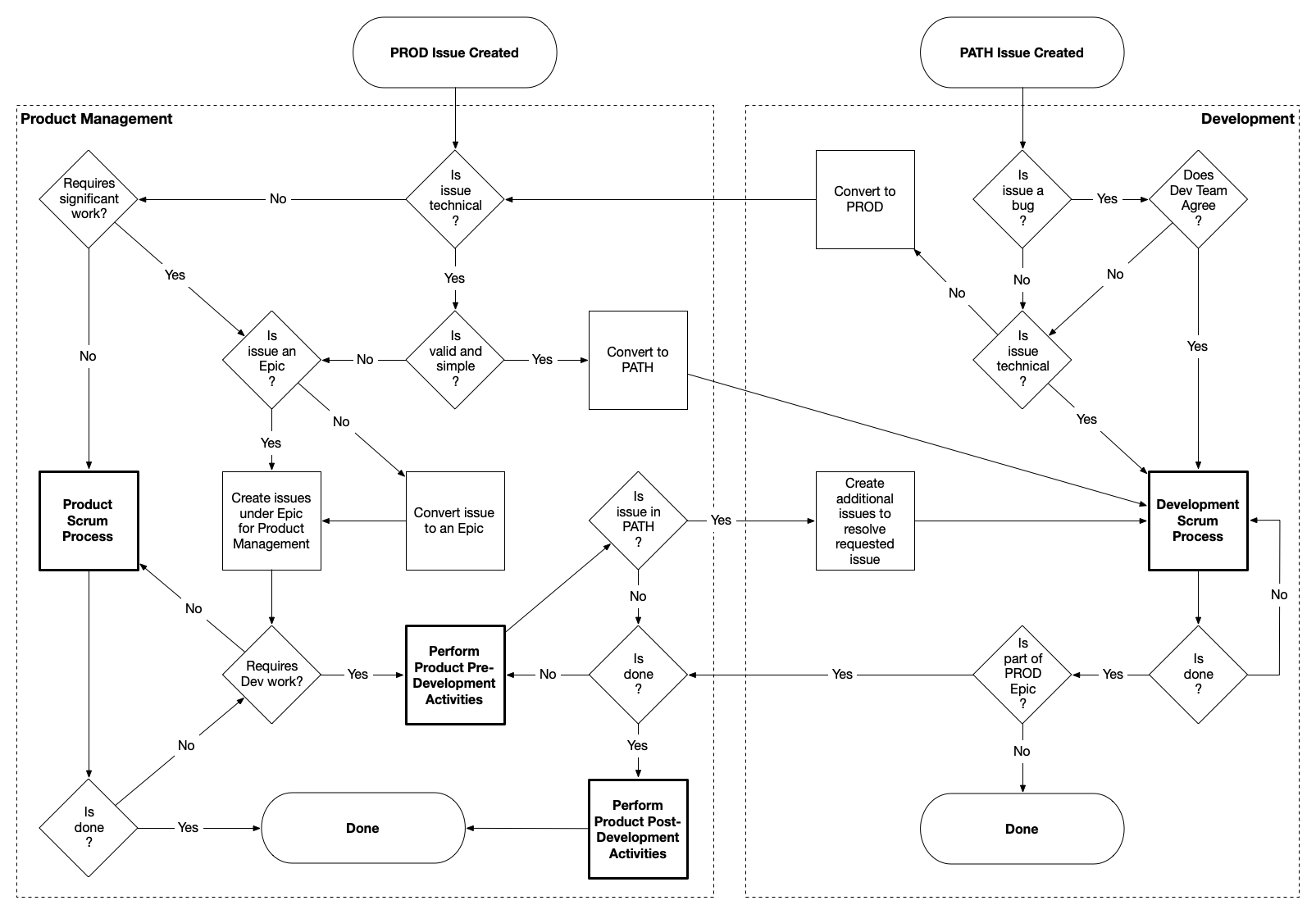
Key decision points:
- Product Management (left): Triages based on significance, Epic structure, technical nature, and readiness
- Development (right): Triages based on bug classification and technical scope
- Conversion points: Issues flow between PROD and PATH based on triage decisions
Overview
The Fundamental Distinction
The process recognizes two distinct but interdependent functions:
Product Management (PROD):
- Owns the “what” and “why” of products
- Defines product vision, strategy, and market fit
- Conducts pre-development activities: ideation, business case, ROI analysis, requirements definition
- Handles post-development activities: go-to-market, training, commercialization, rollout
- Manages both Revenue Products (client-facing) and Platform Products (internal tools)
- Responsible for ensuring development efforts align with business goals and deliver market value
Development Team (PATH):
- Owns the “how” of technical implementation
- Creates, designs, deploys, and supports software
- Executes on well-defined requirements with clear acceptance criteria
- Manages technical debt, architecture decisions, and system quality
- Focuses on building solutions that are performant, scalable, and maintainable
Why This Separation Is Critical
Without clear separation, several failure modes emerge:
- Scope Creep: Development teams spend time on discovery and requirements that Product Management should own
- Weak Requirements: Issues enter development without proper analysis, leading to rework
- Misaligned Priorities: Urgent requests override strategic initiatives; ROI-driven prioritization breaks down
- Incomplete Delivery: Products get built but not launched properly—missing training, documentation, or go-to-market
- Burnout and Friction: Teams struggle with unclear accountability
Work Classification
Not all work requires the same level of process. Work at Path2Response falls into three categories:
| Category | Description | Process |
|---|---|---|
| Initiative | Strategic, high-impact, cross-functional | Full Stage-Gate Process |
| Non-Initiative | Enhancements, medium features | Streamlined PROD flow (this document) |
| Operational | Bugs, maintenance, small fixes | Direct to PATH |
Key principle: This document (PROD-PATH Process) defines how work flows between teams. The Stage-Gate Process defines when gates and approvals occur for Initiatives.
For detailed classification criteria, see the Work Classification Guide.
How They Work Together
- Initiatives follow Stage-Gate for governance, but use this PROD-PATH process for the actual work flow
- Non-Initiatives use this PROD-PATH process directly (no Stage-Gate gates)
- Operational work bypasses PROD entirely and goes directly to PATH
Jira Projects
| Project | Purpose | Owner |
|---|---|---|
| PROD | Product strategy, requirements, commercialization | Karin Eisenmenger |
| PATH | Technical implementation, bugs, development tasks | John Malone |
Process Flow
Entry Points
PROD Issue Created
When someone creates an issue in PROD, they’re saying: “I have a product need, opportunity, or problem that requires Product Management attention.”
Examples:
- New product idea from Product Management
- Feature request from Production
- Strategic initiative from executives
- Internal tool improvement needed by Data Acquisition
- Market opportunity identified by Business Development
PATH Issue Created
When someone creates an issue in PATH, they’re saying: “I have a technical issue that needs Development attention.”
Examples:
- Bug in existing functionality
- Clearly-defined technical task (e.g., “upgrade Node.js to version 24”)
- Technical debt that needs addressing
- Performance issue requiring investigation
Reality of Entry Points
People often don’t know which project to create issues in. A reported “bug” might actually be a misunderstanding of how the product should work (a Product issue). A “feature request” might be a simple configuration change (a Development issue).
The process accommodates this reality. Both teams perform triage at entry, with explicit expectation that issues will be converted between PROD and PATH as needed. This is intentional design, not failure.
Product Management Flow
Step 1: “Does it Require Significant Work?”
This is the first triage decision for any PROD issue (see flowchart).
“Significant work” means:
- Multiple people or teams involved
- Timeline spans multiple sprints
- Coordination and planning required
- Substantial dependencies
- Outcome materially impacts the business
If NO (not significant): Goes directly to Product Scrum Process (routine PM work—tasks like updating marketing copy, creating presentations, conducting competitive analysis, writing documentation).
If YES (significant work): Proceeds to Epic evaluation (Step 2).
Step 2: “Is Issue an Epic?”
For significant work, the next question is whether it’s already structured as an Epic.
Why Epics matter:
- Provide structure for complex work
- Enable progress tracking and visibility
- Allow prioritization within initiative
- Clarify handoffs between teams
- Make dependencies visible
If NO (not yet an Epic): Convert to Epic first, then proceed.
If YES (already an Epic): Create child issues under the Epic for PM activities (discovery, ideation, analysis, requirements, stakeholder alignment).
Step 3: “Is Issue Technical?”
After Epic structure is established, determine if the work requires Development.
What “technical” means:
- The issue is about how something should be implemented, not what should be built or why
- Writing code, changing infrastructure, or modifying system architecture is clearly required
- Scope is well-understood and doesn’t require significant product discovery
What “technical” does NOT mean:
- “We need some kind of technical solution” (still a product problem—what solution?)
- “This involves our software” (everything does)
- “Development will eventually work on it” (true, but not yet)
If NO (not technical): Returns to Product Scrum Process for PM-only work.
If YES (technical): Proceeds to readiness evaluation (Step 4).
Step 4: “Is Valid and Simple?”
For technical issues, determine if they can go directly to PATH or need pre-development work.
“Valid” means:
- Legitimate need (not based on misunderstanding)
- Aligns with product strategy and priorities
- Business case is sound
- Stakeholders agree this should be done
- Priority is established based on business value and ROI
“Simple” means:
- Scope is clear and constrained
- Requirements are well-understood (meets PATH Epic Requirements)
- No significant discovery or analysis needed
- No cross-team coordination or complex dependencies
- Acceptance criteria are obvious and testable
- Source of truth for new data/fields is identified
- Impact on other products has been analyzed
- Release parameters are defined (patch vs standard release)
If YES (valid and simple): Convert to PATH — this is the fast lane for work that’s ready for Development without additional PM overhead.
If NO (not valid and/or not simple): Requires Pre-Development Activities (Step 5).
Step 5: Pre-Development Activities
For work that isn’t “valid and simple,” Product Management performs pre-development activities to prepare it for Development.
What this preparation includes:
- Detailed user stories from persona perspectives
- Clear, testable acceptance criteria
- Wireframes or mockups if needed
- Technical feasibility validated with Engineering/Data Science
- Data sources and infrastructure dependencies identified
- Executive/stakeholder approval and alignment
- Success metrics and measurement approach established
After pre-development activities complete:
The flowchart shows a “Requires Dev?” decision:
- If NO (doesn’t require Development): Check “Is Done?” — if yes, work is complete; if no, continue in Product Scrum Process.
- If YES (requires Development): Work is converted to PATH or child PATH issues are created under the PROD Epic.
Summary: Product Management Decision Flow
PROD Issue Created
        │
        ▼
"Requires significant work?" ─── No ──→ Product Scrum Process
        │
       Yes
        ▼
"Is Issue an Epic?" ─── No ──→ Convert to Epic
        │
       Yes
        ▼
Create child issues under Epic
        │
        ▼
"Is Issue Technical?" ─── No ──→ Product Scrum Process
        │
       Yes
        ▼
"Is valid and simple?" ─── Yes ──→ Convert to PATH (fast lane)
        │
        No
        ▼
Pre-Development Activities
        │
        ▼
"Requires Dev?" ─── No ──→ Is Done? → Done / Product Scrum
        │
       Yes
        ▼
Convert to PATH / Create PATH child issues
PATH Epic Requirements
For a PATH Epic to be ready for Development, it must include all of the following. These requirements define what “well-defined,” “valid and simple,” and “ready for PATH” actually mean.
1. The “Why?” - Problem, Not Solution
- Written from the persona’s perspective (who will use this?), not the ticket creator’s
- Captures: Who is the user, what do they want to do, why do they want to do it
- Uses structure: “As a [persona], I [want to], [so that]”
- Focuses on the problem being solved, not how to solve it
- Includes performance expectations when relevant
Example - Problem vs Solution Focus:
| Wrong (Solution-focused) | Correct (Problem-focused) |
|---|---|
| “As a college registrar, I want to be able to search for a student when a family member calls.” | “As a college registrar, I want to be able to connect a family member and a student quickly in the event of an emergency so that I don’t have to search for the student while the family member gets more and more upset while waiting on the phone.” |
Example - Persona’s Perspective:
| Wrong (Creator’s perspective) | Correct (Persona’s perspective) |
|---|---|
| “As a data scientist, I want to create a utility to batch cheeseburger jobs so that production is able to run multiple cheeseburger jobs more seamlessly in their workflow.” | “As a production team member, I want to dramatically reduce the amount of time I’m spending setting up and running cheeseburger jobs. Having to navigate to many different models and running a cheeseburger job for each one individually takes literally 3 hours of my time. What can we do to streamline this?” |
The second version captures the actual problem (3 hours of manual work), the persona experiencing it (production team member), and their goal (reduce time spent), without prescribing the solution.
2. Acceptance Criteria - Clear and Testable
Acceptance criteria must be:
- Clear to everyone involved
- Testable or verifiable
- Binary - either passes or fails (cannot be 50% completed)
- Outcome-focused - what needs to be achieved, not how to achieve it
- Specific as possible (e.g., “3-second page load speed” not “fast page load speed”)
Acceptance criteria describes the “what” (what should be done). The “how” is decided by developers during implementation.
3. Source of Truth for Data
For any newly introduced data or fields, identify:
- Where does this data come from? (Salesforce, user input, automated gathering, etc.)
- What is the authoritative source?
- How will it be obtained/updated?
4. Impact Analysis
Analysis of the requested change’s impact on other products and systems:
- What other products or features does this affect?
- Are there integration points or dependencies?
- What downstream systems need to be aware of this change?
5. Priority & Stakeholders
- Clear priority based on business value, urgency, ROI
- Explicit stakeholder identification
- Agreement on who will accept work as complete
6. Release Parameters
Definition of release expectations:
- Patch ASAP?
- Standard release schedule sufficient?
- Any deployment constraints or requirements?
Development Flow
Initial Triage: “Is the Issue a Bug?”
What qualifies as a bug:
- System behaves differently than intended or documented
- Functionality that previously worked is now broken
- Defect in the implementation
- Users experiencing errors or incorrect results
What does NOT qualify as a bug:
- “The system doesn’t do what I wish it would do” (feature request)
- “This workflow is confusing” (UX improvement)
- “It would be better if…” (enhancement)
Bug Path: “Does Development Team Agree?”
If YES (team agrees it’s a bug): Routes to Development Scrum Process
If NO (team disagrees it’s a bug): Converted to PROD - needs product thinking:
- Working as originally specified, but spec was wrong
- Requires product judgment about how it should behave
- Needs stakeholder input before changing behavior
Non-Bug Path: “Is the Issue Technical?”
If YES: Routes to Development Scrum Process
If NO: Converted to PROD - needs Product Management attention:
- Requirements aren’t clear
- Business justification isn’t established
- Multiple stakeholders need alignment
- It’s really a product question, not technical
Definition of Done
When Development evaluates “Is done?”, they check against:
Before work begins:
- Stakeholders and developers have agreed on Acceptance Criteria
During and after development:
- Each Acceptance Criteria is met
- Stakeholder has accepted that their needs have been met
- Possible regressions have been looked for and addressed
- Existing automated tests are all passing
- Code has been reviewed and approved (via Pull Requests)
- A plan for product deployment is established (patch or standard release)
- New automated tests have been added (or follow-up stories created)
- (Ideally) CI/CD for the project including the work is in place
Converting Between PROD and PATH
PROD to PATH Conversion
When Product Management converts an issue to PATH (after determining it’s valid and simple), Development may create additional issues because:
- Original issue might be stated from user perspective but needs technical task breakdown
- Multiple components may need coordination
- Separate issues may be needed for implementation, testing, deployment
PATH to PROD Conversion
When Development converts an issue to PROD, it’s saying: “This needs Product Management attention before we can proceed.”
Common reasons:
- Requirements are vague or contradictory
- Business priority isn’t established
- Stakeholder alignment is needed
- Scope is larger than initially thought
- Product judgment is required
This conversion is healthy - it protects Development capacity and ensures properly-prepared issues.
Post-Development Activities
When Development completes work that’s part of a PROD Epic, Product Management performs post-development activities.
Why this matters: Many organizations treat “code deployed” as “done.” This leads to:
- Features built but never adopted
- Users who don’t know new functionality exists
- Sales teams unaware of new capabilities
- Training materials that are outdated
- Support teams caught off-guard
Required activities (scaled to initiative size):
- Go-to-Market Activities
- Marketing Collateral
- Sales Training
- Sales Plans
- Internal Training
- Documentation
- Communication
- Success Measurement
Only after these activities are complete is the product truly Done.
Team Ownership
Product Management (PROD)
- Product Owner: Karin Eisenmenger
- Responsible for PROD backlog management
- Owns pre-development and post-development activities
Development (PATH)
- Backlog Owner: John Malone
- Scrum Facilitator: David Fuller
- Responsible for PATH backlog management
- Owns technical implementation
Related Documentation
Process Documentation
- This Page: High-level process for PROD ↔ PATH interaction and triage
- Work Classification Guide - Initiative vs Non-Initiative vs Operational
- Stage-Gate Process - Full process for Initiatives (6 stages, 5 gates)
Development Documentation
- Development Process - Agile/Scrum process, Jira usage, code reviews, releases
- Sprint Process Schedule - Sprint ceremonies and meeting schedules
- PATH Ticket Guidelines and Process - Detailed procedures for PATH tickets
Product Management Documentation (Confluence)
- Product Development Process Outline - Original Stage-Gate proposal
- Product Marketing Sprint Process Schedule - Product team sprint ceremonies
Stage-Gate Process for Initiatives
This document defines the Stage-Gate process for Initiatives at Path2Response. It is based on the Robert Cooper Stage-Gate Process, modified for agile development.
Scope: This process applies only to Initiatives. Non-Initiatives and Operational work follow streamlined processes.
Overview
The Stage-Gate process provides structure and governance for strategic projects. It ensures:
- Validated ideas — Problems are verified before solutions are built
- Executive alignment — Leadership approves progression at each gate
- Resource commitment — Development capacity is reserved for approved work
- Kill decisions — Projects can be stopped at any gate (explicit “No Go”)
- Accountability — Clear ownership at each stage
Process Diagram
┌─────────────────┐
│  INTAKE/TRIAGE  │  All requests enter PROD. COO evaluates Initiative vs Non-Initiative.
└────────┬────────┘
         │
         ▼
┌─────────────────────────────────────────────────────────────────────────────────────┐
│ STAGE 1: IDEATION                                                                   │
│ Lead: COO (Product Owner)                                                           │
│ PM: Gather requirements, research market, draft business case, success metrics      │
│ Dev: CONSULTED for early technical feasibility                                      │
│ Requester: ACTIVE - validates problem, provides context                             │
└────────┬────────────────────────────────────────────────────────────────────────────┘
         │
         ▼
   ╔═════════════════════════════════════════════════════════════════════════════════╗
   ║ GATE 1: Ideation → Planning                                                     ║
   ║ Decision: Executive Team (CEO, COO, CFO, CRO, CTO) — CEO has ultimate say       ║
   ║ Required: Problem validated, high-level ROI, success metrics, resource estimate ║
   ║ Go if: Positive ROI potential, aligns with strategy, resources likely available ║
   ╚═════════╤═══════════════════════════════════════════════════════════════════════╝
             │
             ▼
┌─────────────────────────────────────────────────────────────────────────────────────┐
│ STAGE 2: PLANNING                                                                   │
│ Lead: Product Management                                                            │
│ PM: User stories, competitive review, MVP scope, prioritize features, GTM outline   │
│ Dev: CONSULTED early, ACTIVE later — estimate, commit to timeline                   │
│ Requester: REVIEW concept, APPROVE MVP scope                                        │
└────────┬────────────────────────────────────────────────────────────────────────────┘
         │
         ▼
   ╔═════════════════════════════════════════════════════════════════════════════════╗
   ║ GATE 2: Planning → Development  ★★★ CRITICAL PROD→PATH HANDOFF ★★★              ║
   ║ Decision: Executive Team — Dev team presents                                    ║
   ║ Required: MVP scope, PATH Epic Requirements met, dev estimate & commitment      ║
   ║ Go if: Technical feasibility confirmed, stakeholders aligned, budget approved   ║
   ║ Action: Convert PROD → PATH                                                     ║
   ╚═════════╤═══════════════════════════════════════════════════════════════════════╝
             │
             ▼
┌─────────────────────────────────────────────────────────────────────────────────────┐
│ STAGE 3: DEVELOPMENT                                                                │
│ Lead: Development Lead                                                              │
│ PM: SUPPORT — answer questions, adjust scope, prepare for launch                    │
│ Dev: ACTIVE — build, test, deploy                                                   │
│ Requester: INFORMED — updates, demo reviews                                         │
└────────┬────────────────────────────────────────────────────────────────────────────┘
         │
         ▼
   ╔═════════════════════════════════════════════════════════════════════════════════╗
   ║ GATE 3: Development → Testing                                                   ║
   ║ Decision: Executive Team — Dev team presents                                    ║
   ║ Required: Product built & tested, stakeholder acceptance, deployment plan       ║
   ║ Go if: Acceptance criteria met, ready for pilot                                 ║
   ╚═════════╤═══════════════════════════════════════════════════════════════════════╝
             │
             ▼
┌─────────────────────────────────────────────────────────────────────────────────────┐
│ STAGE 4: TESTING                                                                    │
│ Lead: Product Management                                                            │
│ PM: Manage pilot, collect feedback, analyze results, iterate                        │
│ Dev: SUPPORT — bug fixes, improvements, model tuning                                │
│ Requester: PARTICIPATE in pilot, provide feedback                                   │
└────────┬────────────────────────────────────────────────────────────────────────────┘
         │
         ▼
   ╔═════════════════════════════════════════════════════════════════════════════════╗
   ║ GATE 4: Testing → Launch                                                        ║
   ║ Decision: Executive Team                                                        ║
   ║ Required: Pilot results, performance data, operational readiness, GTM plan      ║
   ║ Go if: Pilot success, positive feedback, business case still valid              ║
   ╚═════════╤═══════════════════════════════════════════════════════════════════════╝
             │
             ▼
┌─────────────────────────────────────────────────────────────────────────────────────┐
│ STAGE 5: LAUNCH                                                                     │
│ Lead: Product Management                                                            │
│ PM: Execute GTM, sales training, marketing collateral, monitor metrics              │
│ Dev: SUPPORT — ensure stability, monitor performance                                │
└────────┬────────────────────────────────────────────────────────────────────────────┘
         │
         ▼
   ╔═════════════════════════════════════════════════════════════════════════════════╗
   ║ GATE 5: Launch → Review                                                         ║
   ║ Decision: Executive Team                                                        ║
   ║ Required: Launch complete, metrics tracking, lessons learned                    ║
   ║ Go if: Launch successful, metrics meet targets, operations stable               ║
   ╚═════════╤═══════════════════════════════════════════════════════════════════════╝
             │
             ▼
┌─────────────────────────────────────────────────────────────────────────────────────┐
│ STAGE 6: REVIEW                                                                     │
│ Lead: Product Management                                                            │
│ PM: Analyze metrics vs targets, document lessons learned, prepare closure report    │
│ Dev: CONSULTED — input on technical lessons learned                                 │
│ Action: Close Initiative in JPD after quarterly review                              │
└─────────────────────────────────────────────────────────────────────────────────────┘
Stage Details
Stage 1: Ideation
Purpose: Validate the problem and build the business case.
Lead: COO (Product Owner)
Activities:
- Gather requirements from requester
- Research market opportunity
- Draft business case with ROI estimate
- Define success metrics
- Identify resource requirements (high-level)
- Assess technical feasibility (consult with Development)
Deliverables for Gate 1:
- Problem statement (validated with requester)
- High-level ROI estimate
- Success metrics definition
- Resource estimate (people, time, money)
Duration: ~1 sprint
Gate 1: Ideation → Planning
Decision Makers: Executive Team (CEO, COO, CFO, CRO, CTO)
Go Criteria:
- Problem is validated and worth solving
- Positive ROI potential
- Aligns with company strategy
- Resources are likely available
No-Go Criteria:
- Problem not validated
- ROI doesn’t justify investment
- Doesn’t align with strategy
- Resources not available
Outcomes:
- Go — Proceed to Stage 2 (Planning)
- No-Go — Stop work, document decision
- Hold — Wait for conditions to change (e.g., Q3 budget)
Stage 2: Planning
Purpose: Define what will be built and how.
Lead: Product Management
Activities:
- Write detailed user stories from persona perspectives
- Conduct competitive review
- Define MVP scope and feature prioritization
- Work with Development on technical approach
- Get Development estimates and timeline commitment
- Outline go-to-market strategy
- Validate MVP scope with requester
Deliverables for Gate 2:
- MVP scope definition
- PATH Epic meeting all PATH Epic Requirements:
- The “Why?” — Problem from persona’s perspective
- Acceptance Criteria — Clear, testable, binary
- Source of Truth — Where data comes from
- Impact Analysis — Effects on other systems
- Priority & Stakeholders — Business value, who accepts
- Release Parameters — Patch ASAP or standard release
- Development estimate and timeline
- GTM outline
Duration: ~2-3 sprints
Gate 2: Planning → Development (Critical Handoff)
Decision Makers: Executive Team — Development team presents
This is the critical PROD → PATH handoff point.
Go Criteria:
- MVP scope is defined and approved
- PATH Epic Requirements are met
- Development has estimated and committed to timeline
- Technical feasibility is confirmed
- Stakeholders are aligned
- Budget is approved
No-Go Criteria:
- Requirements unclear or incomplete
- Technical feasibility not confirmed
- Stakeholders not aligned
- Budget not available
Action on Go: Convert PROD Epic to PATH Epic (or create PATH child issues)
Stage 3: Development
Purpose: Build the product.
Lead: Development Lead
Activities:
- Sprint planning and execution
- Implementation and code review
- Testing and quality assurance
- Stakeholder demos
- Deployment to staging/production
Product Management Role: SUPPORT
- Answer questions about requirements
- Adjust scope if needed (with stakeholder approval)
- Prepare for launch (GTM activities)
Requester Role: INFORMED
- Receive updates
- Attend demo reviews
Duration: ~2-6+ sprints (varies by scope)
Gate 3: Development → Testing
Decision Makers: Executive Team — Development team presents
Go Criteria:
- Product is built and passes internal testing
- Acceptance criteria are met
- Stakeholder has accepted the work
- Deployment plan is established
No-Go Criteria:
- Acceptance criteria not met
- Critical defects remain
- Stakeholder hasn’t accepted
Stage 4: Testing
Purpose: Validate with real users in controlled environment.
Lead: Product Management
Activities:
- Manage pilot program
- Collect feedback from pilot users
- Analyze results against success metrics
- Iterate based on feedback
- Document issues and improvements
Development Role: SUPPORT
- Fix bugs discovered in pilot
- Implement priority improvements
- Tune models (Data Science)
Requester Role: PARTICIPATE
- Use the product in pilot
- Provide feedback
Duration: ~1-4 sprints
Gate 4: Testing → Launch
Decision Makers: Executive Team
Go Criteria:
- Pilot results are positive
- Performance data meets targets
- Operational readiness confirmed
- GTM plan is complete
- Business case still valid
No-Go Criteria:
- Pilot results are negative
- Performance doesn’t meet targets
- Operations not ready
- Business case no longer valid
Stage 5: Launch
Purpose: Bring the product to market.
Lead: Product Management
Activities:
- Execute go-to-market plan
- Sales training
- Marketing collateral creation
- Internal training
- Client communications
- Monitor launch metrics
Development Role: SUPPORT
- Ensure system stability
- Monitor performance
- Address critical issues
Duration: ~1-2 sprints
Gate 5: Launch → Review
Decision Makers: Executive Team
Go Criteria:
- Launch is complete
- Metrics tracking is in place
- Initial lessons learned documented
Stage 6: Review
Purpose: Evaluate success and capture learnings.
Lead: Product Management
Activities:
- Analyze metrics vs original targets
- Document lessons learned (what worked, what didn’t)
- Prepare closure report
- Present to Executive Team
Development Role: CONSULTED
- Input on technical lessons learned
Action: Close Initiative in Jira Product Discovery (JPD) after quarterly review
Duration: ~4-6 sprints post-launch (ongoing measurement)
Preventing “Into the Wash”
The process includes explicit mechanisms to prevent requests from disappearing:
| Mechanism | Description |
|---|---|
| JPD Tracking | Every Initiative tracked with current stage visible |
| Monthly Exec Review | Status, next gate target, blockers reported |
| Duration Red Flags | Escalation if stage exceeds expected duration |
| Explicit Decisions | Cannot advance without documented gate approval |
| Requester Sign-off | Original requester validates at Gates 1 and 2 |
| Kill Explicitly | Requires formal “No Go” decision (not silent death) |
Expected Stage Durations
| Stage | Expected Duration | Red Flag |
|---|---|---|
| Stage 1: Ideation | ~1 sprint | > 2 sprints |
| Stage 2: Planning | ~2-3 sprints | > 4 sprints |
| Stage 3: Development | Varies | Per estimate + 50% |
| Stage 4: Testing | ~1-4 sprints | > 6 sprints |
| Stage 5: Launch | ~1-2 sprints | > 3 sprints |
| Stage 6: Review | ~4-6 sprints | Ongoing |
RACI by Stage
| Stage | Product Management | Development | Requester | Executives |
|---|---|---|---|---|
| Ideation | Responsible | Consulted | Accountable | Informed |
| Gate 1 | Informed | Informed | Consulted | Accountable |
| Planning | Responsible | Consulted → Active | Consulted | Informed |
| Gate 2 | Consulted | Responsible | Consulted | Accountable |
| Development | Support | Responsible | Informed | Informed |
| Gate 3 | Consulted | Responsible | Consulted | Accountable |
| Testing | Responsible | Support | Active | Informed |
| Gate 4 | Consulted | Consulted | Consulted | Accountable |
| Launch | Responsible | Support | Informed | Informed |
| Gate 5 | Consulted | Consulted | Consulted | Accountable |
| Review | Responsible | Consulted | Informed | Accountable |
Related Documentation
- Work Classification Guide — When to use Stage-Gate vs streamlined process
- PROD-PATH Process — How PROD and PATH interact
- PATH Epic Requirements — What “ready for development” means
Work Classification Guide
This guide helps classify incoming work to determine the appropriate process and level of ceremony required.
The Three Categories
All work at Path2Response falls into one of three categories:
| Category | Description | Process | Approval |
|---|---|---|---|
| Initiative | Strategic, high-impact, cross-functional projects | Full Stage-Gate (6 stages, 5 gates) | Executive Team |
| Non-Initiative | Enhancements, medium features, client requests | Streamlined PROD flow | COO + CTO |
| Operational | Bug fixes, maintenance, small tweaks | Direct to PATH | Development Lead |
Key principle: PATH Epic Requirements apply to Initiatives and Non-Initiatives. Operational work can go directly to PATH with a clear problem statement and acceptance criteria.
Initiative
Initiatives are strategic projects that require full Stage-Gate process with executive oversight.
Qualification Criteria
An issue qualifies as an Initiative if it meets any of these criteria:
| Criteria | Examples |
|---|---|
| Executive-level requester | CEO, COO, CFO, CRO requests a new capability |
| Strategic importance | Aligns with company strategy, enters new market |
| Significant revenue impact | Affects multiple clients, opens new revenue stream |
| High risk | Revenue risk, compliance risk, strategic risk |
| Cross-functional | Requires multiple teams (Engineering, Data Science, Sales, Production) |
| Large investment | Significant development effort, external costs |
Process
Initiatives follow the full Stage-Gate Process:
- Stage 1: Ideation — Problem validation, business case, success metrics
- Gate 1 — Executive approval to proceed to planning
- Stage 2: Planning — User stories, MVP scope, dev estimates
- Gate 2 — Executive approval to proceed to development (PROD → PATH handoff)
- Stage 3: Development — Build, test, deploy
- Gate 3 — Executive approval to proceed to testing
- Stage 4: Testing — Pilot, feedback, iteration
- Gate 4 — Executive approval to proceed to launch
- Stage 5: Launch — GTM execution, training, rollout
- Gate 5 — Executive approval to close
- Stage 6: Review — Metrics analysis, lessons learned, closure
Examples
- New product offering (e.g., Digital Modeled Audiences)
- Major platform capability (e.g., real-time scoring engine)
- Strategic partnership integration
- Compliance or security initiative with company-wide impact
Non-Initiative
Non-Initiatives are meaningful work that requires Product Management involvement but not full executive gate approvals.
Qualification Criteria
An issue qualifies as a Non-Initiative if it meets all of these criteria:
| Criteria | Description |
|---|---|
| Department/team requester | Not executive-level, typically operational need |
| Operational improvement | Enhances existing capability, isolated impact |
| Low risk | Reversible, limited blast radius |
| Limited scope | Primarily Eng/DS/PM involvement |
| Normal investment | Fits within regular backlog capacity |
Process
Non-Initiatives follow a streamlined PROD flow:
- PROD triage — Classify, validate need
- Pre-development — Requirements, acceptance criteria (must meet PATH Epic Requirements)
- Convert to PATH — Hand off to Development
- Development — Build, test, deploy
- Post-development — Training, documentation (scaled to size)
Key difference from Initiatives: No executive gate approvals required. COO + CTO provide oversight. Monthly reporting to executives for visibility.
PATH Epic Requirements Still Apply
Even though Non-Initiatives have streamlined approval, the work must still meet all PATH Epic Requirements before entering PATH:
- The “Why?” — Problem from persona’s perspective
- Acceptance Criteria — Clear, testable, binary
- Source of Truth — Where data comes from
- Impact Analysis — Effects on other systems
- Priority & Stakeholders — Business value, who accepts
- Release Parameters — Patch ASAP or standard release
Examples
- New report or dashboard for internal users
- Enhancement to existing product feature
- Client-specific customization
- Process automation for Production team
- Data quality improvement
Operational
Operational work is routine technical work that can go directly to PATH with minimal ceremony.
Qualification Criteria
An issue qualifies as Operational if it meets all of these criteria:
| Criteria | Description |
|---|---|
| Clear and contained | Scope is obvious, no discovery needed |
| Low risk | No strategic impact, easily reversible |
| Technical in nature | Development can assess and execute independently |
| No cross-team coordination | Doesn’t require PM, Sales, or Production involvement |
Process
Operational work follows a direct PATH flow:
- PATH triage — Validate it’s a bug or clear technical task
- Development Scrum Process — Prioritize, implement, test, deploy
- Done — No post-development activities required
Key difference: No PROD involvement required. Development Lead (John Malone) owns triage and prioritization.
Minimum Requirements
Even Operational work needs:
- Clear problem statement — What’s broken or what needs to change
- Acceptance criteria — How do we know it’s fixed/done
Full PATH Epic Requirements are not required.
Examples
- Bug fixes and defect resolution
- Dependency updates and security patches
- Performance optimization (when scope is clear)
- Technical debt cleanup
- Configuration changes
- Documentation updates
- Routine data updates
Decision Flowchart
Use this flowchart to classify incoming work:
New Issue Arrives
        │
        ▼
Is it a bug or clear technical task? ─── Yes ──→ OPERATIONAL
        │                                         (Direct to PATH)
        No
        │
        ▼
Does it meet Initiative criteria? ─── Yes ──→ INITIATIVE
(Executive requester, strategic,              (Full Stage-Gate)
 high risk, cross-functional, large)
        │
        No
        │
        ▼
                    NON-INITIATIVE
                    (Streamlined PROD flow)
Quick Classification Questions
Ask these questions to quickly classify work:
- “Is this a bug or obvious technical fix?” → If yes, likely Operational
- “Did an executive request this?” → If yes, likely Initiative
- “Does this affect company strategy or multiple departments?” → If yes, likely Initiative
- “Is this a routine enhancement or improvement?” → If yes, likely Non-Initiative
Escalation and Reclassification
Work can be reclassified as scope becomes clearer:
| From | To | Trigger | Who Decides |
|---|---|---|---|
| Operational | Non-Initiative | Scope grows, needs PM involvement | Development Lead |
| Non-Initiative | Initiative | Strategic importance discovered, exec attention needed | COO |
| Initiative | Non-Initiative | Scope reduced, strategic importance diminished | COO |
Reclassification is normal. Initial classification is based on available information. As work progresses, reclassification ensures the right process is applied.
Summary Table
| Aspect | Initiative | Non-Initiative | Operational |
|---|---|---|---|
| Requester | Executive | Department/Team | Anyone |
| Impact | Strategic, company-wide | Isolated, operational | Technical only |
| Risk | High | Low-Medium | Low |
| Teams | Cross-functional | Eng/DS/PM | Development only |
| Process | Stage-Gate (6 stages) | Streamlined PROD | Direct to PATH |
| Approval | Executive Team | COO + CTO | Development Lead |
| PATH Epic Req | Full | Full | Minimal |
| Post-dev work | Full GTM | Scaled | None |
Related Documentation
- PROD-PATH Process — How PROD and PATH interact
- Stage-Gate Process — Full Initiative process
- PATH Epic Requirements — What “ready for development” means
Development Process
Source: Confluence - Development Process
Overview
The development process for the Engineering team is dynamic and in place to help the team get work done in the easiest and most productive fashion.
There is no standard or general process that meets the needs of the team. This is true of any team; however, most companies are looking for a process to solve their problems, a silver bullet.
That’s not how a process works. A process evolves out of a current team’s way of doing things. It is an evolution of how things are done, leveraging what works, fixing what doesn’t, and guiding the team (and new members).
This page will familiarize the Engineering Team with the tools, people, and processes related to development at Caveance and Path2Response.
Communication
For information on company communication tools, please refer to: Communications
Software Development Process
This is not a guide to Agile, Scrum, etc. If you don’t know these terms, methodologies, and approaches, learn them!
Resources:
Agile
Agile software development refers to a set of software development methodologies based on iterative development. Requirements and solutions evolve through tight collaboration between self-organizing, cross-functional (engineering, business, and customer) teams. Agile processes promote:
- Frequent inspection and adaptation
- Top-to-bottom leadership philosophy that encourages teamwork, self-organization, and accountability
- Set of engineering best practices intended to allow for rapid delivery of high-quality software
- A business approach that aligns development with customer needs and company goals
At Path2Response, we embrace Agile software development and look for ways to continuously improve our communications, tools, and ability to deliver value to our customers.
Path2Response Philosophy:
- “Tools over processes” and “Tools support people and interactions”
- Tools are critical and should always be improved to support the people and processes
- Processes should be something that individuals fall back to and believe in
Scrum
Scrum is a subset of Agile, a lightweight process framework for agile development. “Lightweight” means that the process’s overhead is kept as small as possible to maximize the amount of productive time available for actually getting useful work done.
Key characteristics:
- Time is divided into short work cadences (sprints) - typically one or two weeks
- Product is kept in a potentially shippable state at all times
- End of each sprint: stakeholders and team members meet to see demonstrated work, discuss the sprint, and plan next steps
Accountabilities - The Hats Worn by Members of a Scrum Team
Product Owner(s)
- Karin Eisenmenger — business product owner
- John Malone — technical product owner
- Michael Pelikan — strategic product owner
Scrum Facilitator
- David Fuller
Developers
Engineering (John Malone)
- Jason Smith
- Carroll Houk
- David Fuller
- Wes Hofmann
- Michael Pelikan
Data Science (Igor Oliynyk)
- Morgan Ford
- Erica Yang
Kanban
Kanban is a method for managing work with an emphasis on “just-in-time” (JIT) delivery while not overloading the team members.
Business and client projects use Kanban. Engineering uses Scrum for all work.
Path2Response Specifics
Jira
For the Engineering team, if it isn’t in Jira, it doesn’t exist. The team shall not perform work without a Jira issue.
All members of the Path2Response team may create an issue (Epic, Story, Task, Bug, etc.). Typically, anything above a Task is put on the backlog for prioritization. Tasks (and Subtasks) and Bugs can be created and worked on by team members immediately, given that the team agrees upon the impact on the current sprint.
Primary Communication Tool
Jira is the primary communication tool for the Engineering team. Jira should be the first place you think of communicating, asking questions, providing information, etc.
Projects
The Engineering Team will perform most of its work on the Path2Response Development Board, part of the PATH Jira project.
Components
All issues for Development should include a component when the issue is created. Issues are automatically assigned to the Component Lead when submitted.
Fix Version
“Where you plan to fix it / where it has been fixed”
For the PATH project, the sprint for which it is intended to be fixed or was fixed should be used. If unknown, then the version may be left empty. When an issue is closed, the fix version becomes the sprint in which the issue was resolved and closed.
Sprints
Path2Response has two-week sprints.
Please see Sprint Process Schedule for specifics on the timing of the Sprint Review, Retrospective, Planning, and other key Sprint meetings.
Sprint Pre-Planning
Prior to the sprint planning meeting, there needs to be individual and team preparation for the sprint commitments. Engineering needs to understand the next sprint, dig into the requests, and ensure that the high-level details and acceptance criteria is understood.
Every developer is expected to go through their backlog and understand what is being requested, recommended, etc. The backlog report in Dashboards is used as a guide for this process.
- Jira tickets are the best place to discuss specific issues
- Prioritization discussions spanning several issues should use Slack #sprint-planning
Sprint Review
The intent of the Sprint Review meeting in Agile is to demonstrate stories, bugs, etc., that were completed in a sprint to external stakeholders.
Recommendation: Stakeholders should read the release notes and drill into individual Jira issues. For questions or demos, join the “Engineering Office Hour” on Monday following the sprint.
Sprint Retrospective
A chance for all team members to state what worked and what didn’t work during the past sprint. Action items are immediately created and assigned for resolution.
The Sprint Retrospective pages are available for the entire sprint and should be updated as issues, ideas, concerns, changes, etc., arise.
Sprint Planning
During the planning meeting, the Scrum Facilitator works with the team to refine estimates (story points) and determine which items can be brought into the next sprint.
Story Point Estimates
| Size | Points | Guidance |
|---|---|---|
| X-Small | 1 | Quick change, configurations, etc. |
| Small | 2 | |
| Medium | 4 | |
| Large | 8 | Consider breaking down the work effort |
| X-Large | 16 | Strongly consider an Epic designation |
Planning Meeting Flow
- Product Owner(s) should have prioritized the backlog
- Scrum Facilitator defines the next sprint
- Scrum Facilitator closes the current sprint at the beginning of the meeting
- Incomplete items automatically roll into next sprint (unless explicitly removed)
- Team agrees that issues are understood and “do-able”
- Scrum Facilitator starts the next sprint
Sprint Naming: Sprint ### (incrementing number)
Sprint Duration: ~3:00 PM MT Friday through ~2:00 PM MT Friday (two weeks later)
Sprint Deployment
There should be an issue created for every sprint for merging into main and deploying to production. This should be the first task for each sprint.
Daily Standup
Path2Response has daily stand-up meetings with teams.
Status Guidelines
- Status should be a proper communication, not copy-paste from previous day
- Intentional thought should be given to your status
- “Highlights / Impacts” section should contain enough detail for all team members
- Post status on #dev-scrum before 9:00 AM MT every workday
Daily Expectations
- Read each team member’s status
- Review your Jira board (ideally My Board)
- Review Sprint Cleanup
SCM (Source Code Management)
All source code generated by the Engineering Team will be placed in SCM, specifically under Git control, and pushed to the corporate repository on a routine basis.
Failure to have source code under SCM and routinely pushed to corporate repository is a terminable offense.
Main Branch
The main branch is the primary branch and shall be continuously in a potentially “shippable” state.
Branching Strategy
See Branching Strategy for the complete branching workflow.
Acceptance Criteria
Acceptance Criteria are a set of statements, each with a clear pass/fail result, that specify both functional and non-functional requirements. They constitute our “Definition of Done”.
Guidelines:
- Prior to bringing a story into the sprint, developer, product owner, and stakeholder(s) should agree upon specific, testable Acceptance Criteria
- If Acceptance Criteria need to change after sprint start:
- If developer is not the stakeholder: renegotiate with stakeholder
- If developer is the stakeholder: can evolve as needed
For “researchy” stories:
- Ideally, start with a smaller “Research” ticket to define follow-up stories
- If work must be done in same sprint, use a larger story point story and split mechanism
Branch Workflow
See Git Feature Branches for detailed instructions.
For Each Epic, User Story, or Bug:
- Create branch for each user story (named after Jira issue, e.g.,
PATH-1045) - Put issue into In Progress when working on it
- Commit and push until acceptance criteria are achieved
- Write automated tests for any new or changed functionality
- Resolve the story to the stakeholder for QC
- Have another team member perform code review via pull request
- If issues found, story may be Reopened
- When satisfied, reviewer selects Accept Issue
- Once you have both Jira acceptance and PR approval, merge to
main - Close the Jira issue
Test Plans
Definition
The Test Plan should indicate what was done and how to verify that it meets the Acceptance Criteria. Write it so it’s useful in the future, not just right now.
Procedure
- Populate Test Plan field with details on how and when the story/bug should be tested
- On sprint release day, test plans are exported to a Google sheet
- Monday Test Plan Review meeting reviews the test plans
- Test on staging after deployment, plan for production testing
- For testing activities likely to be repeated, write well-defined testing scripts
- Before deployment to production Tuesday morning, need:
- All applicable tests checked off
- Approval from Engineering Lead, Scrum Facilitator, and Production Team
- Completed by 5:00 PM the day before deployment
Code Reviews
Another set of eyes helps spot problems and provides knowledge transfer.
When is a Formal Meeting Needed?
The severity/impact should drive the magnitude. Large, complicated, or revenue-impacting changes warrant a meeting.
Formal Process
- Complete code and do developer-level testing
- Resolve Jira story to stakeholder
- Create Pull Request in Bitbucket, assign to reviewer(s)
- Schedule meeting if severity justifies it
- Code Reviewers comment on the pull request
- Code Reviewer either Rejects (with recommendations) or Accepts
- Stakeholder either Reopens (if not as expected) or Accepts
Commits
All commits to Git should be in the format: XXXX-###: Description
XXXX-###is the Jira issue- Multiple issues:
XXXX-###, XXXX-###: Description Descriptionis detailed description of the specific commit
Releases
At the beginning of each sprint, a release of the previous sprint will be performed.
Code Release
- Everyone does their last few merges back to
main - Tag the
mainof each project:
cd ~/workspace/devtools/sprintRelease/
node lib/actions/tagReleases.js --tag-name "188.0.0" --from-branch-name "main" --commit-message "PATH-14914 Sprint Release 188.0.0"
Jira Release
- Add correct sprint name to Fix Version of each issue
- Administrator releases the Version from Versions Administration page
- Jira provides release notes based on Fix Version
Post Release Cleanup
- Cleanup old branches after the release of the following sprint
- Quarterly recurring tasks for cleanup
- Criteria for cleanup:
- User story closed
- Branch merged to
main - One sprint later than the release sprint
# Fetch which prunes upstream deleted branches
git fetch -p

# Remove the branch locally
git branch -d PATH-XXXX

# Remove the branch on BitBucket
git push origin :PATH-XXXX
Git Config
Example ~/.gitconfig:
[user]
    name = username
    email = email@path2response.com
[push]
    default = simple
    autoSetupRemote = true
[merge]
    tool = vscode
[diff]
    tool = opendiff
[pull]
    rebase = false
[mergetool "vscode"]
    cmd = code --wait --merge $REMOTE $LOCAL $BASE $MERGED
[difftool "vscode"]
    cmd = code --wait --diff $LOCAL $REMOTE
Development Sprint Process Schedule
The Development team performs the following sprint ceremonial meetings:
- Development Scrum - Every workday morning
- Development Sprint Pre-Planning - Last Wednesday of the sprint
- Development Sprint Review - Last Thursday of the sprint
- Development Sprint Retrospective and Planning - Last Friday of the sprint
All times are in Mountain Time (MT)
First Week of Sprint
Every Work Day
| Start | End | Event | Description |
|---|---|---|---|
| 9:00 | 9:30 | Development Scrum | Come together as a team, hear what others are working on, communicate challenges and/or major activities, and determine how to assist others. Status on #dev-scrum is not comprehensive but provides collaboration/interaction info and Jira issue numbers. |
| 11:00 | 12:00 | Development Availability Time | Team available via Slack huddle on #back-office-gang for discussion with anyone in the company. Message ahead if you have a specific topic. |
Monday
| Start | End | Event | Description |
|---|---|---|---|
| Early AM | 2:00 PM | Pre-Release Testing | Test on RC after deployment. Check Base Test Plan for items that can only be tested on production. |
| 3:00 | 3:45 | Stakeholder Discussions | Discuss potential upcoming priorities for the following sprint, identify Jira issues needing refinement. |
Tuesday
| Start | End | Event | Description |
|---|---|---|---|
| ~7:00 AM | — | Sprint Release Deployment | Deploy to production after RC testing. On first deployment of the month, apply OS upgrades. Pause Order App queue and scheduler before starting. |
| 10:30 | 11:00 | Data Science Office Hours | Data Science team available for discussion. |
Thursday
| Start | End | Event | Description |
|---|---|---|---|
| 10:30 | 11:00 | Data Science Office Hours | Data Science team available for discussion. |
Last Week of Sprint
Every Work Day
| Start | End | Event | Description |
|---|---|---|---|
| 9:00 | 9:30 | Development Scrum | Same as first week. |
Monday
| Start | End | Event | Description |
|---|---|---|---|
| 11:00 | 12:00 | Development Availability Time | Same as first week. |
| 3:00 | 3:45 | Stakeholder Discussions | Finalize priorities for the following sprint. Result allows Scrum Facilitator to create sprint wiki pages. |
Tuesday
| Start | End | Event | Description |
|---|---|---|---|
| All day | — | “No Meeting Day” | Minimize interruptions for maximum focus/flow. |
| 10:30 | 11:00 | Data Science Office Hours | Data Science team available for discussion. |
Wednesday
| Start | End | Event | Description |
|---|---|---|---|
| 11:00 | 12:00 | Development Sprint Pre-Planning | Review highest priority Epics. Goals: inform planning decisions, build context, improve Epic structure. |
Thursday
| Start | End | Event | Description |
|---|---|---|---|
| 10:30 | 11:00 | Data Science Office Hours | Data Science team available for discussion. |
| 11:00 | 12:00 | Development Sprint Review | Demonstrate completed work to Product Owner and Stakeholders. Goals: generate actionable feedback, set expectations. |
Friday
| Start | End | Event | Description |
|---|---|---|---|
| 9:30 | 11:00 | Sprint Last Call | Last chance to accept/close tickets, merge branches. All code must be merged to main before Retrospective. |
| 11:00 | 12:00 | Development Sprint Retrospective | Scrum Facilitator closes current sprint. Team inspects what went well and what didn’t. Tagging and staging deployments begin. |
| 12:00 | 2:00 | Final Pre-Planning Window | Last chance to triage tickets, perform last-minute pre-planning. Staging and RC releases occur after Retrospective. |
| 2:00 | 3:00 | Development Sprint Planning | Each team member goes over sprint issues. Scrum Facilitator starts the next sprint at completion. |
Standard Sprint Meeting Preambles
Sprint Pre-Planning
Welcome to Sprint X Pre-Planning

Our main goal today is to ensure the team is well prepared for the upcoming sprint.
We'll collaborate to assist the Product Owner and Stakeholders with refining the
backlog, and we'll review the highest-priority Epics with a focus on a few key
objectives:

- Informing our sprint planning decisions
- Building shared context across the team
- Improving the structure of our Epics where possible

If any developers are unable to contribute directly to the highest-priority Epics,
we should use the Dashboards Sprint Planning report as a guideline to ensure their
work still aligns with the company's broader priorities. This is our opportunity to
identify and pursue the work that will provide the greatest value to the team, and
to Path2Response as a whole.
Sprint Review
Welcome to the Sprint X Review

Our primary objectives today are twofold:
First, to gather actionable feedback from our Stakeholders to continuously improve
our products.
Second, the Development team will help set clear expectations by showcasing the
work completed and discussing progress made.

As we walk through the deliverables, feel free to provide feedback that can guide
future improvements and ask questions or clarify any concerns that arise. This is
our opportunity to ensure that our work is meeting the needs of our Stakeholders
and remaining aligned with the broader goals of Path2Response as a whole.
Sprint Retrospective
Welcome to the Sprint Retrospective.

This is our opportunity to discuss Sprint X, with a specific emphasis on process.

We should discuss things like what we did well, what we should start doing, stop
doing, and any actions we should be taking to improve our process going forward.
Feel free to call out anything that we can do to improve our communications and
processes, as this is our primary opportunity to be the catalysts for change.

Also, we should be calling out our accomplishments made during this sprint so that
we can support the end of quarter and board meetings.

This is a blameless meeting, except for the scapegoat of the sprint [who is...]
Branching Strategy
Source: Confluence - Branching Strategy
Overview
A branching strategy is the approach that software development teams adopt when writing, merging, and deploying code when using a version control system (VCS). It is essentially a set of rules that developers can follow to stipulate how they interact with a shared codebase.
Adhering to a branching strategy will:
- Keep repositories organized
- Assist with merging code bases
- Allow developers to work together without stepping on each other’s toes
- Enable teams to work in parallel for faster releases and fewer conflicts
Git and Bitbucket
- VCS: Git
- Remote Repository: Bitbucket - Path2Response
origin: Shorthand for the remote repository (source of truth)
Branching Strategies Overview
Path2Response’s branching strategy draws from the best of common strategies:
Path2Response Branching Strategy
Main Branch
The primary code base is the main branch.
origin/mainis whereHEADreflects our current code base- Represents what is intended to be in production (not necessarily what is deployed)
- All deployments to production are generated from this branch
- Reflects a state with the latest delivered development changes for the next release
Note: Historically the default was
master, now it’smain.
Feature Branch
Feature branches allow developers to work together without constant merge conflicts.
Naming Convention: Use the Jira issue key (e.g., PATH-1234)
Guidelines:
- All development should be done on feature branches
- No development directly on
main - Commit code to the feature branch constantly
- Push to
originwhen ready (at end of development for solo work) - Routinely pull
mainand merge into your feature branch (at least daily for multi-day features) - We do not rebase our branches - just merge and keep individual commits intact
Feature branches are temporal:
- Typically don’t exist longer than a sprint or two
- Delete after cleanup period (after one sprint post-release)
Epic Branches: For complex work spanning multiple sprints:
- Work for each issue under Epic is done on the Epic branch, or
- Work for each issue is done on its own feature branch, then merged into Epic branch
Development Branch
The dev branch is where work from feature branches is placed for testing in an isolated development environment.
Note: Currently, the
devbranch does not exist in our repositories. This will change in the near future.
Purpose:
- Test features in isolation before integration
- Alternative to serverless: feature branch deployed to its own environment
Staging Branch
The staging branch is where all code (typically from all feature branches) is placed for integration testing during a sprint.
Purpose:
- First opportunity for integration testing across developers
- Can expose problems when two feature branches work in isolation but break together
- Intended for developers (not stakeholders)
Current State: We are using
stagingforacceptance. This will change when projects move to serverless.
Acceptance Branch
The acceptance branch contains code to be reviewed and (hopefully) accepted by stakeholders.
Note: Currently, the
acceptancebranch does not exist and there is no acceptance environment. This will change in the near future.
Tag for Release
At the completion of each sprint, the code on main is tagged with the sprint version.
Tag Format: 249.0.0 (sprint number followed by .0.0)
What happens:
- Commit to
mainupdates the version to the official sprint version - Tag is created referencing that commit
- All work for the next sprint includes code from the tagged state
Production Branch
The production branch provides clear separation between the primary code base and the production environment.
Advantages:
- Clear code base representing what is on the production environment
- Enables CI/CD using the
productionbranch for continuous delivery
Access: Merging to
productionis restricted and not available to most developers.
Release Candidate Branch
The release_candidate branch is where code is merged to for pre-release testing.
Environment: “rc” (release candidate environment)
Note: “release candidate” for branch name, “rc” for environment to avoid confusion.
Sprint Release Activities
Reset Branches
At the start of each sprint, branches are reset to the previous sprint’s tag:
dev,staging,acceptance, andrelease_candidateare reset to the previous sprint’s tag- Versions are then set to
250.0.0-SNAPSHOT(indicating temporal snapshot leading to release)
Sprint Release Process
During Development Sprint Planning:
- Tag Release - Tag
mainwith sprint version - Set Pre-Release Versions - Update version numbers
- Reset Staging Branches - Reset all branches from the tag
Sprint Timeline:
- Sprint Retrospective → branches/environments reset
- Pre-release testing on rc environment
- Production approval from Production team
- Sprint tag pushed to
productionand deployed
Hotfix and Patch Process
Hotfix Branch
For issues requiring immediate resolution that can’t wait for the next sprint release.
Creation:
- Create from
mainthat was deployed to production - Named after the Jira issue (e.g.,
PATH-1235)
Testing Hot Fix
- If bug can be isolated, merge hotfix branch to
devand deploy to development environment - Be careful: sprint code may not match production, creating testing challenges
Patch Branch
The patch branch manages and deploys the hotfix to production.
Important: Created from the last tag deployed to production, NOT from main or production.
Naming Conventions:
patch_{Tag Version}(e.g.,patch_250.1.0)patch_{Jira Issue}_{Intended Patch Version}(e.g.,patch_PATH-1235_250.1.0)
Version name must match across patch branch, internal version, and tag.
Patch Workflow
- Cherry-pick commits from hotfix branch to patch branch (don’t merge entire branch)
- Update version information on patch branch
- Create pull requests for both feature branch (to
main) and patch branch (toproduction) - Tag the patch using annotated tags
- Deploy from the tag to production
- Merge fix to main - hotfix branch goes through normal PR and acceptance process
Summary
| Branch | Purpose | Deployed To |
|---|---|---|
main | Primary code base, production-ready state | — |
Feature (PATH-####) | Individual development work | — |
dev | Developer testing (isolated) | Development env |
staging | Integration testing | Staging env |
acceptance | Stakeholder acceptance | Acceptance env |
release_candidate | Pre-release testing | RC env |
production | Production deployment source | Production env |
Patch (patch_###.#.#) | Hotfix deployment | Production env |
Key Principles
- Never develop directly on
main - Name branches after Jira issues
- Merge
maininto feature branches regularly (at least daily) - Don’t rebase - just merge
- Patches come from tags, not
main - Cherry-pick hotfixes to patches, don’t merge entire branches
- Use annotated tags for releases
Git / Bitbucket Feature Branches
Official Documentation
Required Reading:
Create a Feature Branch
Command-line Version
- Clone the main project:
cd ~/workspace
git clone git@bitbucket.org:path2response/co-op.git
cd co-op
- Create branch:
git branch <new-branch>
- Or create and checkout in one command:
git checkout -b <new-branch> <from-branch>
<from-branch> defaults to the branch you are currently on.
Using Bitbucket
- Go to the project in Bitbucket
- Click “Create Branch” button on the left
- Follow the instructions
Common Git Operations
Switch to a Branch
git checkout <branch-name>
<branch-name> can be main.
Sync Branch with Main
While on your branch (if local main is up to date):
git merge main
Merge Branch Back to Main
While on main:
git merge <branch-name>
Delete a Local Branch
git branch -d <branch-name>
Delete a Remote Branch
git push origin :<branch-name>
Full Graphical Comparison Between Branch and Main
Setup Your Git Difftool
In ~/.gitconfig:
[merge]
    tool = opendiff
[diff]
    tool = opendiff
- Mac:
opendiff(comes with XCode) - Linux:
meldworks well
Run Comparison Script
#!/bin/bash

# TODO Parameterize
branchname=PATH-1529

rm -rf ~/temp/diffs/$branchname
mkdir -p ~/temp/diffs/$branchname
cd ~/temp/diffs/$branchname

git clone git@bitbucket.org:path2response/co-op.git
cd co-op
git fetch

git checkout $branchname

git difftool main..$branchname
Quick Reference
| Action | Command |
|---|---|
| Clone repository | git clone git@bitbucket.org:path2response/<repo>.git |
| Create branch | git branch <branch-name> |
| Create and checkout | git checkout -b <branch-name> |
| Switch branches | git checkout <branch-name> |
| Sync with main | git merge main (while on feature branch) |
| Merge to main | git merge <branch-name> (while on main) |
| Delete local branch | git branch -d <branch-name> |
| Delete remote branch | git push origin :<branch-name> |
| Push branch to origin | git push -u origin <branch-name> |
| Pull latest | git pull |
| Fetch and prune | git fetch -p |
Related Resources
Base Test Plan
Source: Confluence - Base Test Plan
This is our base test plan which covers the common things that we test on RC prior to the deployment to production.
Setup of RC for Testing
Install Tags to RC Server
Use Ansible to deploy the tags using inventory/releasecandidate:
ansible-playbook -i inventory/releasecandidate playbooks/release/sprint-release.yml --extra-vars "rc_release=192.0.0"
Test Categories
XGBoost
See: ds-modeling README
Path2Performance (DMRP)
See: ds-modeling README
P2A Layers on Databricks
Launch
- If new preselect functionality to test, configure the Order
- Consider wiping old preselect configs that shouldn’t be tested every time
- Log into Orders App
- Go to order ORDER-12677
- Go to preselect page for ORDER-12678
- Update to the latest Household version
- Increment the Selection # on the History tab
- Select “Run on Databricks”, hit Accept on the Databricks estimate model
- Select Run
Verify
- Ensure run is successful all the way through
- Check output file headers are as expected
- Check output file contents are consistent with headers and values look reasonable
- For 1% households file reports:
- Client Report Download works, all fields filled properly
- Client Graph curve is generally smooth
- Model grade is generally smooth
- All reports display properly
P2A Layers with Density on Databricks
Launch
- If new preselect functionality to test, configure the Order
- Don’t necessarily test same config twice between P2A Layers and this run
- Log into Orders App
- Go to order ORDER-19192
- Go to preselect page for ORDER-19192
- Update to the latest Household version
- Increment the Selection # on the History tab
- Select “Run on Databricks”, hit Accept on the Databricks estimate model
- Select Run
Verify
Same as P2A Layers above.
Hotline Site Visitors
Launch
- If new hotline functionality to test, configure the Order
- Log into Orders App
- Go to ORDER-18544
- Go to preselect page for ORDER-18544
- Update to the latest Household version
- Increment the Selection # on the History tab
- Select Run
Verify
- Ensure run is successful all the way through
- Check output file headers are as expected
- Check output file contents are consistent with headers
- Look at Segmentation Report - ensure it exists and is generally ordered correctly
Email Inquiry
Launch
- If new email inquiry functionality to test, configure the Order
- Log into Orders App
- Go to ORDER-36671
- Go to preselect page for ORDER-36671
- Update to the latest Household version
- Increment the Selection # on the History tab
- Select Run
Note: Test file generating ~30 records is at teacollection/60fb1280c6b86a4da074061d_testing
Verify
Same as Hotline Site Visitors above.
Customer Segmentation
Launch
- If new functionality to test, configure the Order
- Increment the Selection # on ORDER-21902
- Log into Orders App
- Go to page for ORDER-12677
- Update to the latest Household version
- Go to Customer Segmentation test model: ORDER-21902
- Select Run Customer Segmentation
Verify
Same as Hotline Site Visitors above.
Summary File (Reseller)
Summary File is run monthly with output delivered to specific clients (currently 4Cite). Contains individuals with transactions, donations, or subscriptions placed into percentile buckets based on spending.
Launch
If new reseller functionality to test, run from command line:
#!/bin/bash
set -ex
source ~/workspace/OrderProcessingEnvVars.sh
DATE=`date "+%Y-%m-%d"`
REPORTS_DIR=/opt/path2response/reports
APP_DIR=/opt/path2response/reseller-emr/bin
DB_APP_DIR=/usr/local/bin
rm -fr ~/reseller-append
mkdir -p ~/reseller-append/"$DATE"
cd ~/reseller-append/"$DATE"
$DB_APP_DIR/resellerappend-alt -u -l -o ~/reseller-append/"$DATE" -s --cluster l
node $REPORTS_DIR/summaryFileReports/summaryCounts.js --file ~/reseller-append/"$DATE"/reseller-append.csv.gz --counts ~/reseller-append/"$DATE"/reseller-append-counts.json.gz
$APP_DIR/resellerqc.sc -m -c ~/convertConfig2.json -r file:///home/chouk/reseller-append/"$DATE"/reseller-append.csv.gz -o ~/reseller-append/"$DATE" --counts-file ~/reseller-append/"$DATE"/reseller-append-counts.json.gz 2>&1 | tee ~/reseller-append/"$DATE"/qc.log
$APP_DIR/resellercounts.sc -c reseller-append-counts.json.gz -o cat_nmad-"$DATE"-counts.csv
mv reseller-append.csv.gz cat_nmad-"$DATE".csv.gz
ls ~/reseller-append/"$DATE"
Verify
- Ensure reseller run is successful all the way through
- Ensure reseller counts script is successful
- Check output file headers are as expected
- Check output file contents are consistent and values look reasonable
Fulfillment
Launch
- If fulfillment #1 exists for ORDER-12677, clear it out:
- Edit ORDER-12677 in Jira, remove Fulfillment File 1 value
- Refresh ORDER-12677 in Orders App
- Go to fulfillment page #1, hit Reset and Start Over
- Log into Orders App
- Go to ORDER-12677
- Configure models with keycodes for desired fulfillment
- Go to fulfillment page for fulfillment #1
- Review fulfillment configuration
- Ensure “Run on Databricks” is checked
- Select Run Fulfillment
Verify
- Ensure run is successful all the way through
- Check output file headers are as expected
- Ensure results are as expected for desired use case
- Ensure sitevisit data has been uploaded to HDFS (if configured) and S3
Shipment
Launch
- Run fulfillment test first to ensure valid fulfillment file exists
- If shipment #1 exists for ORDER-12677, clear it out:
- Edit ORDER-12677 in Jira, remove Fulfillment Ship Date 1 and Fulfillment History Data 1
- Refresh ORDER-12677 in Orders App
- Go to shipment page #1, hit Reset and Start Over
- Log into Orders App
- Go to ORDER-12677
- Go to shipment page for shipment #1
- Run Check File, ensure analysis passes (no duplications, line numbers as expected)
- Choose test shipment route (p2r.superbowl_kj)
- Ensure Contacts section does not contain client emails, contains checkable email
- Select Ship
Verify
Ensure it:
- Successfully zips the fulfillment file
- Successfully puts the file on FTP
- Successfully sends the shipment email
- Successfully updates Jira issue with Fulfillment Ship Date 1 and Fulfillment History Data 1
- Successfully puts copy of fulfillment in /mnt/data/prod/completed_fulfillments
Data Tools
Launch
- Login as
datatoolsuser torc01 - Restart all Data Tools Services:
cd /opt/datatools/ node scripts/restartCLI.js stop node scripts/restartCLI.js start -b - Set up testing files:
- Remove prior test
datafilemongo docs (superbowl client, ~6 docs) - Ensure files at
p2r.files.comin/p2r.superbowl/incoming/path with spaces/ - Copy test files if not available from
/home/datatools/base_test_files - Copy
'test'_fulfillment_file.txtto/mnt/data/client/path2response/.load/ - Manually retrieve
base_test_house_and_transactions.zipandProduct Upload 20190607.psv
- Remove prior test
- Map and convert test files:
- House file: Send to builder, define mapping, trigger Production convert
- Transaction file: Send to builder, define mapping, trigger Production convert, delete and reload
Verify
- Ensure MongoDB data is coming through (tab numbers populated)
- Ensure basic automation by following path2response mailfile through each stage
- Ensure EFS and S3 state reflects Data Tools state
Shiny Reports
Verify
Ensure these DRAX reports load successfully in RC and Production:
-
- Select title from dropdown, ensure all tabs load
- Download housefile report successfully
- Verify housefile report downloads from Data Tools
-
- Select title from dropdown, ensure all tabs load
Dashboards
Audit
Run as dashboards user:
cd /opt/dashboards/reports/
./audit.js -d
Ensure audit completes without errors (may have third-party service errors for Salesforce, QuickBooks, etc.)
Admin
If Google dependencies changed, log in with Google admin rights:
- Go to dashboards.path2response.com/admin
- Click “Generate Groups for Users”
Reports
Run various reports from front-end UI:
| Report | URL | Notes |
|---|---|---|
| Revenue Report | /reports/revenue | Basic reporting |
| Recommendation Report | /reports/recommendation | Open in Excel |
| Backlog Report | /reports/backlog | |
| Triage Report | /reports/triage | |
| Planning Report | /reports/planning | |
| Merged Report | /reports/merged | Tests Bitbucket |
Service
Run as service-user (password in Ansible):
| Service | URL |
|---|---|
| Client Results | /services/client_results?json=true |
| Jira Users | /services/jira_users |
| Jira User (by name) | /services/jira_users/jmalone |
| Jira User (by ID) | /services/jira_users/557058:fc90fdb7-fc07-4b78-b1c2-3619db1b85b1 |
Direct Mail Marketing Fundamentals
Purpose: Foundation document explaining the direct mail industry for Path2Response team members.
What is Direct Mail Marketing?
Direct mail marketing is physical correspondence sent to consumers to encourage them to patronize a business, make a donation, or take another desired action. Unlike broadcast advertising, direct mail targets specific individuals based on data-driven selection criteria.
Key Characteristics:
- Addressable: Each piece is sent to a specific person at a specific address
- Measurable: Response can be tracked via keycodes, URLs, phone numbers
- Targetable: Recipients are selected based on behavioral and demographic data
- Tangible: Physical mail has higher open rates (~90%) than email (~20-30%)
The Direct Mail Value Chain
┌─────────────┐   ┌─────────────┐   ┌─────────────┐   ┌─────────────┐   ┌─────────────┐
│    DATA     │ → │  CREATIVE   │ → │   PRINT     │ → │    MAIL     │ → │  RESPONSE   │
│  Selection  │   │   Design    │   │ Production  │   │  Delivery   │   │  Analysis   │
└─────────────┘   └─────────────┘   └─────────────┘   └─────────────┘   └─────────────┘
      │                 │                 │                 │                 │
   Co-ops            Agencies         Printers          Service           Match Back
   Brokers           In-house         Lettershops       Bureaus           Analytics
   List Owners                                          USPS
Key Players in the Ecosystem
Data & List Providers
| Player Type | Role | Business Model | Examples |
|---|---|---|---|
| Data Cooperative | Pool member transaction data; provide modeled audiences | Membership + usage fees | Path2Response, Epsilon/Abacus, Wiland |
| List Broker | Facilitate list rentals between owners and mailers | Commission (~20%) from list managers | AccuList, American List Counsel |
| List Manager | Represent list owners; handle rentals and maintenance | Fee from list owners | Various |
| List Owner | Own customer/subscriber lists available for rental | Rental income (CPM) | Magazines, catalogs, nonprofits |
| Data Broker | Aggregate data from multiple sources; sell/license | Data licensing fees | Experian, Acxiom |
Campaign Execution
| Player Type | Role | Services |
|---|---|---|
| Direct Mail Agency | Full-service campaign management for brands | Strategy, creative, list selection, production oversight, analytics |
| Service Bureau | Physical production and mailing | Print, lettershop, merge/purge, postal optimization |
| Lettershop | Mail piece assembly and preparation | Inserting, labeling, sorting, postal prep |
Example Agency: Belardi Wong
Belardi Wong is a leading direct mail agency serving 300+ DTC brands:
- Founded 1997, headquartered in NYC
- Mails 1 billion+ pieces annually
- Services: Strategy, creative, data/list selection, production, analytics
- Products: Swift (triggered postcard program), Right@Home (shared mail)
- Clients: AllBirds, Bonobos, Untuckit, Petco, Lucky Brand, CB2
Path2Response Relationship: Path2Response provides the data layer for Swift, identifying site visitors and matching to postal addresses using co-op transaction data for scoring.
Types of Mailing Lists
Response Lists
Lists of people who have taken an action - purchased, donated, subscribed, responded to an offer.
| Characteristics | Details |
|---|---|
| Source | Actual customer/donor transactions |
| Quality | Higher - proven responders |
| Cost | Higher CPM ($100-$300/M) |
| Performance | Better response rates |
Compiled Lists
Lists assembled from public and commercial sources - directories, registrations, surveys.
| Characteristics | Details |
|---|---|
| Source | Public records, surveys, registrations |
| Quality | Variable - no proven response behavior |
| Cost | Lower CPM ($30-$100/M) |
| Performance | Lower response rates |
Cooperative Data
Pooled transaction data from multiple contributors with modeling to identify best prospects.
| Characteristics | Details |
|---|---|
| Source | Member-contributed transaction data |
| Quality | High - real purchase behavior across sources |
| Cost | Varies by program |
| Performance | Optimized through modeling |
Campaign Economics
Pricing Terminology
| Term | Definition |
|---|---|
| CPM | Cost Per Mille (thousand) - standard pricing unit for lists |
| List Rental | One-time use of a mailing list; typical CPM: $50-$300 |
| Selects | Additional targeting criteria (age, geography, recency); add $5-$25/M each |
| Minimum | Minimum order quantity; typically 5,000-10,000 names |
Cost Components (Typical Campaign)
| Component | Cost Range | Notes |
|---|---|---|
| List/Data | $50-$300/M | Varies by list quality and selects |
| Creative | $2,000-$10,000+ | Design and copywriting |
| $200-$800/M | Depends on format, color, paper | |
| Postage | $200-$400/M | Depends on mail class and presort level |
| Lettershop | $30-$80/M | Assembly, addressing, sorting |
Total Campaign Cost: Typically $500-$1,500 per thousand pieces (all-in)
Response Metrics
| Metric | Definition | Typical Range |
|---|---|---|
| Response Rate | % of recipients who respond | 0.5% - 5% |
| Conversion Rate | % of responders who purchase | 20% - 80% |
| AOV | Average Order Value | Varies by vertical |
| Cost Per Acquisition | Total cost / number of new customers | $20 - $200+ |
| Breakeven | Response rate needed to cover costs | Calculated per campaign |
Traditional vs. Programmatic Direct Mail
Traditional Direct Mail
- Batch-based: Large mailings planned weeks/months in advance
- List rental: One-time use of rented lists
- Long lead times: Weeks from planning to in-home
- Campaign-focused: Discrete campaigns with defined drops
Programmatic/Triggered Direct Mail
- Event-driven: Triggered by real-time behavior (site visit, cart abandonment)
- Continuous: Daily mailings based on triggers
- Fast turnaround: 24-48 hours from trigger to mail
- Always-on: Automated, ongoing programs
| Aspect | Traditional | Programmatic |
|---|---|---|
| Trigger | Campaign calendar | Behavior/event |
| Volume | Large batches | Small daily volumes |
| Lead Time | Weeks | 24-48 hours |
| Personalization | Segment-level | Individual-level |
| Use Case | Prospecting, catalogs | Retargeting, cart abandonment |
Market Size (Programmatic Direct Mail):
- 2022: $317MM (~0.6% of total DM spend)
- 2025 projected: $523MM (~1.3% of total DM spend)
- CAGR: 27.4%
- Growth driven by digitally-native DTC brands seeking offline retargeting
Path2Response Products:
- Path2Acquisition: Traditional prospecting audiences
- Path2Ignite: Programmatic/triggered direct mail (PDDM)
- Path2Ignite Boost: Daily modeled prospects (model rebuilt weekly)
- Path2Ignite Ultimate: Combined site visitors + modeled prospects
The Direct Mail Campaign Lifecycle
Order ──▶ Data Selection ──▶ Creative ──▶ Production ──▶ Mail ──▶ Response ──▶ Analysis
  │            │                │             │           │          │            │
  │       List rental      Design &      Print &      In-home    Purchases    Match back
  │       Co-op models     Copywriting   Lettershop   delivery   Donations    ROI calc
  │       Merge/purge                    Postal prep             Inquiries
  │
  └── Campaign planning, budgeting, targeting strategy
Timeline (Traditional Campaign)
| Phase | Duration |
|---|---|
| Planning & List Selection | 2-4 weeks |
| Creative Development | 2-4 weeks |
| Production & Print | 1-2 weeks |
| Postal Processing | 3-5 days |
| In-Home Delivery | 3-10 days |
| Response Window | 4-12 weeks |
| Match Back & Analysis | 2-4 weeks |
Total: Many months from planning to final results
Related Documentation
- Data Cooperatives - How co-ops work and competitive landscape
- List Rental & Exchange - Economics of list transactions
- Service Bureau Operations - Merge/purge and production
- Postal Operations - USPS discounts and optimization
- Path2Acquisition Flow - Path2Response’s solution architecture
- Products & Services - Path2Response product portfolio
Data Cooperatives in Direct Mail
Purpose: Explain how data cooperatives work and Path2Response’s position in the competitive landscape.
What is a Data Cooperative?
A data cooperative (co-op) is a group of companies that pool their customer transaction data to gain access to a larger universe of prospects. Members contribute their customer data and, in return, gain access to modeled audiences from the entire cooperative database.
Core Principle: Give data to get data. The more you contribute, the more value you can extract.
┌─────────────────────────────────────────────────────────────────────────┐
│                         DATA COOPERATIVE                                 │
├─────────────────────────────────────────────────────────────────────────┤
│                                                                          │
│   Member A ──▶ ┌─────────────────────────────────────┐ ──▶ Audiences    │
│   (Catalog)    │                                     │     for Member A  │
│                │      POOLED TRANSACTION DATA        │                   │
│   Member B ──▶ │                                     │ ──▶ Audiences    │
│   (Nonprofit)  │   • Billions of transactions        │     for Member B  │
│                │   • Modeling & scoring              │                   │
│   Member C ──▶ │   • Response prediction             │ ──▶ Audiences    │
│   (Retailer)   │                                     │     for Member C  │
│                └─────────────────────────────────────┘                   │
│                                                                          │
└─────────────────────────────────────────────────────────────────────────┘
How Co-ops Differ from List Rental
| Aspect | List Rental | Data Cooperative |
|---|---|---|
| Data Access | Specific list from one owner | Pooled data from all members |
| Selection | Rent names from individual lists | Modeled audiences across universe |
| Optimization | Limited to list owner’s data | Cross-list modeling and scoring |
| Relationship | Transactional (one-time use) | Ongoing membership |
| Data Contribution | None required | Must contribute to participate |
| Intelligence | Basic selects (recency, geography) | Predictive models, propensity scores |
Co-op Membership Model
What Members Contribute
- Transaction data: Customer purchases, donations, orders
- Frequency: Weekly or more frequent updates
- Data elements: Name, address, transaction date, amount, product category
What Members Receive
- Access to universe: Prospects from other members’ customers
- Modeling: Propensity and affinity scores
- Suppression: Identify existing customers across sources
- Optimization: Score and rank rented lists against co-op data
Participation Requirements
- Minimum data contribution thresholds
- Data quality standards
- Ongoing update cadence
- Usage agreements and privacy compliance
Co-op Value Proposition
For Prospecting
Co-ops identify individuals who:
- Have purchased from similar companies (synergistic titles)
- Show recent transaction activity (recency)
- Demonstrate purchasing patterns matching your best customers (affinity)
- Have predicted likelihood to respond (propensity)
For List Optimization
When renting traditional lists, co-ops can:
- Score names against co-op data to predict response
- Suppress low-performers before mailing
- Identify multi-buyers appearing on multiple lists
- Lift performance by 15-70% through optimization
The Math
Traditional List Rental:
  100,000 names × 1.5% response = 1,500 responders

Co-op Optimized:
  100,000 names scored → 60,000 high-propensity names mailed
  60,000 names × 2.5% response = 1,500 responders

  Result: Same responders, 40% less mail cost
Competitive Landscape
Major Data Cooperatives
| Co-op | Overview | Scale | Focus |
|---|---|---|---|
| Path2Response | Founded ~2015, Broomfield CO | Billions of transactions, 5B+ daily site visits | Catalog, Nonprofit, DTC; digital integration |
| Epsilon/Abacus | Part of Publicis Groupe | Massive scale (acquired Abacus Alliance) | Full-service marketing; broad verticals |
| Wiland | Founded as co-op enterprise 2004 | 160B+ transactions from thousands of sources | ML/AI focus; doesn’t sell raw data |
| I-Behavior | Includes Acerno (online) | Multi-channel | Online + offline integration |
| Experian | Z-24 catalog cooperative | Large | Life events, lifestyle data enhancement |
Epsilon/Abacus
- History: Epsilon (founded 1969) acquired Abacus Alliance
- Scale: Enormous - part of Publicis Groupe global marketing network
- Products: Abacus ONE (next-gen modeling), full marketing services
- Approach: Integrated with broader Epsilon marketing technology stack
- Positioning: Enterprise-scale, full-service
Wiland
- History: Launched as consumer intelligence co-op in 2004
- Scale: 160 billion+ transactions from thousands of sources
- Approach: Heavy ML/AI investment; does NOT sell consumer data directly
- Privacy: No SSN, credit card, or bank account numbers stored
- Positioning: Analytics-first, privacy-conscious
Path2Response Differentiation
- Digital integration: Site visitor identification + co-op transaction data
- Speed: Custom audiences delivered within hours
- Scale: Billions of transactions, 5B+ unique daily site visits
- Products: Path2Acquisition (prospecting), Path2Ignite (PDDM), Digital Audiences
- Focus: Performance-driven results (“Performance, Performance, Performance”)
Co-op Economics
Typical Fee Structures
- Membership fees: Annual or ongoing participation fees
- Usage fees: Per-campaign or per-thousand pricing
- Optimization fees: Additional charge for scoring rented lists (~$45/M)
- Minimum commitments: Volume or spend minimums
Value Drivers
- Data breadth: More members = larger universe
- Data depth: More transaction history = better models
- Recency: Fresher data = better predictions
- Modeling sophistication: Better algorithms = better selection
Why Multiple Co-ops Exist
Each co-op has:
- Different member mix: Different catalogs, nonprofits, retailers
- Different modeling approaches: Unique “secret sauce”
- Different data structures: Variables and attributes vary
- Different strengths by vertical: Some stronger in nonprofit, others in catalog
Result: The same individual may be scored differently by different co-ops. Sophisticated mailers test multiple co-ops to find best performers for their specific audience.
The Digital Evolution
Traditional co-ops focused on postal prospecting. The industry is evolving to support:
| Channel | Application |
|---|---|
| Direct Mail | Traditional prospecting and triggered mail |
| Display Advertising | Onboarding audiences to DSPs |
| Social Media | Custom audiences for Meta, TikTok |
| Connected TV | Addressable TV advertising |
| Mobile | Location and app-based targeting |
Path2Response’s digital strategy:
- Digital Audiences product (300+ segments)
- LiveRamp and Trade Desk partnerships
- Path2Ignite for programmatic direct mail
- Site visitor identification capabilities
Related Documentation
- Direct Mail Fundamentals - Industry overview
- List Rental & Exchange - Traditional list economics
- Competitive Landscape - Detailed competitor analysis
- Products & Services - Path2Response product portfolio
- Path2Acquisition Flow - How Path2Response’s solution works
List Rental & Exchange
Purpose: Explain the economics and mechanics of mailing list transactions.
Overview
Before data cooperatives became prevalent, list rental was the primary method for acquiring prospect names. It remains an important part of the direct mail ecosystem, often used alongside co-op data.
List Rental
Definition
A list rental is the one-time use of a mailing list owned by another organization. The mailer pays a fee (CPM) for the right to mail to those names once.
Key Characteristics
- One-time use: Names cannot be reused without paying again
- No ownership transfer: The list owner retains the list
- Seeded: List owners insert “seed names” to verify usage compliance
- Managed: Typically facilitated through list brokers and managers
How It Works
┌──────────────┐     ┌──────────────┐     ┌──────────────┐     ┌──────────────┐
│  List Owner  │ ──▶ │ List Manager │ ──▶ │ List Broker  │ ──▶ │   Mailer     │
│  (Catalog,   │     │  (Manages    │     │  (Finds      │     │  (Rents      │
│   Magazine,  │     │   rentals)   │     │   lists)     │     │   names)     │
│   Nonprofit) │     │              │     │              │     │              │
└──────────────┘     └──────────────┘     └──────────────┘     └──────────────┘
                            │                    │
                            └── Commission ◀─────┘
                               (~20% to broker)
Pricing (CPM - Cost Per Thousand)
| List Type | Typical CPM | Notes |
|---|---|---|
| Consumer Response Lists | $80 - $200 | Buyers, donors, subscribers |
| Consumer Compiled Lists | $30 - $80 | Demographics only |
| B2B Response Lists | $150 - $350 | Business buyers |
| B2B Compiled Lists | $50 - $150 | Business demographics |
| Hot Lists (recent buyers) | $150 - $300+ | Premium for recency |
Selects (Additional Targeting)
Selects are additional filters that narrow the list. Each select adds cost.
| Select | Typical Adder | Purpose |
|---|---|---|
| Recency | $5 - $15/M | Buyers in last 30/60/90 days |
| Dollar Amount | $5 - $10/M | Minimum purchase threshold |
| Geography | $5 - $10/M | State, region, ZIP, SCF |
| Gender | $5/M | Male/female selection |
| Multi-buyer | $10 - $20/M | Purchased from multiple sources |
Minimum Orders
Most lists have minimum order quantities:
- Typical minimum: 5,000 - 10,000 names
- Test minimum: Sometimes lower for initial tests
- Continuation: Full list available after successful test
List Exchange
Definition
A list exchange is a barter arrangement where two organizations trade access to their lists, often at no cost or minimal processing fees.
When Exchanges Work
- Organizations have similar audiences (synergistic)
- Both have lists of comparable size and quality
- Neither is a direct competitor
- Both benefit from cross-promotion
Example
Outdoor Apparel Catalog ◀──────────▶ Hiking Equipment Catalog
     (100,000 names)     EXCHANGE      (100,000 names)

Both benefit: Their customers likely buy from each other
Exchange Fees
- No rental fee: Names exchanged at no CPM cost
- Processing fee: Small fee ($5-$15/M) for data handling
- Exchange conversion: If one party wants more names, they pay rental for the difference
Key Players
List Owner
The organization that owns the customer/subscriber data.
Responsibilities:
- Maintain list quality and hygiene
- Set rental policies and pricing
- Approve or reject rental requests
- Insert seed names for compliance monitoring
Revenue: Rental income is often significant (especially for magazines, nonprofits)
List Manager
Represents list owners and handles rental operations.
Responsibilities:
- Market the list to brokers and mailers
- Process rental orders
- Ensure data quality and delivery
- Collect payments and remit to owner
- Monitor seed name reports
Compensation: Percentage of rental revenue
List Broker
Works on behalf of mailers to find appropriate lists.
Responsibilities:
- Understand mailer’s target audience
- Research and recommend lists
- Negotiate pricing and terms
- Coordinate orders across multiple lists
- Track performance and optimize
Compensation: Commission (~20%) paid by list manager
- Important: Mailers pay the same price whether using a broker or not
Why Use a Broker?
- Expertise: Know which lists perform for specific audiences
- Relationships: Access to lists and preferential treatment
- No extra cost: Commission comes from manager, not mailer
- Efficiency: Handle paperwork, coordination, tracking
Seed Names
Purpose
Seed names are decoy addresses inserted into rented lists to:
- Verify one-time use: Detect unauthorized re-mailings
- Monitor content: Ensure mail piece matches approved sample
- Track timing: Confirm mail drops as scheduled
How They Work
Rented List (100,000 names):
├── 99,950 real customer names
└── 50 seed names (owner's monitoring addresses)

If mailer sends unauthorized second mailing → seeds receive it → violation detected
Consequences of Violation
- Blacklisting: Mailer banned from future rentals
- Legal action: Breach of contract
- Industry reputation damage
The Rental Process
Step 1: Planning
- Define target audience
- Set budget and quantity goals
- Determine test vs. rollout strategy
Step 2: List Research
- Broker researches available lists
- Obtains data cards (list descriptions)
- Recommends lists based on audience fit
Step 3: Order
- Submit list order with selects
- Provide merge/purge instructions
- Specify delivery format and timing
Step 4: Approval
- List owner reviews mailer and mail piece
- May require sample approval
- Some lists restrict competitive mailers
Step 5: Delivery
- List delivered to mailer or service bureau
- Typically via secure transfer (SFTP)
- Names remain confidential
Step 6: Merge/Purge
- Combine rented lists with house file
- Remove duplicates
- Apply suppressions (DNM, deceased, etc.)
Step 7: Mailing
- Mail within agreed timeframe
- One-time use only
Step 8: Results & Analysis
- Track response by list (keycode)
- Calculate performance metrics
- Determine continuation/rollout decisions
List Rental vs. Co-op Data
| Aspect | List Rental | Co-op Data |
|---|---|---|
| Selection | Specific lists from specific owners | Modeled from pooled universe |
| Targeting | Basic selects (recency, geography) | Predictive models, propensity scores |
| Optimization | Limited | Can score against co-op data |
| Exclusivity | Same list available to competitors | Models customized to your audience |
| Contribution | None required | Must contribute data |
| Best For | Known good lists, specific audiences | Broad prospecting, optimization |
Using Both Together
Sophisticated mailers often:
- Rent lists from known performers
- Score rented names against co-op data
- Suppress low-propensity names before mailing
- Supplement with co-op-only names
Related Documentation
- Direct Mail Fundamentals - Industry overview
- Data Cooperatives - How co-ops work
- Service Bureau Operations - Merge/purge process
- Glossary - Term definitions
Service Bureau Operations
Purpose: Explain what service bureaus do, with focus on merge/purge and mail production.
What is a Service Bureau?
A service bureau (also called a mail house or lettershop) is a third-party facility that handles the physical production and mailing of direct mail campaigns. They bridge the gap between data/creative and actual mail delivery.
Core Functions
┌─────────────────────────────────────────────────────────────────────────┐
│                         SERVICE BUREAU                                   │
├─────────────────────────────────────────────────────────────────────────┤
│                                                                          │
│   DATA PROCESSING          PRINT PRODUCTION          MAIL PREPARATION   │
│   ───────────────          ────────────────          ────────────────   │
│   • Merge/Purge            • Digital printing        • Inserting        │
│   • NCOA processing        • Offset printing         • Tabbing/sealing  │
│   • CASS/DPV               • Personalization         • Labeling         │
│   • Address hygiene        • Variable data           • Sorting          │
│   • Deduplication          • Bindery                 • Postal prep      │
│                                                                          │
│                         POSTAL LOGISTICS                                 │
│                         ────────────────                                 │
│                         • Presort optimization                           │
│                         • Entry point selection                          │
│                         • Commingling                                    │
│                         • Drop shipping                                  │
│                                                                          │
└─────────────────────────────────────────────────────────────────────────┘
Merge/Purge Process
Merge/purge is the process of combining multiple mailing lists and removing duplicates and unwanted records. It’s critical for cost savings and campaign effectiveness.
Why Merge/Purge Matters
Without merge/purge:
- Same person receives multiple identical pieces (wasted postage)
- Existing customers receive acquisition offers (wrong message)
- Deceased and moved individuals receive mail (waste + bad optics)
- Suppression violations occur (compliance risk)
With merge/purge:
- Each person receives one piece
- Customers and prospects are handled appropriately
- Bad addresses are removed
- Compliance requirements are met
The Merge/Purge Process
Step 1: DATA INTAKE
────────────────────────────────────────────────────────────
House File ─────────┐
Rented List A ──────┤
Rented List B ──────┼──▶  Combined Input File
Rented List C ──────┤
Co-op File ─────────┘

Step 2: DATA HYGIENE
────────────────────────────────────────────────────────────
Combined File ──▶ NCOA ──▶ CASS ──▶ DPV ──▶ Standardized File
                   │        │        │
                   │        │        └── Delivery point validation
                   │        └── Address standardization
                   └── Change of address updates

Step 3: MATCHING & DEDUPLICATION
────────────────────────────────────────────────────────────
Standardized File ──▶ Match Logic ──▶ Identify Duplicates
                           │
                      Name + Address
                      Name variations
                      Household matching

Step 4: PRIORITY ASSIGNMENT
────────────────────────────────────────────────────────────
For each duplicate set:
├── House File wins (always)
│   └── Best RFM segment within house file
├── Then rented lists by performance ranking
└── Then co-op names

Step 5: SUPPRESSION
────────────────────────────────────────────────────────────
Apply suppressions:
├── DNM (Do Not Mail)
├── Deceased
├── DMA Pander File
├── Prison addresses
├── Client-specific suppressions
└── Competitor employees (if applicable)

Step 6: OUTPUT
────────────────────────────────────────────────────────────
                    ┌── Hits Report (duplicates found)
Deduplicated ───────┼── Nets by Source (unique names per list)
Mail File           ├── Multi-buyer File (appear on multiple lists)
                    └── Final Mail File (ready for production)
Key Outputs
| Output | Definition | Purpose |
|---|---|---|
| Hits | Records that matched across lists | Identify overlap, pay only for unique names |
| Nets | Unique records after deduplication | What you actually mail and pay for |
| Multis | Names appearing on multiple lists | Often more responsive (premium segment) |
| Kill File | Removed records | Audit trail, suppression verification |
List Priority Rules
Priority determines which source “owns” a duplicate name:
-
House File First: Your customers always take priority
- Within house: Best RFM segments at top
- Prevents customers from receiving acquisition offers
-
Rented Lists by Performance: Best-performing lists get priority
- Based on historical response rates
- Higher-performing lists “keep” more of their names
-
Co-op Names Last: Fill in with co-op after rented lists
Why Priority Matters:
- Determines which list gets credited for a name
- Affects final net counts and list rental costs
- Impacts response attribution and future decisions
Multi-Buyers (Multis)
Names appearing on multiple input lists are called “multi-buyers” or “multis.”
Why Multis Matter:
- Higher response rates: People on multiple lists are proven buyers
- Premium segment: Often mailed as a separate, higher-priority group
- List evaluation: High multi-hit rate suggests good list synergy
Example:
  John Smith appears on:
  ├── House File (customer)
  ├── Rented List A (purchased from them)
  └── Rented List B (purchased from them)

  Result: John is a multi-buyer, assigned to House File,
          Lists A and B show him as a "hit"
Data Hygiene
NCOA (National Change of Address)
USPS database of address changes for people who have moved.
- Lookback: Typically 48 months
- Updates: Weekly from USPS
- Result: Updates old addresses to new addresses
CASS (Coding Accuracy Support System)
USPS certification for address standardization.
- Standardizes: Street names, abbreviations, ZIP+4
- Adds: Delivery point codes
- Required: For postal discounts
DPV (Delivery Point Validation)
Confirms address is actually deliverable.
- Validates: Address exists and receives mail
- Flags: Vacant, no mail receptacle, etc.
- Prevents: Mailing to invalid addresses
Deceased Suppression
Removes deceased individuals from mail files.
- Sources: Social Security Death Index, proprietary databases
- Updates: Monthly or more frequent
- Purpose: Avoid mailing to deceased (wasteful, insensitive)
DMA Pander File
Direct Marketing Association’s opt-out list.
- Content: Consumers who requested no mail
- Compliance: Industry standard suppression
- Updates: Quarterly
Lettershop Services
After merge/purge, the lettershop handles physical mail preparation.
Print Production
| Service | Description |
|---|---|
| Digital Printing | Variable data, short runs, personalization |
| Offset Printing | High-volume, consistent quality |
| Inkjet | High-speed addressing and personalization |
Mail Assembly
| Service | Description |
|---|---|
| Inserting | Placing materials into envelopes |
| Tabbing | Sealing self-mailers with tabs |
| Labeling | Applying address labels |
| Collating | Assembling multi-piece packages |
Personalization
| Service | Description |
|---|---|
| Variable Data | Personalized text, images per recipient |
| Versioning | Different creative by segment |
| Matching | Letter to envelope to insert |
Turnaround Times
| Activity | Typical Duration |
|---|---|
| Merge/Purge | 24-48 hours |
| Print Production | 3-7 days |
| Lettershop/Assembly | 2-5 days |
| Postal Processing | 1-2 days |
| Total | 1-2 weeks (rush available) |
Working with Service Bureaus
What Mailers Provide
- Mail files (from merge/purge or co-op)
- Creative files (print-ready PDFs)
- Personalization specifications
- Postal class and entry preferences
- Drop date requirements
What Service Bureaus Deliver
- Printed and assembled mail pieces
- Postal reports (piece counts, postage)
- Delivery to USPS
- Proof of mailing documentation
Selecting a Service Bureau
Consider:
- Capabilities: Equipment, volume capacity, specialties
- Location: Proximity to postal entry points
- Turnaround: Speed and reliability
- Quality: Print quality, error rates
- Pricing: Competitive rates, transparency
- Security: Data handling, facility security
Related Documentation
- Direct Mail Fundamentals - Industry overview
- Postal Operations - USPS discounts and optimization
- Path2Acquisition Flow - Where merge/purge fits in Path2Response flow
- Glossary - Term definitions
Postal Operations
Purpose: Explain USPS mail classes, discounts, and postal optimization for direct mail.
Overview
Postage is one of the largest costs in direct mail (often 30-50% of total campaign cost). Understanding postal operations and optimization strategies is essential for cost-effective campaigns.
USPS Mail Classes
Marketing Mail (formerly Standard Mail)
The primary class for direct mail marketing.
| Attribute | Details |
|---|---|
| Use Case | Advertising, catalogs, promotions |
| Minimum | 200 pieces or 50 lbs |
| Delivery | 3-10 business days |
| Tracking | Limited (Informed Visibility available) |
| Cost | Lower than First Class |
First-Class Mail
Premium service for time-sensitive mail.
| Attribute | Details |
|---|---|
| Use Case | Bills, statements, time-sensitive offers |
| Minimum | 500 pieces for presort rates |
| Delivery | 1-5 business days |
| Tracking | Available |
| Cost | Higher than Marketing Mail |
Periodicals
For magazines and newspapers.
| Attribute | Details |
|---|---|
| Use Case | Magazines, newsletters, newspapers |
| Requirements | USPS authorization required |
| Delivery | Varies |
Bound Printed Matter
For catalogs and books.
| Attribute | Details |
|---|---|
| Use Case | Catalogs, directories, books |
| Weight | 1-15 lbs |
| Content | Must be bound; limited advertising |
Postal Discounts
USPS offers discounts for mailers who do work that would otherwise be done by the Postal Service.
Presort Discounts
Presort means sorting mail by ZIP code/destination before presenting to USPS.
| Presort Level | Description | Discount Level |
|---|---|---|
| Basic | Minimum qualification | Lowest discount |
| 3-Digit | Sorted to 3-digit ZIP prefix | Moderate discount |
| 5-Digit | Sorted to 5-digit ZIP | Higher discount |
| Carrier Route | Sorted to individual mail carrier routes | Highest discount |
The more you sort, the less USPS has to sort, the more you save.
Automation Discounts
Automation-compatible mail can be processed by USPS machines without human handling.
Requirements:
- Readable barcode (IMb - Intelligent Mail barcode)
- Standard dimensions and thickness
- Machinable format
Discount: Significant savings over non-automated mail
Destination Entry Discounts
Bypassing parts of the USPS network by delivering mail closer to final destination.
ORIGIN ENTRY (lowest discount)
Mail enters at local post office
    │
    ▼
NDC ENTRY (Network Distribution Center)
Mail delivered to regional NDC
    │
    ▼
SCF ENTRY (Sectional Center Facility)
Mail delivered to sectional facility
    │
    ▼
DDU ENTRY (Destination Delivery Unit)
Mail delivered to local delivery unit (highest discount)
| Entry Point | Description | Discount |
|---|---|---|
| Origin | Enter at any acceptance point | None |
| DNDC | Destination Network Distribution Center | Eliminated July 2025 |
| DSCF | Destination Sectional Center Facility | Reduced (was $7/M, now ~$3.80/M) |
| DDU | Destination Delivery Unit | Highest remaining |
2025 Postal Changes (Important)
Effective July 2025, USPS made significant changes:
- NDC discounts eliminated for Marketing Mail, Periodicals, Bound Printed Matter
- SCF discounts reduced by approximately 30%
- Strategy shift: Mailers should maximize SCF entry to preserve remaining discounts
Impact: Higher postage costs; increased importance of postal optimization
Postal Facilities
NDC (Network Distribution Center)
Large regional facilities that serve as hubs for mail processing and distribution.
- Function: Centralized processing for geographic areas
- Volume: High-volume automated processing
- Coverage: Each NDC serves multiple states/regions
SCF (Sectional Center Facility)
Facilities serving specific 3-digit ZIP code areas.
- Function: Sort and distribute mail within ZIP prefix area
- Relationship: Receives mail from NDCs, sends to local offices
- Entry point: Key destination entry opportunity
DDU (Destination Delivery Unit)
Local post offices that handle final delivery.
- Function: Last-mile delivery
- Coverage: Serves specific carrier routes
- Entry: Highest discount but most logistically complex
Mail Piece Design
Format Types
| Format | Description | Postal Considerations |
|---|---|---|
| Letter | Standard envelope | Most automation-compatible |
| Flat | Large envelope, catalog | Higher postage, more handling |
| Postcard | Single card, no envelope | Cost-effective, limited content |
| Self-mailer | Folded piece, tabbed | Automation-compatible with proper tabs |
Automation Requirements
To qualify for automation discounts:
Letters:
- Minimum: 3.5“ × 5“
- Maximum: 6.125“ × 11.5“
- Thickness: 0.007“ to 0.25“
- Must have readable barcode
Flats:
- Minimum: 6.125“ × 11.5“ (larger than letter max)
- Maximum: 12“ × 15“
- Thickness: up to 0.75“
Postcards:
- Minimum: 3.5“ × 5“
- Maximum: 4.25“ × 6“
- Thickness: 0.007“ to 0.016“
Commingling
Commingling combines mail from multiple mailers to achieve higher presort densities and better discounts.
How It Works
Mailer A: 50,000 pieces ─┐
Mailer B: 30,000 pieces ─┼──▶ Combined: 130,000 pieces ──▶ Better presort density
Mailer C: 50,000 pieces ─┘                                  Higher discounts
Benefits
- Smaller mailers access discounts normally requiring higher volumes
- Better postal rates through combined density
- Professional postal optimization
Providers
- Large service bureaus
- Mail consolidators
- Postal optimization specialists
Postal Optimization Strategies
1. Maximize Automation
- Design mail pieces to automation specs
- Use Intelligent Mail barcode (IMb)
- Avoid dimensional issues
2. Presort to Deepest Level
- Work with service bureau to maximize presort depth
- Consider commingling for small volumes
3. Strategic Entry Points
- Evaluate SCF vs. DDU entry based on volume and geography
- Consider drop shipping to multiple entry points
4. Address Quality
- CASS certification required
- NCOA processing for current addresses
- DPV validation to avoid undeliverable addresses
5. Clean Lists
- Remove duplicates (merge/purge)
- Suppress deceased, moved, DMA pander
- Validate addresses before mailing
Key Terms
| Term | Definition |
|---|---|
| IMb | Intelligent Mail barcode - required for automation discounts |
| Presort | Sorting mail by destination before presenting to USPS |
| Commingling | Combining mail from multiple sources for better density |
| Drop Ship | Transporting mail to entry point rather than local entry |
| Worksharing | Mailer doing work (sorting, transport) USPS would otherwise do |
| Entry Point | Location where mail enters USPS network |
| Piece Rate | Postage cost per individual mail piece |
Related Documentation
- Direct Mail Fundamentals - Industry overview
- Service Bureau Operations - Merge/purge and production
- Path2Acquisition Flow - Where postal fits in campaign flow
- Glossary - Term definitions
Competitive Landscape
Purpose: Overview of Path2Response’s competitive position in the data cooperative and direct mail data market.
Market Overview
The direct mail data market includes several types of competitors:
| Category | Description | Examples |
|---|---|---|
| Data Cooperatives | Pool member transaction data; provide modeled audiences | Path2Response, Epsilon/Abacus, Wiland |
| Data Brokers | Aggregate and sell/license consumer data | Experian, Acxiom, TransUnion |
| Direct Mail Agencies | Full-service marketing for brands | Belardi Wong, Amsive |
| List Brokers/Managers | Facilitate list rentals | Various |
Data Cooperative Competitors
Epsilon / Abacus
| Attribute | Details |
|---|---|
| Parent | Publicis Groupe (global advertising network) |
| Founded | Epsilon: 1969; Abacus Alliance acquired |
| Headquarters | Irving, TX |
| Scale | Massive - one of largest marketing data companies globally |
| Key Products | Abacus ONE (next-gen modeling), full marketing services stack |
Path2Response Leadership Connection:
- Brian Rainey (Path2Response CEO & Co-founder) was previously CEO of Abacus
- Tony White (Path2Response Chairman of the Board) is the founder of Abacus
- This heritage gives Path2Response deep expertise in cooperative database strategy and operations
Epsilon Weaknesses (per market feedback):
- Organization too large for effective customer service
- Tech stack is antiquated and hasn’t been meaningfully updated
- Data cooperative is a small part of the conglomerate—doesn’t receive sufficient attention or investment
- Corporate structure dilutes focus on cooperative members
Positioning:
- Enterprise-focused
- Full-stack marketing solution
- Premium pricing
Path2Response Differentiation:
- More agile, faster turnaround
- Superior customer service (smaller, focused organization)
- Modern, actively-developed tech stack
- Specialized focus on direct response performance
- Digital integration (site visitor identification)
- Leadership with direct Abacus lineage and deep co-op expertise
Market Dynamics:
- Path2Response is gaining market share from Epsilon, though gradually
- Epsilon’s dataset and co-op participant base remains significantly larger
Wiland
| Attribute | Details |
|---|---|
| Founded | Launched as co-op enterprise 2004 |
| Headquarters | Niwot, CO (near Path2Response in Broomfield) |
| Scale | 160 billion+ transactions from thousands of sources |
| Focus | Consumer intelligence, analytics |
Strengths:
- Massive transaction database (160B+)
- Heavy investment in ML/AI modeling
- Privacy-conscious (doesn’t sell raw data)
- Strong nonprofit vertical presence
Key Differentiators:
- Analytics-first approach
- No storage of SSN, credit cards, bank accounts
- Sophisticated machine learning models
- Clients receive “profiles and audiences” not raw data
Path2Response Differentiation:
- 3.15 billion transactions (smaller but growing)
- Digital behavior integration (5B+ daily site visits)
- Faster audience delivery (hours not days)
- Path2Ignite for programmatic/triggered mail
- ML-driven modeling using XGBoost and other advanced techniques
- Performance-focused positioning
I-Behavior
| Attribute | Details |
|---|---|
| Subsidiary | Acerno (online cooperative) |
| Focus | Multi-channel consumer data |
Strengths:
- Online + offline data integration
- Acerno provides digital extension
Experian (Z-24)
| Attribute | Details |
|---|---|
| Parent | Experian (credit bureau) |
| Product | Z-24 catalog cooperative |
| Focus | Enhanced with life events and lifestyle data |
Strengths:
- Credit bureau data assets
- Life event triggers (new movers, new parents, etc.)
- Lifestyle data enhancement
- Broad data ecosystem
Direct Mail Agencies
Belardi Wong
| Attribute | Details |
|---|---|
| Founded | 1997 |
| Headquarters | New York City |
| Clients | 300+ DTC brands, retailers, nonprofits |
| Volume | 1 billion+ pieces mailed annually |
Services:
- Strategy and campaign management
- Creative development
- List/data selection and management
- Print production oversight
- Analytics and optimization
Key Products:
- Swift: Programmatic/triggered postcard marketing
- Right@Home: Shared mail program
Path2Response Relationship:
- Path2Response is the data provider for Swift
- Path2Response provides site visitor identification + co-op data scoring
- Path2Response is not visible to Belardi Wong’s end clients
- Complementary relationship (not competitive)
Notable Clients: AllBirds, Bonobos, Untuckit, Petco, Lucky Brand, CB2
Amsive
| Attribute | Details |
|---|---|
| Positioning | Data-led performance marketing agency |
| Volume | Billion+ direct mail pieces annually |
| Facilities | Three production facilities across US |
Capabilities:
- USPS SEAMLESS mailer certification
- Offset, digital, bindery, lettershop
- Healthcare, finance, government, retail focus
Competitive Positioning Matrix
| Capability | Path2Response | Epsilon | Wiland | Experian |
|---|---|---|---|---|
| Transaction Data Scale | 3.15B | Massive | 160B+ | Large |
| Digital Behavior Data | 5B+ daily visits | Yes | Limited | Limited |
| Speed to Delivery | Hours | Days | Days | Days |
| Programmatic/PDDM | Path2Ignite | Limited | No | No |
| Nonprofit Focus | Yes | Yes | Strong | Moderate |
| Catalog Focus | Strong | Strong | Strong | Strong (Z-24) |
| DTC Focus | Growing | Yes | Yes | Limited |
| ML/AI Modeling | XGBoost + advanced | Yes | Heavy | Yes |
| Full Marketing Stack | No | Yes | No | Partial |
| Enterprise Focus | Mid-market+ | Enterprise | All | Enterprise |
Path2Response Competitive Advantages
1. Leadership Heritage
- CEO Brian Rainey: former CEO of Abacus
- Chairman Tony White: founder of Abacus
- Deep expertise in cooperative database strategy from day one
2. Speed
- Custom audiences delivered within hours
- Competitors often take days or weeks
- Critical for programmatic/triggered campaigns
3. Digital Integration
- 5B+ unique site visits daily
- Site visitor identification capabilities
- Bridge between digital behavior and postal data
- Powers Path2Ignite and agency programs like Swift
4. Performance Focus
- “Performance, Performance, Performance” (2025 theme)
- Emphasis on measurable results
- Client retention rate of 97%
5. Agility & Service
- Smaller, more nimble than Epsilon
- Superior customer service (frequently cited by clients switching from Epsilon)
- Faster decision-making and customization
- Direct relationships with clients
6. Modern Technology
- Actively developed tech stack (vs. Epsilon’s antiquated systems)
- ML-driven modeling using XGBoost and other advanced techniques
- Path2Ignite (PDDM) - programmatic direct mail
- Digital Audiences (300+ segments)
- LiveRamp and The Trade Desk partnerships (established Summer 2025)
Market Trends
Shift to Digital
- Co-ops expanding beyond direct mail
- Audience onboarding to DSPs, social platforms
- Connected TV and programmatic display
Programmatic Direct Mail
- Triggered/event-based mailings growing
- Integration with digital retargeting
- Faster turnaround expectations
Privacy Regulations
- CCPA/CPRA compliance requirements
- Increased scrutiny on data practices
- Advantage for first-party data sources (co-ops)
AI/ML Investment
- More sophisticated modeling
- Real-time scoring and optimization
- Wiland leading in this area
Competitive Threats
| Threat | Description | Path2Response Response |
|---|---|---|
| Epsilon scale | Massive data and full-stack platform | Focus on speed, agility, specialization |
| Wiland ML | Advanced analytics capabilities | Invest in modeling, leverage digital data |
| Agency vertical integration | Agencies building own data capabilities | Partner model (Swift), Path2Ignite white-label |
| Digital-only players | Digital retargeting platforms | Bridge digital + postal (Path2Ignite) |
| Privacy changes | Regulations limiting data use | First-party co-op data advantage |
Related Documentation
- Data Cooperatives - How co-ops work
- Direct Mail Fundamentals - Industry overview
- Products & Services - Path2Response product portfolio
- Company Profile - Path2Response overview
Product Management Knowledge Base
A comprehensive reference for product management concepts, frameworks, and best practices at Path2Response.
Contents
Foundations
| Document | Description |
|---|---|
| Role Definitions | Product Management vs. Product Development vs. Project Management — the key distinctions |
| What is Product Management | PM role definition, responsibilities, core competencies, and mindset |
| Product Manager Types | Different PM specializations: Growth, Platform, Technical, Data, B2B, Internal |
Product Development
| Document | Description |
|---|---|
| What is Product Development | The “how” — disciplines, processes, methodologies, and team structures |
| Product Development Lifecycle | Stages from ideation to sunset, Double Diamond model |
| Discovery & Research | User research, market analysis, validation techniques |
| Requirements & Specifications | PRDs, user stories, acceptance criteria, INVEST framework |
| Agile & Scrum | Sprint ceremonies, backlog management, estimation |
Product Marketing
| Document | Description |
|---|---|
| Product Marketing Fundamentals | PMM role, responsibilities, buyer personas |
| Positioning & Messaging | Value propositions, messaging frameworks, competitive positioning |
| Go-to-Market Strategy | Launch planning, GTM components, launch tiers |
Frameworks & Tools
| Document | Description |
|---|---|
| Prioritization Frameworks | RICE, MoSCoW, Kano, Value/Effort, weighted scoring |
| Metrics & KPIs | AARRR funnel, B2B metrics, dashboards |
Templates
| Template | Use Case |
|---|---|
| PRD Template | Comprehensive product requirements document |
| User Story Template | Story format with acceptance criteria |
| Launch Checklist | Go-to-market launch checklist by phase |
Quick Start Guides
New to Product Management?
- Start with Role Definitions to understand PM vs. Development vs. Project Management
- Read What is Product Management
- Understand PM Types to see where you fit
- Learn the Product Lifecycle
Working with Product Development?
- Understand What is Product Development
- Review Role Definitions for clear responsibilities
- Learn Agile & Scrum for working together
Planning a New Feature?
- Begin with Discovery & Research
- Write requirements using Requirements Guide
- Use the PRD Template
- Prioritize with Prioritization Frameworks
Launching a Product?
- Review Go-to-Market Strategy
- Develop Positioning & Messaging
- Use the Launch Checklist
- Track success with Metrics & KPIs
Working with Engineering?
- Review Agile & Scrum
- Use User Story Template
- Follow P2R’s Jira standards in story templates
Path2Response Context
This knowledge base is tailored for Path2Response’s context:
Our Business
- Type: B2B data cooperative
- Products: Data products for marketing/audience targeting
- Customers: Nonprofits, agencies, retail brands, DTC companies
Key Considerations for P2R Product Management
- Data product thinking — Quality, freshness, privacy
- B2B go-to-market — Long sales cycles, relationship-driven
- Technical products — Integration complexity, API design
- Compliance — Privacy regulations, SOC 2, data handling
- Multiple personas — User buyers, economic buyers, technical buyers
Our Tools
- Jira: PROD (product) and PATH (engineering) projects
- Confluence: Documentation and wikis
- Salesforce: Customer and pipeline data
Contributing
This knowledge base is a living document. To contribute:
- Identify gaps or improvements needed
- Create or update documentation
- Keep examples relevant to P2R context
- Maintain consistent formatting
Further Learning
Books
- Inspired by Marty Cagan
- The Lean Product Playbook by Dan Olsen
- Escaping the Build Trap by Melissa Perri
- Continuous Discovery Habits by Teresa Torres
- Obviously Awesome by April Dunford (positioning)
Online Resources
- Reforge (product growth)
- Lenny’s Newsletter
- Product Talk (Teresa Torres)
- Silicon Valley Product Group (SVPG)
What is Product Management?
Definition
Product Management is the organizational function responsible for guiding the success of a product throughout its lifecycle—from identifying market opportunities, through development and launch, to ongoing optimization and eventual sunset.
A Product Manager (PM) is the person accountable for the product’s success. They sit at the intersection of business, technology, and user experience.
         Business
            ▲
            │
            │
    ┌───────┴───────┐
    │     PRODUCT   │
    │     MANAGER   │
    └───────┬───────┘
           ╱ ╲
          ╱   ╲
         ╱     ╲
   Technology   User Experience
The PM’s Core Responsibility
Decide what to build and why.
Product managers don’t typically build products themselves (that’s engineering) or sell them (that’s sales) or market them (that’s marketing). Instead, PMs:
- Discover what problems are worth solving
- Define what the solution should be
- Deliver the solution through cross-functional teams
- Drive adoption and measure success
Key Responsibilities
Strategic
- Define product vision and strategy
- Identify market opportunities
- Set product goals and success metrics
- Make prioritization decisions
- Manage the product roadmap
Tactical
- Gather and synthesize user feedback
- Write requirements and specifications
- Work with engineering on implementation
- Coordinate launches with marketing and sales
- Analyze product performance data
Leadership (Without Authority)
- Align stakeholders around product decisions
- Influence without direct management authority
- Communicate vision across the organization
- Navigate competing priorities and politics
Core Competencies
1. Customer Empathy
Understanding users deeply—their needs, pain points, workflows, and goals. This comes from:
- User interviews and research
- Analyzing usage data
- Spending time with customers
- Reading support tickets and feedback
2. Business Acumen
Understanding how the business works:
- Revenue models and unit economics
- Market dynamics and competition
- Go-to-market strategies
- Financial metrics and P&L impact
3. Technical Literacy
Not coding, but understanding:
- How software systems work
- Technical constraints and tradeoffs
- What’s easy vs. hard to build
- How to communicate with engineers
4. Communication
The PM’s primary tool:
- Writing clear requirements
- Presenting to stakeholders
- Facilitating productive meetings
- Saying “no” diplomatically
5. Analytical Thinking
Making decisions with data:
- Defining and tracking metrics
- A/B testing and experimentation
- Market sizing and forecasting
- Root cause analysis
6. Prioritization
The hardest part of PM:
- Evaluating tradeoffs
- Saying no to good ideas
- Balancing short-term vs. long-term
- Managing stakeholder expectations
What Product Managers Are NOT
| Common Misconception | Reality |
|---|---|
| Mini-CEO | PMs have responsibility without authority |
| Project Manager | PMs focus on what and why, not schedules and resources |
| Product Developer | PMs define requirements, not technical implementation |
| Business Analyst | PMs own outcomes, not just requirements |
| Feature Factory Operator | PMs solve problems, not just ship features |
| The Customer’s Advocate Only | PMs balance user needs with business viability |
See: Role Definitions for a detailed comparison of Product Management, Product Development, and Project Management.
The PM Mindset
Outcome Over Output
Focus on the results the product achieves, not just features shipped.
Output thinking: “We shipped 12 features this quarter” Outcome thinking: “We increased user activation by 15%”
Hypothesis-Driven
Treat product decisions as experiments to validate, not truths to implement.
Assumption: “Users want feature X” Hypothesis: “If we build X, then metric Y will improve by Z%”
Continuous Discovery
Product work is never “done.” Constantly learn about:
- Changing user needs
- Market shifts
- Competitive moves
- Technology opportunities
Embrace Uncertainty
Product management involves making decisions with incomplete information. Get comfortable with:
- Ambiguity
- Being wrong
- Changing direction based on learning
PM in Different Contexts
B2B vs B2C
| B2B (Path2Response) | B2C |
|---|---|
| Longer sales cycles | Faster adoption cycles |
| Fewer, larger customers | Many small customers |
| Relationship-driven sales | Self-service common |
| Complex buying committees | Individual decisions |
| ROI-focused value props | Experience-focused value props |
Data Products (Path2Response Context)
Managing data products adds considerations:
- Data quality and freshness
- Privacy and compliance
- Integration complexity
- Technical buyer personas
- Longer validation cycles
Success Metrics for PMs
How do you know if you’re doing well?
Product Metrics
- User adoption and engagement
- Revenue and growth
- Customer satisfaction (NPS, CSAT)
- Retention and churn
Process Metrics
- Roadmap delivery rate
- Stakeholder alignment
- Team velocity and health
- Decision quality
Personal Metrics
- Team trust and collaboration
- Stakeholder confidence
- Career growth
- Learning velocity
Further Reading
-
Books:
- Inspired by Marty Cagan
- The Lean Product Playbook by Dan Olsen
- Escaping the Build Trap by Melissa Perri
-
Related Topics:
- Role Definitions — PM vs. Product Development vs. Project Management
- PM Types — Specializations within product management
- What is Product Development — The “how” function
- Product Development Lifecycle — Stages from idea to sunset
Product Manager Types & Specializations
Overview
“Product Manager” is a broad title that encompasses many different roles. The specific focus varies based on:
- Company size and stage
- Product type (B2B, B2C, platform, internal)
- Team structure
- Industry
Core PM Archetypes
1. Growth Product Manager
Focus: Acquisition, activation, retention, revenue, and referral (AARRR funnel)
Responsibilities:
- Run experiments to improve conversion
- Optimize user onboarding
- Reduce churn through feature improvements
- Identify growth levers and opportunities
Key Skills:
- A/B testing and experimentation
- Data analysis and SQL
- Funnel optimization
- Marketing collaboration
Metrics: Conversion rates, activation %, retention curves, LTV
2. Platform Product Manager
Focus: Internal platforms, APIs, and developer tools
Responsibilities:
- Define APIs and integration capabilities
- Serve internal teams as “customers”
- Balance platform flexibility with simplicity
- Enable other products to build on your platform
Key Skills:
- Technical depth
- Systems thinking
- Documentation
- Developer empathy
Metrics: API adoption, developer satisfaction, platform reliability
Path2Response Context: Managing data delivery APIs, partner integrations, Path2Linkage
3. Technical Product Manager (TPM)
Focus: Technically complex products requiring deep engineering collaboration
Responsibilities:
- Translate complex technical capabilities into user value
- Work closely with engineering on architecture decisions
- Manage technical debt and infrastructure priorities
- Bridge technical and business stakeholders
Key Skills:
- Strong technical background (often former engineers)
- System architecture understanding
- Technical documentation
- Engineering team collaboration
Metrics: System performance, technical debt reduction, engineering velocity
Path2Response Context: Data pipeline products, ML model products, infrastructure
4. Data Product Manager
Focus: Products built around data—analytics, ML, data platforms
Responsibilities:
- Define data requirements and quality standards
- Work with data science on model development
- Balance data utility with privacy/compliance
- Translate data capabilities into user features
Key Skills:
- Data literacy and analytics
- ML/AI understanding
- Privacy and compliance knowledge
- Statistical thinking
Metrics: Data quality, model accuracy, data product adoption
Path2Response Context: All core products—audience creation, data enrichment, scoring models
5. B2B / Enterprise Product Manager
Focus: Products sold to businesses, often with complex sales cycles
Responsibilities:
- Understand buying committees and stakeholders
- Balance customer-specific requests with scalable product
- Support sales with technical expertise
- Manage integrations and enterprise requirements
Key Skills:
- Enterprise sales collaboration
- Customer success partnership
- Contract and pricing strategy
- Multi-stakeholder management
Metrics: Win rate, deal size, enterprise NPS, expansion revenue
Path2Response Context: Primary PM type—selling to agencies, brands, nonprofits
6. Internal Product Manager
Focus: Tools and systems for internal users (employees)
Responsibilities:
- Improve internal workflow efficiency
- Partner with internal teams as stakeholders
- Balance build vs. buy decisions
- Manage internal adoption and change
Key Skills:
- Process improvement
- Internal stakeholder management
- Vendor evaluation
- Change management
Metrics: Time savings, internal NPS, process efficiency
Path2Response Context: Internal dashboards, audit tools, operational systems
7. Product Marketing Manager (PMM)
Focus: Go-to-market, positioning, and market success (see Product Marketing)
Responsibilities:
- Define positioning and messaging
- Enable sales team
- Launch products to market
- Gather competitive intelligence
Key Skills:
- Marketing and messaging
- Sales enablement
- Market research
- Content creation
Metrics: Launch success, sales adoption, market share
Note: PMM is often a separate role from PM, but in smaller organizations may be combined.
PM by Company Stage
Startup PM (Early Stage)
- Generalist doing everything
- Heavy customer development
- Rapid iteration and pivoting
- Wearing many hats (sometimes including engineering, design, marketing)
Scale-up PM (Growth Stage)
- More specialized roles emerge
- Process and structure needed
- Balancing speed with scale
- Building PM team and practices
Enterprise PM (Mature Stage)
- Highly specialized roles
- Complex stakeholder management
- Incremental improvements over big bets
- Political navigation skills critical
PM Career Ladder
                    ┌─────────────────────┐
                    │   Chief Product     │
                    │      Officer        │
                    └──────────┬──────────┘
                               │
                    ┌──────────┴──────────┐
                    │   VP of Product     │
                    └──────────┬──────────┘
                               │
          ┌────────────────────┼────────────────────┐
          │                    │                    │
┌─────────┴─────────┐ ┌────────┴────────┐ ┌────────┴────────┐
│  Director of      │ │  Director of    │ │  Director of    │
│  Product (Area A) │ │  Product (Area B)│ │  Product (Area C)│
└─────────┬─────────┘ └────────┬────────┘ └────────┬────────┘
          │                    │                    │
┌─────────┴─────────┐ ┌────────┴────────┐ ┌────────┴────────┐
│  Senior PM        │ │  Senior PM      │ │  Group PM       │
└─────────┬─────────┘ └────────┬────────┘ └────────┬────────┘
          │                    │                    │
┌─────────┴─────────┐ ┌────────┴────────┐ ┌────────┴────────┐
│  Product Manager  │ │  Product Manager│ │  Product Manager│
└─────────┬─────────┘ └─────────────────┘ └─────────────────┘
          │
┌─────────┴─────────┐
│  Associate PM     │
└───────────────────┘
Level Expectations
| Level | Scope | Autonomy | Impact |
|---|---|---|---|
| Associate PM | Features | Guided | Team |
| Product Manager | Product area | Independent | Product |
| Senior PM | Product line | Strategic input | Multiple products |
| Director | Product portfolio | Strategic ownership | Business unit |
| VP | All products | Company strategy | Company |
| CPO | Product + business | Executive leadership | Company + market |
Path2Response PM Context
Given Path2Response’s business:
Most Relevant PM Types:
- Data Product Manager - Core audience/data products
- B2B/Enterprise PM - Agency and brand customers
- Platform PM - Path2Linkage, API products
- Internal PM - Dashboards, operational tools
Key PM Skills for P2R:
- Data product expertise
- B2B sales cycle understanding
- Privacy/compliance awareness
- Technical depth for data systems
- Multi-stakeholder management (brands, agencies, nonprofits)
Product Management, Product Development, and Project Management
Understanding the distinctions between these three functions is fundamental to effective product organizations. While the terms are sometimes used interchangeably, they represent distinct responsibilities with different focuses.
The Three Functions
Product Management
Focus: The “what” and “why”
Responsibilities:
- Market research and competitive analysis
- Customer needs identification
- Product vision and strategy
- Roadmap planning and prioritization
- Requirements and specifications
- ROI analysis
- Go-to-market strategy
- Rollout and training coordination
Span: Entire product lifecycle — before, during, and after development
Key Question: “Are we building the right thing?”
Product Development
Focus: The “how”
Responsibilities:
- Engineering and software development
- Data science and analytics implementation
- UX/UI design
- System architecture
- Building and coding
- Testing and quality assurance
- Deployment and release
Span: The build phase — takes requirements and creates working software
Key Question: “Are we building it right?”
Project Management
Focus: The “when” and “who”
Responsibilities:
- Timeline planning
- Resource allocation
- Dependency management
- Risk tracking and mitigation
- Status reporting
- Cross-functional coordination
- Budget management
Span: Execution of specific initiatives with defined start and end dates
Key Question: “Are we on track?”
Key Distinctions
| Aspect | Product Management | Product Development | Project Management |
|---|---|---|---|
| Focus | What & Why | How | When & Who |
| Owns | Product across lifecycle | The build | The execution |
| Horizon | Strategy → Launch → Iterate | Requirements → Working software | Start → Finish |
| Success Metric | Product-market fit, business outcomes | Technical quality, working software | On-time, on-budget delivery |
| Primary Artifacts | PRDs, roadmaps, specs | Code, architecture, tests | Schedules, status reports, RACI |
How They Work Together
Product Management          Product Development           Project Management
      │                            │                             │
      │   "Here's WHAT we need     │                             │
      │    to build and WHY"       │                             │
      │ ─────────────────────────> │                             │
      │                            │                             │
      │                            │   "We'll need X weeks,      │
      │                            │    Y resources"             │
      │                            │ ─────────────────────────>  │
      │                            │                             │
      │   Questions about          │   HOW to build it           │
      │   requirements             │   (design, architecture)    │
      │ <───────────────────────── │                             │
      │                            │                             │
      │                            │                             │
      │                            │   WHEN it will be done      │
      │                            │   WHO is doing what         │
      │                            │ <───────────────────────────│
      │                            │                             │
      ▼                            ▼                             ▼
Collaboration Patterns
Product Management + Product Development:
- PM defines requirements; Dev determines technical approach
- PM sets priorities; Dev estimates effort and identifies constraints
- PM accepts work against criteria; Dev ensures quality standards
- Together they negotiate scope, tradeoffs, and MVP boundaries
Product Development + Project Management:
- Dev provides estimates and dependencies; ProjM builds schedules
- Dev raises technical blockers; ProjM coordinates resolution
- Dev tracks work progress; ProjM reports status to stakeholders
Product Management + Project Management:
- PM sets strategic priorities; ProjM allocates resources accordingly
- PM owns the “what”; ProjM ensures the “when” is tracked
- PM manages stakeholder expectations on scope; ProjM manages expectations on timing
In Agile/Scrum Contexts
In Agile organizations, much of traditional Project Management is absorbed by Scrum ceremonies:
- Sprint Planning replaces detailed upfront scheduling
- Daily Standups replace status meetings
- Retrospectives replace formal process reviews
- Burndown charts replace Gantt charts
This is why many find dedicated Project Management redundant in Agile teams. Project Management should not devolve into “managing by Gantt chart.”
However, some Project Management functions remain valuable:
- Cross-team coordination on large initiatives
- Resource planning across multiple product teams
- Dependency management between teams
- Program-level risk tracking
Scrum Role Mapping
| Traditional Role | Scrum Equivalent |
|---|---|
| Product Manager | Product Owner (often same person) |
| Project Manager | Scrum Master (partially), or eliminated |
| Development Lead | Part of self-organizing team |
Common Misalignments
Product Manager Acting as Project Manager
Symptom: PM spends most time on schedules, status updates, and task tracking instead of customer research and strategy. Fix: Let Scrum ceremonies handle execution tracking; PM focuses on discovery and prioritization.
Product Manager Acting as Product Developer
Symptom: PM prescribes implementation details, database schemas, or architectural choices. Fix: PM defines the “what” and “why”; trust the development team to determine “how.”
Product Developer Acting as Product Manager
Symptom: Engineering decides what to build based on technical interest rather than customer value. Fix: PM owns prioritization based on customer needs and business goals.
Project Manager Acting as Product Manager
Symptom: Scope and priorities are driven by schedule and resource constraints rather than customer value. Fix: PM sets strategic direction; ProjM optimizes execution within those constraints.
Path2Response Context
At Path2Response, these functions are distributed as follows:
Product Management:
- CTO and product leadership define product vision and strategy
- Product initiatives flow through the PROD Jira project
- PRDs and requirements documented in Confluence
Product Development:
- Engineering teams build and deploy
- Data Science develops models and algorithms
- Work tracked in PATH Jira project
- Architecture decisions documented in Architecture Decision Records (ADRs)
Project Management:
- Largely absorbed into Agile ceremonies
- Cross-team coordination handled by engineering leadership
- Major initiatives may have dedicated coordination
Further Reading
External Sources
- Shopify: Product Development vs. Product Management
- Wrike: Product Management vs. Product Development
- LaunchNotes: Understanding the Key Differences
Product Development Lifecycle
Overview
The product development lifecycle describes the stages a product goes through from initial concept to eventual retirement. Understanding this lifecycle helps PMs apply the right activities and mindset at each stage.
The Product Lifecycle Stages
┌─────────┐   ┌─────────┐   ┌─────────┐   ┌─────────┐   ┌─────────┐   ┌─────────┐
│ Ideation│ → │Discovery│ → │ Define  │ → │ Develop │ → │ Launch  │ → │  Grow   │
└─────────┘   └─────────┘   └─────────┘   └─────────┘   └─────────┘   └─────────┘
                                                                            │
                                                                            ↓
                                                                      ┌─────────┐
                                                                      │ Mature  │
                                                                      └────┬────┘
                                                                           ↓
                                                                      ┌─────────┐
                                                                      │ Sunset  │
                                                                      └─────────┘
Stage 1: Ideation
Purpose: Generate and capture potential product opportunities
Activities
- Brainstorming sessions
- Customer feedback analysis
- Market trend monitoring
- Competitive analysis
- Internal stakeholder input
- Technology opportunity scanning
Outputs
- Idea backlog
- Initial opportunity assessments
- Problem statements
Key Questions
- What problems do we see in the market?
- What are customers asking for?
- What could we do better than competitors?
- What new technologies enable new solutions?
Path2Response Context
- New data products or audiences
- New delivery channels (e.g., Digital Audiences)
- Partner integration opportunities
- Internal tool improvements
Stage 2: Discovery
Purpose: Validate that the problem is worth solving and understand it deeply
Activities
- User research and interviews
- Market sizing and analysis
- Competitive landscape mapping
- Technical feasibility assessment
- Business case development
Outputs
- User research findings
- Market opportunity assessment
- Problem/solution hypotheses
- Go/no-go decision
Key Questions
- Is this a real, significant problem?
- Who exactly has this problem?
- How are they solving it today?
- Can we build a differentiated solution?
- Is the market large enough?
Artifacts
- User personas
- Customer journey maps
- Competitive analysis
- Business case / opportunity sizing
See: Discovery & Research
Stage 3: Define
Purpose: Specify what we’re building and why
Activities
- Solution design and exploration
- Requirements writing
- Technical architecture planning
- UX/UI design
- Scope definition and prioritization
- Success metrics definition
Outputs
- Product Requirements Document (PRD)
- User stories and acceptance criteria
- Wireframes / mockups / prototypes
- Technical design documents
- MVP scope definition
Key Questions
- What is the minimum viable solution?
- What are the must-have vs. nice-to-have features?
- How will we measure success?
- What are the technical constraints?
- What’s the launch timeline?
See: Requirements & Specifications
Stage 4: Develop
Purpose: Build the product
Activities
- Sprint planning and execution
- Daily standups and coordination
- Code development
- Quality assurance and testing
- Bug fixing and iteration
- Stakeholder demos and feedback
Outputs
- Working software increments
- Test results
- Technical documentation
- Release candidates
PM Role During Development
- Clarify requirements and answer questions
- Make scope decisions when tradeoffs arise
- Remove blockers for the team
- Keep stakeholders informed
- Accept completed work against criteria
See: Agile & Scrum
Stage 5: Launch
Purpose: Release the product to customers
Activities
- Go-to-market planning
- Sales and support training
- Documentation and help content
- Beta/pilot programs
- Phased rollout
- Launch communications
- Monitoring and issue response
Outputs
- Live product in production
- Launch metrics baseline
- Customer communications
- Sales enablement materials
Key Questions
- Who are our launch customers?
- How do we communicate the value?
- What training does sales/support need?
- What could go wrong and how do we respond?
- How do we measure launch success?
See: Launch & Release, Go-to-Market Strategy
Stage 6: Grow
Purpose: Drive adoption and expand the product’s impact
Activities
- Customer acquisition optimization
- Onboarding improvement
- Feature iteration based on feedback
- Upsell/expansion opportunities
- Customer success engagement
- Performance optimization
Outputs
- Growth metrics dashboards
- Feature enhancements
- Case studies and testimonials
- Expansion playbooks
Key Questions
- How do we acquire more customers?
- How do we increase usage and value?
- What features drive retention?
- How do we expand within accounts?
Stage 7: Mature
Purpose: Maximize value from an established product
Activities
- Efficiency optimization
- Technical debt reduction
- Competitive defense
- Customer retention focus
- Process automation
- Cost optimization
Characteristics
- Slower growth rate
- Established market position
- Focus on profitability
- Incremental improvements
Key Questions
- How do we protect market share?
- How do we improve margins?
- What’s the long-term roadmap?
- When does it make sense to sunset?
Stage 8: Sunset
Purpose: Retire the product gracefully
Activities
- Customer migration planning
- Communication to stakeholders
- Data preservation/migration
- Contractual obligations fulfillment
- System decommissioning
- Team transition
Key Questions
- How do we minimize customer disruption?
- What’s the migration path?
- What are our contractual obligations?
- How do we preserve learnings?
The Double Diamond Model
A complementary view focusing on discovery and delivery:
        DISCOVER          DEFINE           DEVELOP          DELIVER
      ╱          ╲      ╱        ╲       ╱         ╲      ╱        ╲
     ╱            ╲    ╱          ╲     ╱           ╲    ╱          ╲
    ╱   Diverge    ╲  ╱  Converge  ╲   ╱   Diverge   ╲  ╱  Converge  ╲
   ╱                ╲╱              ╲ ╱               ╲╱              ╲
  ╱                  ╲              ╱╲                 ╲               ╲
 ╱                    ╲            ╱  ╲                 ╲               ╲
────────────────────────────────────────────────────────────────────────→

    Explore the         Focus on         Explore           Focus on
    problem space       the right        solutions         the right
                        problem                            solution
First Diamond: Discover and Define (What problem to solve) Second Diamond: Develop and Deliver (How to solve it)
Continuous Product Development
Modern product development isn’t strictly linear. Teams often:
- Run multiple stages in parallel (e.g., discovering new opportunities while developing current features)
- Iterate back to earlier stages when learning invalidates assumptions
- Use continuous discovery to constantly validate direction
        ┌──────────────────────────────────────────┐
        │                                          │
        ↓                                          │
    ┌────────┐     ┌────────┐     ┌────────┐      │
    │Discover│ ←→  │ Define │ ←→  │Deliver │ ─────┘
    └────────┘     └────────┘     └────────┘
        ↑              ↑              │
        │              │              │
        └──────────────┴──────────────┘
              Continuous Learning
Lifecycle Management Tips
For Each Stage, Ask:
- What are the key activities?
- What are the success criteria to move forward?
- Who needs to be involved?
- What are the key risks?
- What artifacts should we produce?
Common Pitfalls
| Pitfall | Consequence |
|---|---|
| Skipping discovery | Building the wrong thing |
| Vague requirements | Rework and scope creep |
| Big bang launches | High risk, no learning |
| Ignoring mature products | Missed optimization opportunities |
| Delaying sunset decisions | Resource drain |
Key Principles
- Stage gates are checkpoints, not barriers — Use them to make informed go/no-go decisions
- Learning is continuous — Don’t wait for formal stages to gather feedback
- Right-size the process — Small features need less ceremony than major launches
Discovery & Research
What is Product Discovery?
Product discovery is the process of understanding user needs, market opportunities, and solution viability before committing to build. The goal is to reduce risk by validating assumptions early.
“Fall in love with the problem, not the solution.” — Uri Levine, Waze founder
Why Discovery Matters
| Without Discovery | With Discovery |
|---|---|
| Build what stakeholders ask for | Build what users actually need |
| Discover problems after launch | Discover problems before building |
| High rework and pivot costs | Lower cost of learning |
| Feature factory mentality | Outcome-driven development |
The Four Risks to Address
Discovery should validate four types of risk:
1. Value Risk
Question: Will users want this?
- Do users have this problem?
- Is the problem painful enough to solve?
- Will they use/buy our solution?
2. Usability Risk
Question: Can users figure out how to use it?
- Is the solution intuitive?
- Does it fit their workflow?
- What’s the learning curve?
3. Feasibility Risk
Question: Can we build it?
- Do we have the technical capability?
- What are the constraints?
- How long will it take?
4. Viability Risk
Question: Does it work for the business?
- Can we make money?
- Does it align with strategy?
- Can we support it operationally?
Discovery Methods
User Research
User Interviews
One-on-one conversations to understand user needs, behaviors, and pain points.
Best for: Deep understanding, discovering unknown problems, validating assumptions
Tips:
- Ask about past behavior, not hypothetical futures
- “Tell me about the last time you…” > “Would you use…?”
- Listen more than you talk (80/20 rule)
- Don’t pitch or validate your solution
Sample Questions:
- “Walk me through how you do X today”
- “What’s the hardest part about that?”
- “What happens when X goes wrong?”
- “How do you currently solve this problem?”
Surveys
Quantitative data collection from larger samples.
Best for: Validating hypotheses at scale, prioritizing known problems, measuring satisfaction
Tips:
- Keep it short (5-10 minutes max)
- Use a mix of closed and open questions
- Avoid leading questions
- Consider incentives for completion
Observation / Contextual Inquiry
Watching users in their natural environment.
Best for: Understanding real workflows, discovering unstated needs, seeing workarounds
Tips:
- Observe before asking questions
- Note what they do vs. what they say
- Look for frustration points and workarounds
Market Research
Competitive Analysis
Understanding what alternatives exist and how you can differentiate.
Key Areas:
- Feature comparison
- Pricing and packaging
- Positioning and messaging
- Strengths and weaknesses
- Market share and trends
Output: Competitive landscape map, feature matrix, positioning opportunities
Market Sizing
Estimating the potential opportunity.
Approaches:
- TAM (Total Addressable Market): Total market demand
- SAM (Serviceable Addressable Market): Portion you could realistically reach
- SOM (Serviceable Obtainable Market): Realistic near-term target
Methods:
- Top-down: Industry reports, analyst data
- Bottom-up: Customer counts × average deal size
- Value-based: Problem cost × willingness to pay
Validation Techniques
Prototype Testing
Test solution concepts before building production code.
Fidelity Levels:
| Type | Description | Best For |
|---|---|---|
| Paper sketches | Hand-drawn screens | Very early concepts |
| Wireframes | Low-fidelity digital | Information architecture |
| Clickable prototypes | Interactive mockups | User flows and usability |
| Wizard of Oz | Fake it with human backend | Technical feasibility unclear |
| Concierge MVP | Manual service delivery | Value validation |
Fake Door / Painted Door Tests
Measure interest before building.
How it works:
- Create a button/link for the new feature
- Track clicks/interest
- Show “coming soon” message
- Use data to validate demand
Example: Add “Digital Audiences” to the navigation, track clicks, show waitlist signup
Landing Page Tests
Test positioning and value proposition.
What to test:
- Headlines and messaging
- Feature emphasis
- Pricing approaches
- Call-to-action effectiveness
Discovery Artifacts
User Persona
A semi-fictional representation of your target user based on research.
Components:
- Demographics and role
- Goals and motivations
- Pain points and frustrations
- Behaviors and preferences
- Quotes from research
Path2Response Example:
Acquisition Director - Nonprofit “I need to find new donors who will give, not just open mail. I’m tired of agencies promising results they can’t deliver.”
Customer Journey Map
Visualization of user experience across touchpoints.
Stages:
- Awareness → 2. Consideration → 3. Purchase → 4. Onboarding → 5. Usage → 6. Renewal
For each stage, document:
- User actions
- Thoughts and feelings
- Pain points
- Opportunities
Problem Statement
Clear articulation of the problem to solve.
Format:
[User type] needs a way to [action/goal] because [insight/pain point]. Today they [current workaround], which [consequence].
Example:
Marketing agencies need a way to target in-market consumers for their clients because third-party cookies are being deprecated. Today they rely on modeled data from DMPs, which delivers declining performance and lacks transparency.
Opportunity Assessment
Structured evaluation of whether to pursue an opportunity.
Key sections:
- Problem/opportunity description
- Target user and market
- Current alternatives
- Proposed solution approach
- Business case (sizing, revenue potential)
- Risks and open questions
- Recommendation (pursue, investigate, pass)
Continuous Discovery
Discovery isn’t just a phase—it’s an ongoing practice.
Weekly Discovery Habits
Teresa Torres’ Continuous Discovery framework suggests:
- Weekly customer touchpoints — At least one user interaction per week
- Map the opportunity space — Maintain an opportunity solution tree
- Run small experiments — Continuously validate assumptions
Opportunity Solution Tree
                    ┌─────────────────────┐
                    │   Desired Outcome   │
                    │  (Business metric)  │
                    └──────────┬──────────┘
                               │
         ┌─────────────────────┼─────────────────────┐
         │                     │                     │
    ┌────┴────┐           ┌────┴────┐           ┌────┴────┐
    │Opportunity│         │Opportunity│         │Opportunity│
    │    A      │         │    B      │         │    C      │
    └────┬────┘           └────┬────┘           └────┬────┘
         │                     │                     │
    ┌────┴────┐           ┌────┴────┐           ┌────┴────┐
    │Solution │           │Solution │           │Solution │
    │   A1    │           │   B1    │           │   C1    │
    └────┬────┘           └─────────┘           └─────────┘
         │
    ┌────┴────┐
    │Experiment│
    │   A1.1   │
    └─────────┘
Discovery at Path2Response
B2B Discovery Considerations
- Access to users: Work through sales and account management relationships
- Buying committees: Research multiple stakeholders (user, buyer, influencer)
- Longer cycles: Plan for extended validation timelines
- Relationship sensitivity: Coordinate research through proper channels
Data Product Discovery
- Data quality validation: Test data meets user expectations
- Integration requirements: Understand technical environment
- Privacy constraints: Ensure compliance from discovery phase
- Performance requirements: Validate scale and latency needs
Research Sources at P2R
| Source | Good For |
|---|---|
| Sales team | Win/loss insights, customer objections |
| Account management | Usage patterns, renewal risks |
| Support/success | Pain points, feature requests |
| Customer interviews | Deep understanding, validation |
| Usage data | Behavior patterns, adoption metrics |
| Competitive intel | Market positioning, feature gaps |
Agile & Scrum for Product Managers
What is Agile?
Agile is a set of values and principles for software development that emphasizes:
- Individuals and interactions over processes and tools
- Working software over comprehensive documentation
- Customer collaboration over contract negotiation
- Responding to change over following a plan
Scrum Framework
Scrum is the most popular Agile framework. It provides structure for teams to deliver work in regular, predictable cycles.
Scrum Roles
| Role | Responsibilities |
|---|---|
| Product Owner | Owns the backlog, prioritizes work, represents stakeholders, accepts work |
| Scrum Master | Facilitates ceremonies, removes blockers, coaches team on Scrum |
| Development Team | Self-organizing group that delivers the work |
Note: In many organizations, the Product Manager fills the Product Owner role.
Scrum Artifacts
Product Backlog
The prioritized list of all work for the product.
Characteristics:
- Single source of truth for what to build
- Ordered by priority (most important at top)
- Continuously refined and updated
- Owned by Product Owner
Sprint Backlog
The work committed to for the current sprint.
Characteristics:
- Subset of product backlog
- Team commits to completing these items
- Cannot be changed mid-sprint (scope protection)
Increment
The working product at the end of a sprint.
Characteristics:
- Must be potentially shippable
- Builds on previous increments
- Meets Definition of Done
Scrum Ceremonies
Sprint Planning
When: Start of each sprint Duration: 2-4 hours Purpose: Decide what to work on this sprint
Agenda:
- Review sprint goal
- Product Owner presents prioritized stories
- Team discusses and estimates
- Team commits to sprint backlog
- Break down stories into tasks
Daily Standup
When: Every day, same time Duration: 15 minutes max Purpose: Synchronize and identify blockers
Each person answers:
- What did I do yesterday?
- What will I do today?
- Any blockers?
PM Role: Listen, note blockers, avoid turning into status meeting
Sprint Review (Demo)
When: End of sprint Duration: 1-2 hours Purpose: Show what was built, gather feedback
Agenda:
- Demo completed work
- Stakeholder feedback
- Discuss what’s next
- Celebrate!
Sprint Retrospective
When: End of sprint (after review) Duration: 1-2 hours Purpose: Improve team process
Common format:
- What went well?
- What could improve?
- What will we try next sprint?
Sprint Cycle
┌─────────────────────────────────────────────────────────┐
│                    2-Week Sprint                         │
├──────────┬──────────────────────────────┬───────────────┤
│ Sprint   │         Development          │ Review + Retro│
│ Planning │    (Daily Standups)          │               │
│ (Day 1)  │    (Days 2-9)                │ (Day 10)      │
└──────────┴──────────────────────────────┴───────────────┘
                         ↓
              ┌──────────────────┐
              │   Shippable      │
              │   Increment      │
              └──────────────────┘
Backlog Management
Backlog Grooming (Refinement)
Purpose: Ensure upcoming work is ready for sprint planning
Activities:
- Clarify requirements
- Break down large stories
- Estimate effort
- Identify dependencies
- Add acceptance criteria
Best Practices:
- Groom 1-2 sprints ahead
- Limit to ~10% of sprint capacity
- Involve whole team
Story Points & Estimation
Story points measure relative effort, not time.
Common scale: Fibonacci (1, 2, 3, 5, 8, 13, 21)
| Points | Meaning |
|---|---|
| 1 | Trivial, well-understood |
| 2-3 | Small, some complexity |
| 5 | Medium, typical story |
| 8 | Large, some unknowns |
| 13 | Very large, should probably split |
| 21+ | Too big, must split |
Estimation techniques:
- Planning Poker
- T-shirt sizing (S/M/L/XL)
- Affinity mapping
Definition of Ready
Criteria for a story to enter a sprint:
- User story is clear and complete
- Acceptance criteria defined
- Dependencies identified
- Estimated by team
- Small enough for one sprint
- Design/mockups available (if needed)
Definition of Done
Criteria for a story to be considered complete:
- Code complete and reviewed
- Tests written and passing
- Acceptance criteria met
- Documentation updated
- Deployed to staging
- Product Owner accepted
The PM’s Role in Agile
During Sprint Planning
- Present prioritized stories
- Explain context and value
- Answer questions
- Negotiate scope if needed
- Confirm sprint goal
During the Sprint
- Available to answer questions
- Don’t change committed scope
- Remove blockers
- Refine future stories
- Gather stakeholder feedback
During Review
- Demo or facilitate demo
- Capture feedback
- Celebrate team achievements
During Retrospective
- Participate as team member
- Listen to team concerns
- Commit to improvements
Common Challenges
Challenge: Scope Creep
Symptom: New work added mid-sprint Solution: Protect sprint commitment; add to backlog for future sprints
Challenge: Unclear Requirements
Symptom: Team confused, work gets stuck Solution: Better grooming, spikes for research, acceptance criteria
Challenge: Stakeholder Interference
Symptom: People bypassing process to add work Solution: Educate on process, single prioritized backlog
Challenge: Sprint Not Completing
Symptom: Work carries over every sprint Solution: Better estimation, smaller stories, reduce WIP
Challenge: No Time for Innovation
Symptom: Always in execution mode Solution: Reserve capacity (e.g., 20%) for exploration
Path2Response Context
Jira Workflow
- PROD Project: Product epics and requirements
- PATH Project: Engineering stories and tasks
- Sprint Length: [Your sprint length]
- Sprint Ceremonies: [Your schedule]
Backlog Grooming Standards
P2R uses grooming scores to measure story quality:
- Acceptance criteria completeness
- Test plan presence
- Context and clarity
- Technical feasibility
Definition of Done at P2R
[Customize for your team’s standards]
- Code merged to main
- Tests passing
- Code reviewed
- Acceptance criteria met
- Deployed to staging
- Product Owner acceptance
Requirements & Specifications
Overview
Requirements documentation bridges the gap between product strategy and engineering execution. Good requirements clearly communicate what to build and why, while leaving how to the engineering team.
Types of Requirements Documents
Product Requirements Document (PRD)
A comprehensive document describing a feature, product, or initiative.
Best for: Major features, new products, complex initiatives
Key Sections:
- Overview and context
- Problem statement
- Goals and success metrics
- User stories or use cases
- Functional requirements
- Non-functional requirements
- Design considerations
- Out of scope
- Open questions
- Timeline and milestones
See: PRD Template
User Stories
Short, simple descriptions of features from the user’s perspective.
Format:
As a [user type], I want to [action] so that [benefit/goal].
Examples:
As a nonprofit fundraiser, I want to filter audiences by giving history so that I can target donors likely to give again.
As an agency account manager, I want to download audience lists in CSV format so that I can import them into my client’s CRM.
Components:
- Title: Brief descriptive name
- Story: The as/want/so that statement
- Acceptance Criteria: Conditions that must be true for the story to be complete
- Context: Background information and constraints
See: User Story Template
Acceptance Criteria
Specific, testable conditions that define when a user story is complete.
Good Acceptance Criteria Are:
- Specific: Clear and unambiguous
- Testable: Can be verified as pass/fail
- Outcome-focused: Describe results, not implementation
- Independent: Don’t assume other stories
Format Options:
Scenario-based (Given/When/Then):
Given I am logged in as an agency user
When I select an audience and click "Download"
Then a CSV file downloads containing all audience records with columns: Name, Address, City, State, Zip, Score
Checklist format:
- [ ] Download button appears for all audience types
- [ ] CSV includes all required columns
- [ ] File name includes audience name and date
- [ ] Download completes within 30 seconds for audiences up to 100K records
- [ ] Error message displays if download fails
Epic
A large body of work that can be broken down into multiple user stories.
Format:
Enable [user type] to [achieve goal] through [capability area].
Example:
Enable nonprofit fundraisers to discover high-potential donors through predictive audience modeling.
Epic Components:
- Summary and goals
- User persona
- Success metrics
- Child stories
- Dependencies
- Timeline
Writing Effective Requirements
The INVEST Criteria (for User Stories)
| Letter | Meaning | Description |
|---|---|---|
| I | Independent | Can be developed separately from other stories |
| N | Negotiable | Details can be discussed and refined |
| V | Valuable | Delivers value to user or business |
| E | Estimable | Team can estimate the effort |
| S | Small | Can be completed in one sprint |
| T | Testable | Clear criteria for done |
Levels of Detail
Requirements should be detailed enough to:
- Enable accurate estimation
- Prevent major misunderstandings
- Allow testing and verification
But not so detailed that they:
- Constrain engineering creativity
- Become outdated quickly
- Take longer to write than build
Rule of thumb: If the team is asking clarifying questions, add more detail. If they’re implementing exactly what’s written without thinking, you may be over-specifying.
Common Pitfalls
| Pitfall | Problem | Better Approach |
|---|---|---|
| Solution masquerading as problem | “We need a dropdown” | “Users need to select from options” |
| Vague acceptance criteria | “Should be fast” | “Response time < 2 seconds” |
| Missing edge cases | Happy path only | Include error states, empty states |
| No success metrics | Can’t measure value | Define measurable outcomes |
| Too much detail | Over-constrains solution | Focus on what, not how |
Functional vs Non-Functional Requirements
Functional Requirements
What the system should do.
Examples:
- User can filter audiences by date range
- System sends email notification when export completes
- API returns audience count before download
Non-Functional Requirements (NFRs)
How the system should perform.
Categories:
| Category | Examples |
|---|---|
| Performance | Response time < 500ms, handle 1000 concurrent users |
| Scalability | Support 10x data growth over 3 years |
| Reliability | 99.9% uptime, graceful degradation |
| Security | Data encryption, access controls, audit logging |
| Usability | Accessible (WCAG 2.1), mobile-responsive |
| Compatibility | Browser support, API versioning |
| Compliance | GDPR, CCPA, SOC 2 requirements |
Path2Response NFRs to Consider:
- Data freshness (within X hours)
- Match rate accuracy
- Privacy compliance
- Integration compatibility
- Processing throughput
Requirements at Different Scales
For Small Features (1-2 Sprints)
- User story with acceptance criteria
- Verbal discussion with team
- Minimal documentation
For Medium Features (1-2 Months)
- Brief PRD (1-2 pages)
- Multiple user stories
- Design mockups
- Technical review
For Large Initiatives (Quarter+)
- Full PRD
- Epic with many stories
- Architecture review
- Cross-team coordination
- Phased rollout plan
The Requirements Process
1. Draft
PM writes initial requirements based on discovery.
2. Review with Engineering
- Validate technical feasibility
- Identify dependencies
- Surface concerns and questions
- Rough effort estimation
3. Review with Design
- UX feasibility
- Design patterns
- User flow considerations
4. Refine
Incorporate feedback, add detail, resolve questions.
5. Approve
Stakeholder sign-off on scope and priorities.
6. Groom
Break into sprint-sized stories, refine acceptance criteria.
7. Iterate
Continue refining as work progresses and questions arise.
Path2Response Requirements Context
Jira Structure
- PROD Project: Product requirements and stories
- PATH Project: Engineering implementation tickets
- Epics: Link related stories together
- Custom Fields: Acceptance Criteria, Test Plan
Story Format Standards
Based on existing P2R practices:
Description Structure:
**Persona Statement**
As a [user type], I need to [action] so that [benefit].

**Current Context / Situation**
[What exists today and why it's a problem]

**Desired Situation / Behavior**
[What should happen after this story is complete]
Custom Fields:
- Acceptance Criteria: Checklist of testable conditions
- Test Plan: Steps to verify the story works
Grooming Scores
P2R uses grooming scores to measure ticket quality:
- Acceptance criteria completeness
- Test plan presence
- Context clarity
- Technical readiness
Prioritization Frameworks
Why Prioritization Matters
Every product team has more ideas than capacity. Prioritization is the discipline of deciding what to work on and—equally important—what NOT to work on.
“Strategy is about making choices, trade-offs; it’s about deliberately choosing to be different.” — Michael Porter
Common Prioritization Frameworks
RICE Scoring
RICE = Reach × Impact × Confidence / Effort
| Factor | Definition | Scale |
|---|---|---|
| Reach | How many users will this affect in a time period? | Number of users/quarter |
| Impact | How much will it affect each user? | 3=Massive, 2=High, 1=Medium, 0.5=Low, 0.25=Minimal |
| Confidence | How confident are we in our estimates? | 100%=High, 80%=Medium, 50%=Low |
| Effort | How many person-months to complete? | Person-months |
Formula:
RICE Score = (Reach × Impact × Confidence) / Effort
Example:
| Initiative | Reach | Impact | Confidence | Effort | Score |
|---|---|---|---|---|---|
| New dashboard | 500 | 2 | 80% | 3 | 267 |
| API improvement | 100 | 3 | 100% | 1 | 300 |
| Email feature | 2000 | 0.5 | 50% | 2 | 250 |
Best for: Comparing initiatives when you need a quantitative approach
MoSCoW Method
Categorize features into four buckets:
| Category | Definition | Rule of Thumb |
|---|---|---|
| Must Have | Critical for launch/success | Without this, the release fails |
| Should Have | Important but not critical | Significant value, can work around |
| Could Have | Nice to have | Only if time/resources allow |
| Won’t Have | Explicitly out of scope | Not this time, maybe later |
Best for: Scope negotiations, release planning, MVP definition
Tips:
- Limit Must Haves to ~60% of capacity
- Be honest about Won’t Haves—clarity helps
- Revisit categorization as you learn more
Kano Model
Categorize features by how they affect customer satisfaction:
Satisfaction
     ▲
     │         Delighters
     │        ╱ (Excitement)
     │       ╱
     │      ╱     Performance
     │     ╱     ╱ (Linear)
─────┼────╱─────╱────────────────▶ Feature
     │   ╱     ╱                   Fulfillment
     │  ╱     ╱
     │ ╱     ╱
     │╱     ╱
     │   Must-Haves
     │   (Basic)
     ▼
| Category | Description | Example |
|---|---|---|
| Must-Haves (Basic) | Expected; absence causes dissatisfaction | Data accuracy, system uptime |
| Performance (Linear) | More is better, linear relationship | Speed, match rates, volume |
| Delighters (Excitement) | Unexpected; presence creates delight | AI-powered insights, proactive alerts |
| Indifferent | No impact on satisfaction | Features users don’t care about |
| Reverse | Presence causes dissatisfaction | Unwanted complexity |
Best for: Understanding customer perception, balancing feature types
Value vs. Effort Matrix
Simple 2x2 prioritization:
        High Value
             │
    ┌────────┼────────┐
    │  Do    │ Plan   │
    │ First  │ Next   │
    │        │        │
────┼────────┼────────┼────▶ High
Low │        │        │      Effort
    │ Quick  │ Avoid  │
    │ Wins   │ These  │
    │        │        │
    └────────┴────────┘
             │
        Low Value
| Quadrant | Strategy |
|---|---|
| High Value, Low Effort | Do first (quick wins) |
| High Value, High Effort | Plan and execute strategically |
| Low Value, Low Effort | Fill in when capacity allows |
| Low Value, High Effort | Avoid or deprioritize |
Best for: Quick triage, visual communication to stakeholders
Weighted Scoring
Create a custom scoring model based on your priorities:
Step 1: Define criteria that matter
| Criterion | Weight |
|---|---|
| Revenue impact | 30% |
| Strategic alignment | 25% |
| Customer demand | 20% |
| Technical feasibility | 15% |
| Competitive necessity | 10% |
Step 2: Score each initiative (1-5 scale)
Step 3: Calculate weighted score
Score = Σ (Criterion Score × Weight)
Best for: When you have specific strategic priorities to optimize
ICE Scoring
Simpler alternative to RICE:
| Factor | Definition | Scale |
|---|---|---|
| Impact | How much will this improve the metric? | 1-10 |
| Confidence | How sure are we? | 1-10 |
| Ease | How easy to implement? | 1-10 |
Formula:
ICE Score = (Impact + Confidence + Ease) / 3
Best for: Quick prioritization, growth experiments
Opportunity Scoring
Based on customer importance and current satisfaction:
Opportunity Score = Importance + (Importance - Satisfaction)
Where:
- Importance: How important is this to users? (1-10)
- Satisfaction: How satisfied are they with current solution? (1-10)
Interpretation:
- High importance + Low satisfaction = Big opportunity
- High importance + High satisfaction = Maintain (table stakes)
- Low importance = Deprioritize
Best for: Customer-centric prioritization, identifying gaps
Prioritization in Practice
Combining Frameworks
No single framework is perfect. Many teams combine approaches:
- Strategic filter first: Does it align with company/product strategy?
- Qualitative triage: MoSCoW or Value/Effort matrix for initial sorting
- Quantitative scoring: RICE or weighted scoring for detailed comparison
- Stakeholder input: Incorporate business constraints and context
Avoiding Common Mistakes
| Mistake | Problem | Solution |
|---|---|---|
| HiPPO (Highest Paid Person’s Opinion) | Loudest voice wins | Use data and frameworks |
| Recency bias | Latest request gets priority | Maintain backlog discipline |
| Squeaky wheel | Whoever complains most wins | Balance all customer input |
| Scope creep | Everything becomes a Must Have | Enforce WON’T HAVE category |
| Analysis paralysis | Too much scoring, no action | Timebox prioritization |
| Ignoring tech debt | Short-term thinking | Reserve capacity for maintenance |
The Prioritization Meeting
Preparation:
- Pre-score items individually
- Gather supporting data
- Know your capacity constraints
Meeting flow:
- Review criteria and goals
- Discuss outliers (high/low scores)
- Debate disagreements
- Align on final priority order
- Commit to what’s in/out
Outputs:
- Prioritized backlog
- Clear rationale for decisions
- Stakeholder alignment
Path2Response Context
Prioritization Criteria for P2R
| Criterion | Why It Matters |
|---|---|
| Revenue impact | Direct business value |
| Client retention | 97% retention is key metric |
| Competitive necessity | Stay ahead of alternatives |
| Data differentiation | Core value proposition |
| Operational efficiency | Internal tools matter too |
| Compliance/security | Non-negotiable requirements |
Balancing Stakeholders
P2R serves multiple customer types with different needs:
| Stakeholder | Priority Lens |
|---|---|
| Nonprofits | Donor acquisition, cost per donor |
| Agencies | Client results, margins, ease of use |
| Brands | Customer acquisition, integration |
| Internal | Operational efficiency, data quality |
Technical Debt Allocation
Reserve capacity for non-feature work:
- Platform reliability
- Data quality improvements
- Security and compliance
- Performance optimization
Recommendation: 20-30% of capacity for technical health
Metrics & KPIs for Product Management
Why Metrics Matter
Metrics are how we know if we’re succeeding. Without measurement, product decisions are opinions. With measurement, they’re informed choices.
“What gets measured gets managed.” — Peter Drucker
Types of Product Metrics
Input Metrics vs. Output Metrics
| Type | Definition | Example |
|---|---|---|
| Input (Leading) | Activities we control | Features shipped, experiments run |
| Output (Lagging) | Results we want | Revenue, retention, satisfaction |
Focus on outcomes (output) but track inputs to understand causation.
The Metrics Hierarchy
                    ┌─────────────────┐
                    │  North Star     │  ← Company-level
                    │    Metric       │
                    └────────┬────────┘
                             │
              ┌──────────────┼──────────────┐
              ▼              ▼              ▼
        ┌──────────┐  ┌──────────┐  ┌──────────┐
        │ Product  │  │ Product  │  │ Product  │  ← Product-level
        │ KPIs     │  │ KPIs     │  │ KPIs     │
        └────┬─────┘  └────┬─────┘  └────┬─────┘
             │             │             │
        ┌────┴────┐   ┌────┴────┐   ┌────┴────┐
        │ Feature │   │ Feature │   │ Feature │  ← Feature-level
        │ Metrics │   │ Metrics │   │ Metrics │
        └─────────┘   └─────────┘   └─────────┘
The AARRR Framework (Pirate Metrics)
A classic framework for measuring the customer journey:
Acquisition
Question: How do users find us?
| Metric | Definition |
|---|---|
| Traffic sources | Where visitors come from |
| Cost per acquisition (CPA) | Marketing spend / new users |
| Conversion to signup | Visitors → Signups |
Activation
Question: Do users have a good first experience?
| Metric | Definition |
|---|---|
| Time to value | How long until first success |
| Onboarding completion | % completing key steps |
| Activation rate | % reaching “aha moment” |
Retention
Question: Do users come back?
| Metric | Definition |
|---|---|
| Retention rate | % still active after N days/months |
| Churn rate | % leaving per period |
| DAU/MAU ratio | Daily/monthly active user engagement |
Revenue
Question: Are we making money?
| Metric | Definition |
|---|---|
| MRR/ARR | Monthly/Annual recurring revenue |
| ARPU | Average revenue per user |
| LTV | Lifetime value of a customer |
| Expansion revenue | Revenue from existing customers |
Referral
Question: Do users tell others?
| Metric | Definition |
|---|---|
| NPS | Net Promoter Score |
| Referral rate | % of users who refer others |
| Viral coefficient | Referrals per user |
B2B SaaS Metrics
Revenue Metrics
| Metric | Formula | Why It Matters |
|---|---|---|
| ARR | Sum of annual contract values | Overall business health |
| MRR | Sum of monthly contract values | Monthly health |
| Net Revenue Retention (NRR) | (Start MRR + Expansion - Churn - Contraction) / Start MRR | Growth from existing customers |
| Gross Revenue Retention (GRR) | (Start MRR - Churn - Contraction) / Start MRR | Customer retention health |
Customer Metrics
| Metric | Formula | Target |
|---|---|---|
| Customer Acquisition Cost (CAC) | Sales & Marketing spend / New customers | Lower is better |
| LTV:CAC Ratio | Customer LTV / CAC | >3:1 is healthy |
| Payback Period | CAC / Monthly revenue | <12 months ideal |
| Logo Retention | Customers retained / Total customers | >90% for B2B |
Engagement Metrics
| Metric | Definition |
|---|---|
| DAU/WAU/MAU | Active users by period |
| Feature adoption | % of users using specific features |
| Session frequency | How often users return |
| Time in product | Engagement depth |
Product-Specific Metrics
For Data Products (Path2Response Context)
| Metric | Definition | Why It Matters |
|---|---|---|
| Match rate | Records matched / Records submitted | Data quality indicator |
| Data freshness | Age of most recent update | Competitive differentiator |
| Audience performance | Response rates, ROI | Customer success |
| Query volume | API calls, exports | Usage and engagement |
| Coverage | % of addressable market in database | Scale indicator |
For Platform Products
| Metric | Definition |
|---|---|
| API uptime | Availability percentage |
| API latency | Response time (p50, p95, p99) |
| Error rate | Failed requests / Total requests |
| Developer adoption | # of integrations, active developers |
Setting Good Metrics
SMART Criteria
| Letter | Meaning | Example |
|---|---|---|
| S | Specific | “Increase retention” → “Increase 90-day retention” |
| M | Measurable | Can track with data |
| A | Achievable | Realistic given resources |
| R | Relevant | Connected to business goals |
| T | Time-bound | “by end of Q2” |
Good Metrics vs. Vanity Metrics
| Good Metric | Vanity Metric |
|---|---|
| Activation rate | Total signups |
| Monthly active users | Registered users |
| Retention rate | Total accounts |
| Revenue per customer | Press mentions |
Test: Does this metric drive decisions? Can we act on it?
Metric Anti-Patterns
| Anti-Pattern | Problem | Solution |
|---|---|---|
| Too many metrics | Analysis paralysis | Focus on 3-5 key metrics |
| Vanity metrics | Feels good, no insight | Tie to business outcomes |
| Gaming | Optimizing metric, not goal | Use balanced scorecard |
| Short-term focus | Sacrifice long-term health | Include leading indicators |
| No baseline | Can’t measure improvement | Establish baselines first |
Path2Response Metrics Framework
North Star Metric
Revenue from recurring customers (ARR × retention)
Product KPIs
| Area | Key Metrics |
|---|---|
| Acquisition | New customers, pipeline generated |
| Activation | First campaign delivered, time to first order |
| Retention | 97% client retention (company goal) |
| Revenue | ARR, expansion revenue, ARPU |
| Data Quality | Match rates, data freshness, coverage |
Feature-Level Metrics Examples
| Feature | Success Metrics |
|---|---|
| Digital Audiences | Segment adoption, campaign performance lift |
| Path2Contact | Append match rate, client satisfaction |
| Path2Ignite | Campaigns run, response rate improvement |
| Path2Linkage | Partner integrations, query volume |
Operational Metrics
| Metric | Target |
|---|---|
| Data update frequency | Weekly (transactions), Daily (digital) |
| API uptime | 99.9% |
| Support response time | <4 hours |
| Onboarding time | <2 weeks |
Building a Metrics Dashboard
Dashboard Principles
- Hierarchy: Start with top-level, drill down
- Context: Include trends, comparisons, targets
- Actionability: Show metrics someone can act on
- Freshness: Update frequency matches decision cadence
Dashboard Layout
┌─────────────────────────────────────────────────────┐
│  NORTH STAR: [Metric] [Trend] [vs Target]           │
├─────────────────────┬───────────────────────────────┤
│  Revenue            │  Retention                    │
│  • ARR: $X          │  • Logo retention: X%         │
│  • Growth: +X%      │  • NRR: X%                    │
│  • Pipeline: $X     │  • Churn: X customers         │
├─────────────────────┼───────────────────────────────┤
│  Acquisition        │  Engagement                   │
│  • New customers: X │  • Active customers: X        │
│  • Win rate: X%     │  • Feature adoption: X%       │
│  • CAC: $X          │  • Campaigns run: X           │
├─────────────────────┴───────────────────────────────┤
│  Data Quality                                       │
│  • Match rate: X%  • Freshness: X days  • Coverage  │
└─────────────────────────────────────────────────────┘
Tools and Systems
Source: New Employee Back-Office Orientation (2025-08)
Core Principle
“If it isn’t in Jira, it doesn’t exist.”
All work must be tracked in Jira. This is the primary communication and tracking tool for the development teams.
Collaborative Tools
Preferred: Google Workspace
While Microsoft Office products may be required when interacting with clients and partners, all employees should use Google Suite for internal work.
Why Google Suite?
- Better collaboration features
- Enhanced security
- Real-time co-editing
| Tool | Purpose |
|---|---|
| Docs | Documents, proposals, specifications |
| Sheets | Spreadsheets, data analysis, tracking |
| Slides | Presentations |
| Drive | File storage and sharing |
| GMail | Email communication |
| Meet | Video conferencing |
Communication
| Tool | Purpose |
|---|---|
| Slack | Real-time team communication |
| Confluence | Documentation wiki |
Business Systems
| Tool | Purpose |
|---|---|
| Salesforce | CRM and sales pipeline |
| QuickBooks | Financial management |
| ADP | HR and payroll |
Security Tools
| Tool | Purpose |
|---|---|
| LastPass | Password management |
| JumpCloud | Identity and access management |
| Sophos | Endpoint security |
Development Tools
Project Management
| Tool | Purpose |
|---|---|
| Jira | Issue tracking, sprint management, backlog |
| Confluence | Technical documentation |
Source Control
| Tool | Purpose |
|---|---|
| Git | Version control |
| Bitbucket | Git repository hosting |
Path2Response Internal Systems
BERT (Base Environment for Re-tooled Technology)
BERT is Path2Response’s unified backend application platform, consolidating internal tools into a single application with a common codebase. Named in August 2023 (submitted by Wells) after Albert Einstein’s pursuit of a unified field theory.
Design Goals:
- Common codebase across applications
- Serverless architecture
- Faster development and migration
Modules within BERT:
| Module | Function | Migration Status |
|---|---|---|
| Order App | Order entry and campaign management | ✅ Migrated (Shipment in progress) |
| Data Tools | Data processing utilities | Planned |
| Dashboards | Reporting and analytics | Planned |
| Response Analysis | Campaign response measurement | Planned |
Note: The legacy orders deployment (“Orders Legacy”) remains operational until Shipment functionality is fully ported to BERT.
Naming Convention: Sesame Street theme enables naming related tools (Ernie, Big Bird, Oscar, etc.)
See BERT Overview for complete documentation.
DRAX
DRAX is Path2Response’s reporting system that replaced the legacy Shiny Reports application. Part of the Sesame Street naming convention.
Processing Infrastructure
| Component | Technology |
|---|---|
| Spark Processing | AWS EMR (formerly Databricks) |
| File Storage | AWS S3, EFS |
| Database | MongoDB Atlas |
Data Partners
| Partner | Function |
|---|---|
| BIGDBM | External data enrichment |
| LiveRamp | Digital audience onboarding |
Security & Privacy
Security
- The CTO is Path2Response’s Security Officer
- Strong security across the organization
- Weakest link is you! - Don’t click on suspicious links
Privacy Compliance
| Term | Definition |
|---|---|
| PII | Personally Identifiable Information - limited usage |
| SPII | Sensitive PII (SSN, credit card, passwords) - NOT allowed |
| CCPA | California Consumer Privacy Act |
| CPRA | California Privacy Rights Act - current standard |
Path2Response is CPRA compliant.
Agile/Scrum Process
Sprint Cadence
- Duration: 2 weeks
- Start: Friday ~3:00 PM MT
- End: Friday ~2:00 PM MT (two weeks later)
Sprint Cycle
Product Backlog → Sprint Planning → Sprint Backlog → Daily Scrum (1 day)
                                                           ↓
                                              Sprint (2 weeks) → Review → Retrospective
                                                           ↓
                                                        Release
Key Ceremonies
| Ceremony | Purpose |
|---|---|
| Sprint Planning | Select work for upcoming sprint |
| Daily Scrum | Daily standup - status and blockers |
| Sprint Review | Demo completed work to stakeholders |
| Retrospective | Reflect and improve process |
Key Concepts
- Backlog management
- Sprint execution
- Automation
- Processes
- Releases
- SCM (Source Code Management)
Related Documentation
- Development Process - Detailed Agile/Scrum process
- Sprint Process Schedule - Meeting schedules
- PROD-PATH Process - PM and Development interaction
Jira Standards and Guidelines
This document consolidates Path2Response’s Jira standards, issue requirements, and workflow guidelines. It serves as the authoritative reference for creating and managing issues in the PATH (Development) and PROD (Product Management) projects.
Source: Adapted from Confluence documentation:
- Development (PATH) Ticket Guidelines and Process
- Process for Product Management and Development Issues
- Backlog Grooming Process
Projects Overview
| Project | Owner | Purpose |
|---|---|---|
| PATH | John Malone | Development work (Engineering & Data Science) |
| PROD | Karin Eisenmenger | Product Management work (pre/post-development) |
When to Use Each Project
Use PATH when:
- It’s a bug in existing functionality
- It’s a clearly-defined technical task
- Requirements are complete and understood
- No significant product discovery needed
Use PROD when:
- Requirements need definition
- Business case/ROI needs analysis
- Stakeholder alignment needed
- Pre-development or post-development work
Issue Types
Epic
The Epic is the level at which Product Owners and Stakeholders track work. It represents a well-scoped, concise statement of a problem to be solved.
Scope:
- Analogous to an Agile “User Story” at the feature level
- Can span single or multiple sprints
- Should be specific and well-understood
- NOT a bucket of loosely-related work
Requirements for Triage (PATH Epic Requirements):
-
The “Why?” - Problem, not solution
- Written from persona’s perspective
- Captures: Who, What they want, Why they want it
- Uses: “As a [persona], I [want to], [so that]”
- Includes performance expectations when relevant
-
Acceptance Criteria - Clear and testable
- Clear to everyone involved
- Can be tested or verified
- Binary (passes or fails, not 50% complete)
- Outcome-focused, not implementation-focused
- As specific as possible
-
Source of Truth - For any new data/fields
- Where does the data come from?
- Salesforce? User input? Automated gathering?
-
Impact Analysis
- Effects on other products/systems
- Integration points and dependencies
-
Priority & Stakeholders
- Business value and ROI
- Explicit stakeholder identification
- Who accepts work as complete
-
Release Parameters
- Patch ASAP or standard release schedule?
- Deployment constraints
Writing the “Why?” Correctly
Problem-focused, not solution-focused:
| Wrong | Right |
|---|---|
| “As a registrar, I want to search for a student when a family member calls.” | “As a registrar, I want to connect a family member and student quickly in an emergency so I don’t have to search while they get upset waiting.” |
From persona’s perspective, not creator’s:
| Wrong | Right |
|---|---|
| “As a data scientist, I want to create a batch utility so production can run jobs more seamlessly.” | “As a production team member, I want to reduce the 3 hours I spend setting up cheeseburger jobs. What can we do to streamline this?” |
Story
A piece of development work representing changes or additions to code to achieve a specific outcome.
Scope:
- Addresses a subset of Epic’s Acceptance Criteria
- May exist outside an Epic for small, one-off work
- “Purely technical” work that doesn’t change product behavior
Requirements for Triage:
- Well-defined Acceptance Criteria
- Clear “Why?”
- Test Plan describing verification steps
- May include more “how” than Epics when meeting specific contracts
Bug
A problem which impairs or prevents the functions of a product.
Scope:
- Problems with existing functionality as originally defined
- Features that used to work but aren’t working correctly
- Should fit in a sprint with room for other work
Requirements for Triage:
| Field | Description |
|---|---|
| Bug Summary | Brief summary of the issue |
| Steps to Reproduce | Specific steps to make the problem happen |
| Expected Behavior | What should happen |
| Actual Behavior | What is actually happening (and why it’s wrong) |
| Workaround | Any temporary workarounds available |
Note: A bug may convert to Stories/Epics if scope is unexpectedly large.
Task
A relatively small piece of work that typically does not involve code development.
Examples:
- Research/SPIKE (time-limited investigation)
- Configuration changes
- Patch tracking
- Third-party conversations
- Documentation writing
- Feature idea capture
Workflow States
PATH Triage Workflow
| State | Description |
|---|---|
| Under Construction | Issue still being defined, not ready for consideration |
| Considering | Being evaluated for completeness and agreement |
| Open | Deemed complete and of sufficient priority for work |
Considering Checklist:
- Is it the right issue type?
- Is it descriptive with clear Summary and Description?
- Does it have Acceptance Criteria?
- Does it have a Test Plan?
- Does it have a stakeholder different from the implementer?
- Is there agreement (technical, product, stakeholder)?
Important: Issues should only be in “Considering” when actively being considered. Move back to “Under Construction” if discussion stalls.
Jira Fields
Standard Fields
| Field | Purpose |
|---|---|
| Summary | Issue title (brief, descriptive) |
| Description | Detailed explanation of the “why” |
| Issue Type | Epic, Story, Bug, Task |
| Priority | Business priority |
| Fix Version | Target release version |
| Sprint | Sprint assignment |
| Assignee | Person doing the work |
| Reporter | Person who created the issue |
Path2Response Custom Fields
| Friendly Name | Field ID | Type | Description |
|---|---|---|---|
| story-points | customfield_10004 | Number | Effort estimate |
| sprint | customfield_10007 | Sprint | Sprint assignment |
| epic-link | customfield_10008 | Epic Link | Parent epic |
| acceptance-criteria | customfield_12700 | ADF Textarea | What must be true when done |
| test-plan | customfield_15023 | ADF Textarea | How to verify acceptance criteria |
| stakeholders | customfield_15006 | Multi-User | People with interest in outcome (names, emails, or account IDs) |
| strategic-value | customfield_15067 | Select | Strategic business value |
| product-value | customfield_15068 | Select | Product business value |
| technical-value | customfield_15069 | Select | Technical business value |
| demo | customfield_12600 | Multi-Checkboxes | Demo requirements |
| flagged | customfield_10002 | Multi-Checkboxes | Impediment flag |
Business Value Options
For strategic-value, product-value, and technical-value fields:
| Option | Description |
|---|---|
low-low | Low Value / Low Urgency |
high-low | High Value / Low Urgency |
low-high | Low Value / High Urgency |
high-high | High Value / High Urgency |
Definition of Done
Before marking work as complete, verify:
Before Work Begins:
- Stakeholders and developers agreed on Acceptance Criteria
During/After Development:
- Each Acceptance Criteria is met
- Stakeholder accepted that needs have been met
- Possible regressions looked for and addressed
- Existing automated tests all passing
- Code reviewed and approved (via Pull Requests)
- Deployment plan established (patch or standard release)
- New automated tests added (or follow-up stories created)
- CI/CD in place for the project
Acceptance Criteria Guidelines
Checklist for Writing Acceptance Criteria
- Clear to everyone involved
- Can be tested or verified
- Binary - passes or fails (not 50% complete)
- Outcome-focused, not implementation-focused
- As specific as possible
Examples
Vague (Bad):
“Page loads fast”
Specific (Good):
“Page loads in under 3 seconds on standard broadband connection”
Implementation-focused (Bad):
“Add a dropdown menu with options A, B, C”
Outcome-focused (Good):
“User can select from available options without typing”
Test Plan Guidelines
The Test Plan describes how to verify that Acceptance Criteria are met.
Structure:
- Prerequisites/setup steps
- Actions to perform
- Expected results to verify
- Edge cases to check
Example:
1. Navigate to the Orders page
2. Click "New Order" button
3. Enter customer name "Test Customer"
4. Select product "Path2Acquisition"
5. Click "Submit"
6. Verify: Order confirmation displays with order number
7. Verify: Order appears in Orders list with status "Pending"
8. Edge case: Submit with empty customer name
9. Verify: Validation error displays
Issue Creation Quick Reference
Creating an Epic
Summary: [Brief problem statement]

Description:
## Persona Statement
As a [persona], I [want to], [so that].

## Current Context / Situation
[What exists today, what's wrong or missing]

## Desired Situation / Behavior
[What should happen after implementation]

Acceptance Criteria: [Use customfield_12700]
- Given [context], when [action], then [result]
- [Additional criteria...]

Test Plan: [Use customfield_15023]
- [Verification steps...]
Creating a Story
Summary: [Specific outcome to achieve]

Description:
[What this story accomplishes and why]

Acceptance Criteria:
- [Specific, testable criteria]

Test Plan:
- [How to verify]

Epic Link: [Parent epic key]
Creating a Bug
Summary: [Brief description of the problem]

Description:
## Bug Summary
[What is broken]

## Steps to Reproduce
1. [Step 1]
2. [Step 2]
3. [Step 3]

## Expected Behavior
[What should happen]

## Actual Behavior
[What is happening instead]

## Workaround
[Any temporary workaround, or "None"]
Related Documentation
- PROD-PATH Process - High-level interaction process
- User Story Template - Story writing guide
- Development Process - Sprint and development workflow
- jira-cli Tool - CLI for Jira operations