Process for Product Management and Development Issues
Source: Confluence - Process for Product Management and Development Issues
This document defines the interaction between Product Management (PROD) and Development (PATH) at Path2Response. It is the foundational process that governs how work flows between teams.
Process Flowchart
The following diagram shows the complete process flow for issues in both PROD and PATH projects:
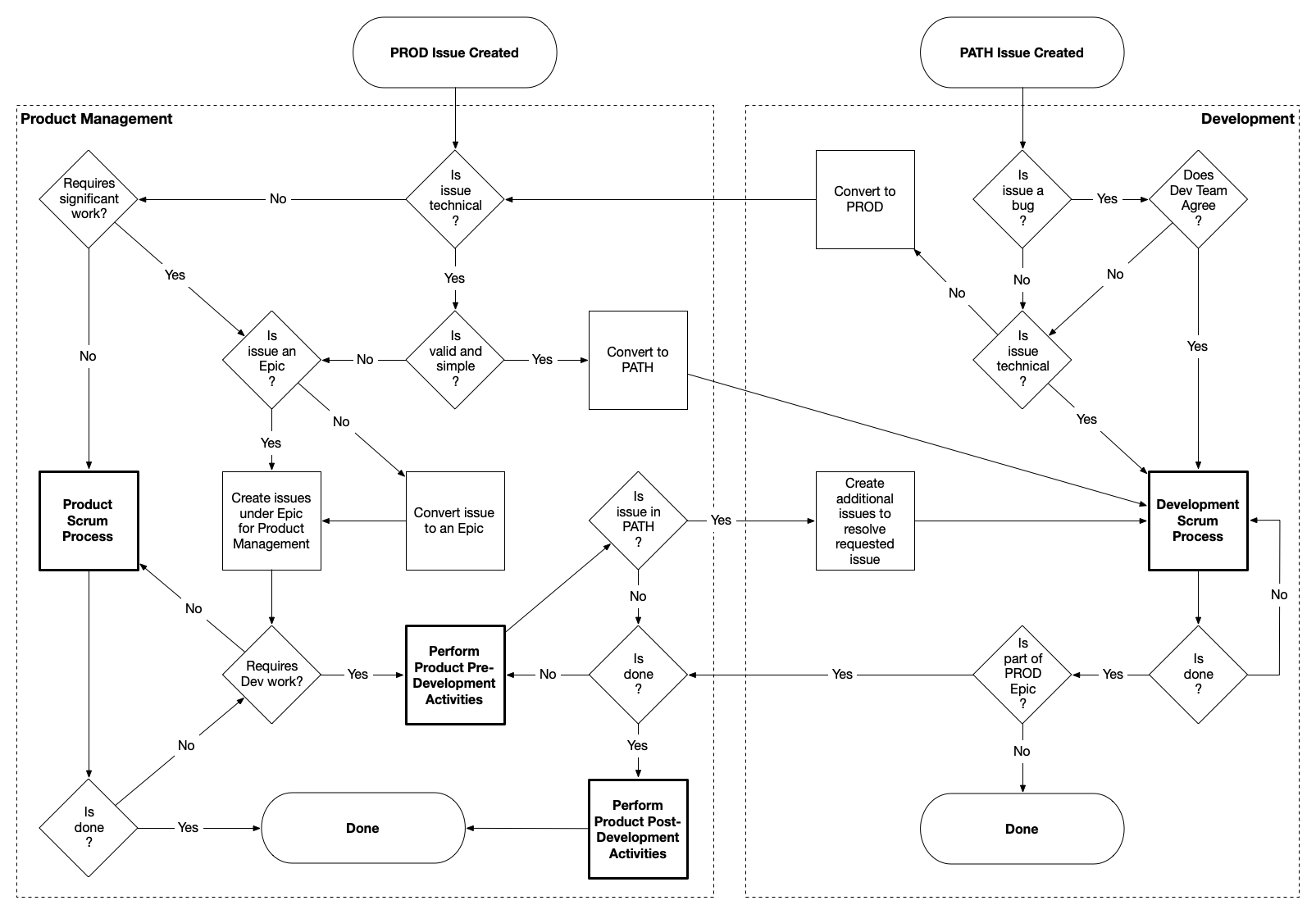
Key decision points:
- Product Management (left): Triages based on significance, Epic structure, technical nature, and readiness
- Development (right): Triages based on bug classification and technical scope
- Conversion points: Issues flow between PROD and PATH based on triage decisions
Overview
The Fundamental Distinction
The process recognizes two distinct but interdependent functions:
Product Management (PROD):
- Owns the “what” and “why” of products
- Defines product vision, strategy, and market fit
- Conducts pre-development activities: ideation, business case, ROI analysis, requirements definition
- Handles post-development activities: go-to-market, training, commercialization, rollout
- Manages both Revenue Products (client-facing) and Platform Products (internal tools)
- Responsible for ensuring development efforts align with business goals and deliver market value
Development Team (PATH):
- Owns the “how” of technical implementation
- Creates, designs, deploys, and supports software
- Executes on well-defined requirements with clear acceptance criteria
- Manages technical debt, architecture decisions, and system quality
- Focuses on building solutions that are performant, scalable, and maintainable
Why This Separation Is Critical
Without clear separation, several failure modes emerge:
- Scope Creep: Development teams spend time on discovery and requirements that Product Management should own
- Weak Requirements: Issues enter development without proper analysis, leading to rework
- Misaligned Priorities: Urgent requests override strategic initiatives; ROI-driven prioritization breaks down
- Incomplete Delivery: Products get built but not launched properly—missing training, documentation, or go-to-market
- Burnout and Friction: Teams struggle with unclear accountability
Work Classification
Not all work requires the same level of process. Work at Path2Response falls into three categories:
| Category | Description | Process |
|---|---|---|
| Initiative | Strategic, high-impact, cross-functional | Full Stage-Gate Process |
| Non-Initiative | Enhancements, medium features | Streamlined PROD flow (this document) |
| Operational | Bugs, maintenance, small fixes | Direct to PATH |
Key principle: This document (PROD-PATH Process) defines how work flows between teams. The Stage-Gate Process defines when gates and approvals occur for Initiatives.
For detailed classification criteria, see the Work Classification Guide.
How They Work Together
- Initiatives follow Stage-Gate for governance, but use this PROD-PATH process for the actual work flow
- Non-Initiatives use this PROD-PATH process directly (no Stage-Gate gates)
- Operational work bypasses PROD entirely and goes directly to PATH
Jira Projects
| Project | Purpose | Owner |
|---|---|---|
| PROD | Product strategy, requirements, commercialization | Karin Eisenmenger |
| PATH | Technical implementation, bugs, development tasks | John Malone |
Process Flow
Entry Points
PROD Issue Created
When someone creates an issue in PROD, they’re saying: “I have a product need, opportunity, or problem that requires Product Management attention.”
Examples:
- New product idea from Product Management
- Feature request from Production
- Strategic initiative from executives
- Internal tool improvement needed by Data Acquisition
- Market opportunity identified by Business Development
PATH Issue Created
When someone creates an issue in PATH, they’re saying: “I have a technical issue that needs Development attention.”
Examples:
- Bug in existing functionality
- Clearly-defined technical task (e.g., “upgrade Node.js to version 24”)
- Technical debt that needs addressing
- Performance issue requiring investigation
Reality of Entry Points
People often don’t know which project to create issues in. A reported “bug” might actually be a misunderstanding of how the product should work (a Product issue). A “feature request” might be a simple configuration change (a Development issue).
The process accommodates this reality. Both teams perform triage at entry, with explicit expectation that issues will be converted between PROD and PATH as needed. This is intentional design, not failure.
Product Management Flow
Step 1: “Does it Require Significant Work?”
This is the first triage decision for any PROD issue (see flowchart).
“Significant work” means:
- Multiple people or teams involved
- Timeline spans multiple sprints
- Coordination and planning required
- Substantial dependencies
- Outcome materially impacts the business
If NO (not significant): Goes directly to Product Scrum Process (routine PM work—tasks like updating marketing copy, creating presentations, conducting competitive analysis, writing documentation).
If YES (significant work): Proceeds to Epic evaluation (Step 2).
Step 2: “Is Issue an Epic?”
For significant work, the next question is whether it’s already structured as an Epic.
Why Epics matter:
- Provide structure for complex work
- Enable progress tracking and visibility
- Allow prioritization within initiative
- Clarify handoffs between teams
- Make dependencies visible
If NO (not yet an Epic): Convert to Epic first, then proceed.
If YES (already an Epic): Create child issues under the Epic for PM activities (discovery, ideation, analysis, requirements, stakeholder alignment).
Step 3: “Is Issue Technical?”
After Epic structure is established, determine if the work requires Development.
What “technical” means:
- The issue is about how something should be implemented, not what should be built or why
- Writing code, changing infrastructure, or modifying system architecture is clearly required
- Scope is well-understood and doesn’t require significant product discovery
What “technical” does NOT mean:
- “We need some kind of technical solution” (still a product problem—what solution?)
- “This involves our software” (everything does)
- “Development will eventually work on it” (true, but not yet)
If NO (not technical): Returns to Product Scrum Process for PM-only work.
If YES (technical): Proceeds to readiness evaluation (Step 4).
Step 4: “Is Valid and Simple?”
For technical issues, determine if they can go directly to PATH or need pre-development work.
“Valid” means:
- Legitimate need (not based on misunderstanding)
- Aligns with product strategy and priorities
- Business case is sound
- Stakeholders agree this should be done
- Priority is established based on business value and ROI
“Simple” means:
- Scope is clear and constrained
- Requirements are well-understood (meets PATH Epic Requirements)
- No significant discovery or analysis needed
- No cross-team coordination or complex dependencies
- Acceptance criteria are obvious and testable
- Source of truth for new data/fields is identified
- Impact on other products has been analyzed
- Release parameters are defined (patch vs standard release)
If YES (valid and simple): Convert to PATH — this is the fast lane for work that’s ready for Development without additional PM overhead.
If NO (not valid and/or not simple): Requires Pre-Development Activities (Step 5).
Step 5: Pre-Development Activities
For work that isn’t “valid and simple,” Product Management performs pre-development activities to prepare it for Development.
What this preparation includes:
- Detailed user stories from persona perspectives
- Clear, testable acceptance criteria
- Wireframes or mockups if needed
- Technical feasibility validated with Engineering/Data Science
- Data sources and infrastructure dependencies identified
- Executive/stakeholder approval and alignment
- Success metrics and measurement approach established
After pre-development activities complete:
The flowchart shows a “Requires Dev?” decision:
- If NO (doesn’t require Development): Check “Is Done?” — if yes, work is complete; if no, continue in Product Scrum Process.
- If YES (requires Development): Work is converted to PATH or child PATH issues are created under the PROD Epic.
Summary: Product Management Decision Flow
PROD Issue Created
        │
        ▼
"Requires significant work?" ─── No ──→ Product Scrum Process
        │
       Yes
        ▼
"Is Issue an Epic?" ─── No ──→ Convert to Epic
        │
       Yes
        ▼
Create child issues under Epic
        │
        ▼
"Is Issue Technical?" ─── No ──→ Product Scrum Process
        │
       Yes
        ▼
"Is valid and simple?" ─── Yes ──→ Convert to PATH (fast lane)
        │
        No
        ▼
Pre-Development Activities
        │
        ▼
"Requires Dev?" ─── No ──→ Is Done? → Done / Product Scrum
        │
       Yes
        ▼
Convert to PATH / Create PATH child issues
PATH Epic Requirements
For a PATH Epic to be ready for Development, it must include all of the following. These requirements define what “well-defined,” “valid and simple,” and “ready for PATH” actually mean.
1. The “Why?” - Problem, Not Solution
- Written from the persona’s perspective (who will use this?), not the ticket creator’s
- Captures: Who is the user, what do they want to do, why do they want to do it
- Uses structure: “As a [persona], I [want to], [so that]”
- Focuses on the problem being solved, not how to solve it
- Includes performance expectations when relevant
Example - Problem vs Solution Focus:
| Wrong (Solution-focused) | Correct (Problem-focused) |
|---|---|
| “As a college registrar, I want to be able to search for a student when a family member calls.” | “As a college registrar, I want to be able to connect a family member and a student quickly in the event of an emergency so that I don’t have to search for the student while the family member gets more and more upset while waiting on the phone.” |
Example - Persona’s Perspective:
| Wrong (Creator’s perspective) | Correct (Persona’s perspective) |
|---|---|
| “As a data scientist, I want to create a utility to batch cheeseburger jobs so that production is able to run multiple cheeseburger jobs more seamlessly in their workflow.” | “As a production team member, I want to dramatically reduce the amount of time I’m spending setting up and running cheeseburger jobs. Having to navigate to many different models and running a cheeseburger job for each one individually takes literally 3 hours of my time. What can we do to streamline this?” |
The second version captures the actual problem (3 hours of manual work), the persona experiencing it (production team member), and their goal (reduce time spent), without prescribing the solution.
2. Acceptance Criteria - Clear and Testable
Acceptance criteria must be:
- Clear to everyone involved
- Testable or verifiable
- Binary - either passes or fails (cannot be 50% completed)
- Outcome-focused - what needs to be achieved, not how to achieve it
- Specific as possible (e.g., “3-second page load speed” not “fast page load speed”)
Acceptance criteria describes the “what” (what should be done). The “how” is decided by developers during implementation.
3. Source of Truth for Data
For any newly introduced data or fields, identify:
- Where does this data come from? (Salesforce, user input, automated gathering, etc.)
- What is the authoritative source?
- How will it be obtained/updated?
4. Impact Analysis
Analysis of the requested change’s impact on other products and systems:
- What other products or features does this affect?
- Are there integration points or dependencies?
- What downstream systems need to be aware of this change?
5. Priority & Stakeholders
- Clear priority based on business value, urgency, ROI
- Explicit stakeholder identification
- Agreement on who will accept work as complete
6. Release Parameters
Definition of release expectations:
- Patch ASAP?
- Standard release schedule sufficient?
- Any deployment constraints or requirements?
Development Flow
Initial Triage: “Is the Issue a Bug?”
What qualifies as a bug:
- System behaves differently than intended or documented
- Functionality that previously worked is now broken
- Defect in the implementation
- Users experiencing errors or incorrect results
What does NOT qualify as a bug:
- “The system doesn’t do what I wish it would do” (feature request)
- “This workflow is confusing” (UX improvement)
- “It would be better if…” (enhancement)
Bug Path: “Does Development Team Agree?”
If YES (team agrees it’s a bug): Routes to Development Scrum Process
If NO (team disagrees it’s a bug): Converted to PROD - needs product thinking:
- Working as originally specified, but spec was wrong
- Requires product judgment about how it should behave
- Needs stakeholder input before changing behavior
Non-Bug Path: “Is the Issue Technical?”
If YES: Routes to Development Scrum Process
If NO: Converted to PROD - needs Product Management attention:
- Requirements aren’t clear
- Business justification isn’t established
- Multiple stakeholders need alignment
- It’s really a product question, not technical
Definition of Done
When Development evaluates “Is done?”, they check against:
Before work begins:
- Stakeholders and developers have agreed on Acceptance Criteria
During and after development:
- Each Acceptance Criteria is met
- Stakeholder has accepted that their needs have been met
- Possible regressions have been looked for and addressed
- Existing automated tests are all passing
- Code has been reviewed and approved (via Pull Requests)
- A plan for product deployment is established (patch or standard release)
- New automated tests have been added (or follow-up stories created)
- (Ideally) CI/CD for the project including the work is in place
Converting Between PROD and PATH
PROD to PATH Conversion
When Product Management converts an issue to PATH (after determining it’s valid and simple), Development may create additional issues because:
- Original issue might be stated from user perspective but needs technical task breakdown
- Multiple components may need coordination
- Separate issues may be needed for implementation, testing, deployment
PATH to PROD Conversion
When Development converts an issue to PROD, it’s saying: “This needs Product Management attention before we can proceed.”
Common reasons:
- Requirements are vague or contradictory
- Business priority isn’t established
- Stakeholder alignment is needed
- Scope is larger than initially thought
- Product judgment is required
This conversion is healthy - it protects Development capacity and ensures properly-prepared issues.
Post-Development Activities
When Development completes work that’s part of a PROD Epic, Product Management performs post-development activities.
Why this matters: Many organizations treat “code deployed” as “done.” This leads to:
- Features built but never adopted
- Users who don’t know new functionality exists
- Sales teams unaware of new capabilities
- Training materials that are outdated
- Support teams caught off-guard
Required activities (scaled to initiative size):
- Go-to-Market Activities
- Marketing Collateral
- Sales Training
- Sales Plans
- Internal Training
- Documentation
- Communication
- Success Measurement
Only after these activities are complete is the product truly Done.
Team Ownership
Product Management (PROD)
- Product Owner: Karin Eisenmenger
- Responsible for PROD backlog management
- Owns pre-development and post-development activities
Development (PATH)
- Backlog Owner: John Malone
- Scrum Facilitator: David Fuller
- Responsible for PATH backlog management
- Owns technical implementation
Related Documentation
Process Documentation
- This Page: High-level process for PROD ↔ PATH interaction and triage
- Work Classification Guide - Initiative vs Non-Initiative vs Operational
- Stage-Gate Process - Full process for Initiatives (6 stages, 5 gates)
Development Documentation
- Development Process - Agile/Scrum process, Jira usage, code reviews, releases
- Sprint Process Schedule - Sprint ceremonies and meeting schedules
- PATH Ticket Guidelines and Process - Detailed procedures for PATH tickets
Product Management Documentation (Confluence)
- Product Development Process Outline - Original Stage-Gate proposal
- Product Marketing Sprint Process Schedule - Product team sprint ceremonies